 COL2
 CHI2
 NZ
 IND
 NAM
 IRE
 Como
 Venezia
 Mumbai City
 SC Delhi
 Getafe
 Sevilla
 Frosinone
 Torino
 Lazio
 Cagliari
 Strasbourg
 Auxerre
 AVL1
 FUL1
 BAR6
 ALA1
 MIL3
 INT1
 TRY2
 MNS0
 OTAGO
 CD
 HKG93/0 (5.1/6 ov)
 SL
 TAS427
 NSW202 & 59/6 (28.2 ov) (f/o)
 NZ-A105/3 (34 ov)
 IND-A346
 QLD56/2 (24.5 ov)
 VIC307
 DHA
 BAR
 SYL218
 CHATT64/1 (15 ov)
 MYMS
 KHU280/8 (82 ov)
 RAN
 RAJ155/6 (59 ov)
 AFG
 ZIM
 NED
 OMA
 ST-W
 BH-W
 SS-W
 HH-W
 MS-W
 PS-W
 SCOT
 UAE
 PAK331/7 (48.3/50 ov, target 326)
 MR-W136/6
 AS-W185/2
 BAN116
 BRB144/4 (18.4/19 ov, target 143)
 MIS142/6 (19/19 ov)
 Inter Kashi
 GOA
 Union Berlin
 Cologne
 HIL2
 FAT0
 TOT2
 CRY0
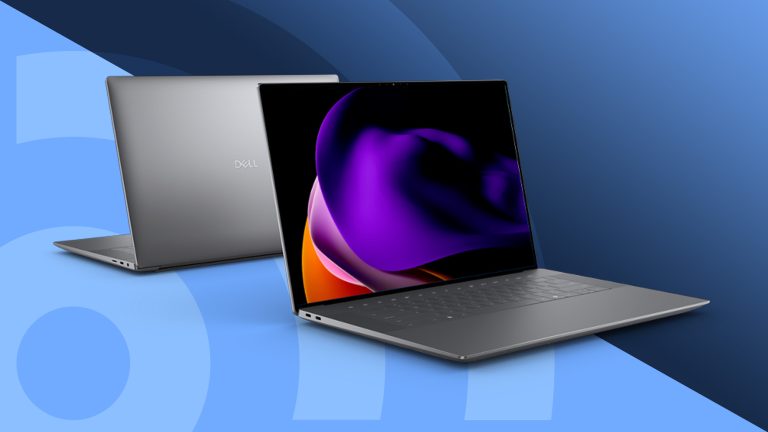
Every festive season, the same question pops up in family WhatsApp groups: “Which laptop should we buy?” Whether you’re gifting a student, upgrading your work setup or finally getting that gaming rig, Dell has four options worth a look this year. Here’s a plain-English guide to each.
Festive Laptop Guide 2026: Overview
| XPS 14 | XPS 16 | XPS 13 | Alienware 15 | |
|---|---|---|---|---|
| Best for | Professionals, creators | Creators who want a big screen | Students, travelers | Entry-level and mid-level gamers |
| Starting weight | 1.36 kg | 1.65 kg | 1 kg | Not specified |
| Screen | 14″ 2K LCD or 2.8K OLED touch | 16″ 2K LCD or 3.2K OLED touch | 13.4″ 2.5K touchscreen | 15.3″ WUXGA, 165Hz |
| Processor | Intel Core Ultra Series 3 | Intel Core Ultra Series 3 | Intel Core 5 or Core Ultra 7 | AMD Ryzen 200 or Intel Core Series 2 |
| Battery claim | Up to 31 hrs streaming* | Up to 31 hrs streaming* | Up to 17 hrs streaming | Not specified |
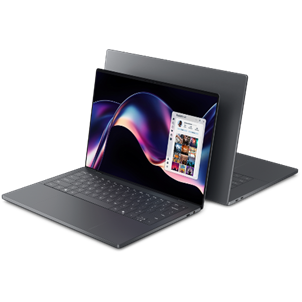
1. Dell XPS 14 and XPS 16: The Premium Pair
If you want one laptop that handles meetings, editing, multitasking and a late-night movie, this duo is built for that. Both use a premium aluminium design that measures just 14.6mm at its thinnest, so the bigger screens don’t feel like a burden in your bag.
| Feature | What You Get |
|---|---|
| Weight | XPS 14 from 1.36 kg, XPS 16 from 1.65 kg |
| Processor | Intel Core Ultra Series 3 (Ultra 7 and Ultra X7, depending on the model) |
| Graphics | Intel Arc on select configurations |
| Display (XPS 14) | 14″ 2K LCD, or optional 2.8K OLED touchscreen |
| Display (XPS 16) | 16″ 2K LCD, or optional 3.2K OLED touchscreen |
| Battery | Up to 31 hours of Netflix streaming on select 2K LCD models |
| Camera and audio | 8MP camera, hidden quad speakers with Dolby Atmos |
Which one should you pick? Go for the XPS 14 if portability is your priority, since it’s the lighter, more compact option. Choose the XPS 16 if you want a bigger, more immersive canvas for editing, spreadsheets or watching shows. The OLED options on both promise sharper detail and richer colors, which is worth considering if you work with visuals.
Festive offer: One-year Accidental Damage Protection at ₹999, 10% cashback up to ₹15,000 and a Tommy Hilfiger Overnighter at ₹999 on eligible purchases (T&C apply).
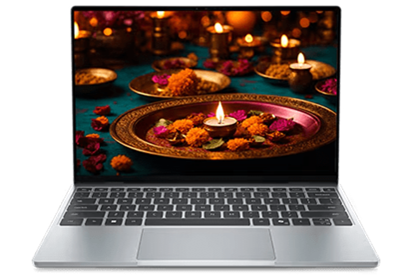
2. Dell XPS 13: The Featherweight Pick
Think of the XPS 13 as the laptop you’ll actually carry everywhere. At 12.7mm thin and starting at just 1 kg, it’s Dell’s thinnest and lightest XPS yet. It slips into a backpack or tote without you noticing, which is ideal for students bouncing between classes or professionals living in cafés and airports.
| Feature | What You Get |
|---|---|
| Weight and thickness | From 1 kg, 12.7mm thin |
| Processor | Series 3 Intel Core 5 or Intel Core Ultra 7 |
| Display | 13.4″ 2.5K InfinityEdge touchscreen |
| Brightness and color | 500 nits typical, 100% DCI-P3, Dolby Vision |
| Battery | Up to 17 hours of streaming |
| Extras | Backlit keyboard, glass touchpad, quad speakers with Dolby Atmos |
Good to know: Core Ultra 7 configurations add extra headroom for light creative work and AI-powered features, while the Core 5 version covers everyday tasks comfortably. The touchscreen and Dolby Vision support make it equally good for documents and movies.
Festive offer: One-year Accidental Damage Protection at ₹999 and a flat ₹5,000 cashback on eligible purchases (T&C apply).’
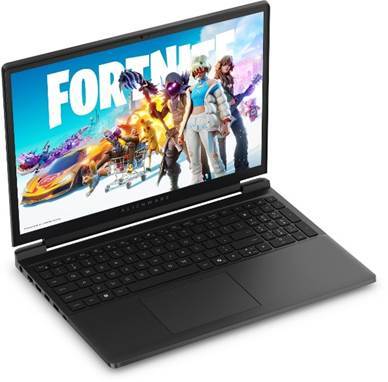
3. Alienware 15: Gaming Without the Overkill
Alienware has a reputation for premium, high-end gaming gear. The Alienware 15 takes that signature look and performance and brings it to people who don’t want to pay for features they’ll never use. That makes it a friendly starting point for first-time gamers or anyone upgrading an older setup.
| Feature | What You Get |
|---|---|
| Processor | AMD Ryzen 200 Series or Intel Core Series 2 |
| Graphics | NVIDIA GeForce RTX 3050 up to RTX 5060 |
| Display | 15.3″ WUXGA, 165Hz refresh rate |
| Cooling | Two fans, three copper heat pipes, rear exhaust vent |
| Keyboard | White backlit, 1.3mm key travel |
| Ports | HDMI 2.1, RJ-45, USB-A, USB-C |
| Upgradability | User-replaceable memory and SSD |
Why gamers might love it: The 165Hz display keeps fast action smooth, while the cooling setup helps sustain performance in long sessions. A Stealth Mode switches the laptop to quieter operation when you’re not gaming, which is handy for study or work. And because memory and storage can be swapped, you can upgrade as your game library grows.
Festive offer: One-year Accidental Damage Protection at ₹999, 15% cashback up to ₹20,000, a Tommy Hilfiger Overnighter at ₹999 and free Steam passes worth ₹975 on eligible purchases (T&C apply).
Festive Offers at a Glance
| Laptop | Cashback | Accidental Damage Protection | Extras |
|---|---|---|---|
| XPS 14 and XPS 16 | 10% up to ₹15,000 | 1 year at ₹999 | Tommy Hilfiger Overnighter at ₹999 |
| XPS 13 | Flat ₹5,000 | 1 year at ₹999 | None listed |
| Alienware 15 | 15% up to ₹20,000 | 1 year at ₹999 | Overnighter at ₹999, Steam passes worth ₹975 |
Which Laptop Should You Buy?
- For college and travel: XPS 13, for its low weight and long battery life.
- For work and creativity: XPS 14 or XPS 16, for performance and display options.
- For gaming on a sensible budget: Alienware 15, for RTX graphics and a fast screen.
Want more guidance before you decide? Learn about the Dell XPS series, then check out our laptop buying guides, gaming laptop reviews and festive tech deals on Technosports.
FAQs
Which Dell laptop is best for students this festive season?
The XPS 13 suits students best, starting at 1 kg with up to 17 hours of streaming battery life.
Can the Alienware 15 be upgraded later?
Yes, its memory and SSD storage are user-replaceable, so you can upgrade as your needs grow.