PSG0
PSG0 LYON0
LYON0 SEV0
SEV0 OSA0
OSA0 QAD1
QAD1 ALS1
ALS1 AQAJ1
AQAJ1 PAK0
PAK0 GAL2
GAL2 FEN1
FEN1 CDSC1
CDSC1 SLB0
SLB0 NED
NED OMA
OMA NZ
NZ IND
IND NAM
NAM IRE
IRE PAK
PAK SL
SL SA
SA AUS
AUS Abha
Abha Al Faisaly
 AFG
AFG ZIM
ZIM Sassuolo
 Lazio
Lazio MBSG1
MBSG1 CFC0
CFC0 Barcelona1
 Real Madrid2
 Udinese0
 Milan2
 Real Sociedad2
 Levante1
 BRB
BRB MIS124/7 (16.5/20 ov)
 NZ-A317
 IND-A113 & 488/8 (119 ov)
 SYL575/4 (167.3 ov)
 KHU
KHU MYMS465/7d
 CHATT424/6 (121 ov)
 DHA521
 RAJ162 & 215/5 (59.1 ov) (f/o)
 RAN402 & 5/0 (2.3 ov)
 BAR443/9d
 SIKM30/1 (15 ov)
 NAGA187
 JHK
JHK DELHI309/5 (90 ov)
 ODSA194
 SVCS13/0 (5 ov)
 BRODA259/6 (86 ov)
 J & K
J & K CHD363/2 (87 ov)
 HP
HP CGR35/1 (14 ov)
 AP231
AP231 BAN
BAN WI
WI IND-W
IND-W ZIM-W
ZIM-W MEX-W51 (12.5/20 ov, target 187)
 ARG-W186/7
 NGA148
 UGA147/9 (20 ov, target 149)
 GMB112/9
 LES109 (19.5/20 ov, target 113)
 MOZ110/7 (19/20 ov, target 110)
 ZMB109/9
 MOW107/9
 TOK111/5 (18.4/20 ov, target 108)
 LUL88/3 (9.5/20 ov, target 88)
 SPR87
SPR87 DEF0
DEF0 SAN0
SAN0 AND1
AND1 BUR3
BUR3 BOU0
BOU0 REIM0
REIM0 MON0
MON0 RSFC0
RSFC0 WAL0
WAL0 SAL0
SAL0 AS Roma
 Cagliari
 Torino
 Como
Como CFC
CFC GRE
GRE FLA
FLA CAM
CAM Daejeon
 Vissel Kobe
 Darul Ta'zim
 Port FC
 Lecce0
 Juventus2
 Sunderland0
 Leeds0
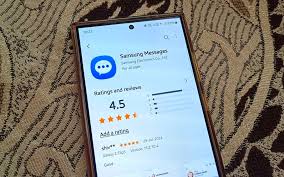
Samsung Messages — the default SMS app on hundreds of millions of Galaxy devices — has officially received an end-of-life date, and the clock is ticking for users who haven’t made the switch yet. This isn’t a quiet deprecation buried in a changelog. Samsung has formally announced it’s pulling the plug, pushing users toward alternative platforms in a move that signals a broader shift in how Android OEMs think about native communication apps. If you’re still using it, here’s everything that matters.
Why Samsung Is Killing Its Messages App Right Now
The short answer: RCS killed it. Google Messages has spent the last three years becoming the standard for RCS (Rich Communication Services) on Android — end-to-end encryption, read receipts, high-res media sharing, the whole package. Samsung’s app never quite caught up, and as Android Authority first reported, Samsung has now set an official end-of-service date.
The timing makes sense. Google’s been pushing hard to make RCS the universal SMS replacement, and it’s working. Apple added RCS support in iOS 18. Carriers around the world are phasing out old SMS infrastructure. Samsung keeping a separate messaging app stopped making any sense — either technically or business-wise. This is the company facing facts, not leading the charge.
Here’s the thing: Samsung had already been quietly switching new Galaxy devices over to Google Messages as the default for more than a year before this announcement.
Messages Alternatives Compared: Google, WhatsApp & RCS
So where should former Samsung Messages users actually go? Let’s break it down:
| App | Protocol | Encryption | Best For |
|---|---|---|---|
| Google Messages | RCS / SMS fallback | End-to-end (RCS) | Direct Samsung replacement |
| Proprietary | End-to-end | Global messaging, groups | |
| Signal | Signal Protocol | End-to-end | Privacy-first users |
| Telegram | MTProto | Optional (Secret Chats) | Large communities, bots |
Google Messages is the obvious choice. It handles SMS, MMS, and RCS in one app, syncs across your devices, and now includes AI-powered features like scam detection — something Samsung’s app never had. The switch is pretty painless for most people since Samsung had already been pre-installing it on newer Galaxy flagships like the best Samsung Galaxy S-series devices.
For users in India, WhatsApp’s still the go-to — exact numbers aren’t public for 2026, but WhatsApp’s been used by over 90% of Indian Galaxy users historically. Google Messages is the technical upgrade; WhatsApp is what people actually use.
What This Means for Galaxy Users Who Ignore the Warning
Here’s what most articles missed. The end-of-service date doesn’t mean the app disappears from your phone overnight. It means Samsung stops maintaining it — no bug fixes, no security patches, no RCS updates. The app keeps working. Until something breaks.
That’s the scary part. An unmaintained messaging app on hundreds of millions of devices becomes a security problem. SMS vulnerabilities are real, and an app that stops getting patches turns into an easy target. As XDA Developers has shown, legacy messaging apps on Android have been used for SIM-swap attacks and SMS interception in the past.
The real question is simple: how many users will actually switch before something goes wrong?
Samsung’s got a track record of keeping old apps around way too long — remember how long Bixby Home stuck around before Galaxy AI took over? But this time, the company’s being direct. The recommendation is clear. And since Samsung’s pushing app updates more aggressively now under its Galaxy AI strategy, you’ve got a narrower window than you might think.
Make the switch now. Don’t wait for the app to break first.
FAQ: Samsung Messages Shutdown Answered
Q: When exactly does Samsung Messages reach end-of-service?
Samsung has announced an official end-of-life date, but the exact cutoff varies by region and device. Check your Galaxy’s notification panel or Samsung’s official support page for the specific date tied to your model.
Q: Will my old SMS history be deleted when Samsung Messages shuts down?
No — your SMS history lives on the device, not in the app itself. Switching to Google Messages or another alternative won’t erase your existing message threads. You can also export backups before switching if you want extra peace of mind.
Q: Is Google Messages a safe replacement for Samsung Messages?
Yes. Google Messages supports RCS with end-to-end encryption for RCS-to-RCS conversations, plus AI-powered spam and scam detection. It’s the most direct functional replacement and is already the default on most new Galaxy devices sold in 2025-2026.
Q: Does this affect Samsung Galaxy Watch message notifications?
It can. If your watch was paired through Samsung Messages for notifications, you’ll need to reconfigure notification mirroring through your new default app. Galaxy Watch users should check the Galaxy Wearable app settings after making the switch.
Q: Can I still use Samsung Messages after the end-of-service date?
Technically yes — the app won’t be forcibly removed. But without security patches or updates, continuing to use it for SMS and MMS opens you up to real security risks. The safe move is switching before the cutoff, not after.
Messaging apps are changing fast, and Samsung’s exit from the space is telling. Google Messages is the clear winner here — better encryption, AI features, and cross-device sync that Samsung’s app never offered. If you’re on a Galaxy device and haven’t switched yet, now’s the time. Don’t let an unmaintained app become your weakest security link.