
 SA329 (82.3 ov)
 AUS
AUS ROMA2
ROMA2 CAG1
CAG1 TOR1
TOR1 COMO0
COMO0 BRD1
BRD1 PET0
PET0 FLE1
FLE1 ARS0
ARS0 BAN
BAN WI
WI IND-W
IND-W ZIM-W
ZIM-W GOA
GOA SC Delhi
 Milan
Milan Bologna
 Parma
Parma Udinese
 Venezia
 Inter Milan
 Genoa
Genoa Juventus
 Monza
Monza Napoli
 SAS2
SAS2 LAZ6
LAZ6 AFG177
 ZIM140 (19.1/20 ov, target 178)
 ABH0
ABH0 ALF1
ALF1 PAK110
 SL114/2 (18.1/50 ov, target 111)
 SIKM184
 NAGA187 & 46/4 (34 ov)
 JHK131/4 (47 ov)
 DELHI515/5d
 ODSA194
 SVCS13/0 (5 ov)
 BRODA616
 J & K6/0 (4 ov)
 CHD685/5d
 HP49/0 (14 ov)
 CGR216/8 (95 ov)
 AP231
AP231 HYD193/2 (54 ov)
 PNJB431
 KNTKA297/7 (95 ov)
 TPURA194
 KER101/6 (35 ov)
 BENG350
 MAHA278/9 (100 ov)
 GUJ223
 MNPR364
 ARP111 & 95/2 (36 ov)
 UAE
UAE OMA
OMA ENG
ENG AUCK
AUCK CANT
CANT CD
CD ND
ND DEN
DEN QAT
QAT KENYA
KENYA KUW
KUW NAM316/7
 IRE253 (44.5/50 ov, target 317)
 NZ198/3
 IND199/4 (13.2/20 ov, target 199)
 NED371/5
 JAB113 (19.3/20 ov, target 133)
 KAY132/9
 UDC1
UDC1 ALM0
ALM0 ALC1
ALC1 LPA2
LPA2 TORD3
TORD3 MIR3
MIR3 LLA1
LLA1 PON1
PON1 BVV1
BVV1 RKC2
RKC2 DON2
DON2 EXT1
EXT1 MNR0
MNR0 AND0
AND0 DOR2
DOR2 SVW0
SVW0 Gamba Osaka
 Buriram
 Kashima
 Pohang Steelers
 Sevilla2
 Osasuna0
 PSG2
PSG2 Lyon0
Lyon0 Mohun Bagan1
 Chennaiyin0
 ALS3
ALS3 HIL1
HIL1
Until recently, cloud integration teams treated Rust as a research curiosity — something to admire from afar while shipping Python and Node.js services that were quick to write but slow to wake up.
Cold starts on serverless functions stretched past a second, memory bills crept upward, and every new traffic spike meant another round of autoscaling anxiety. That trade-off felt permanent. It wasn’t.
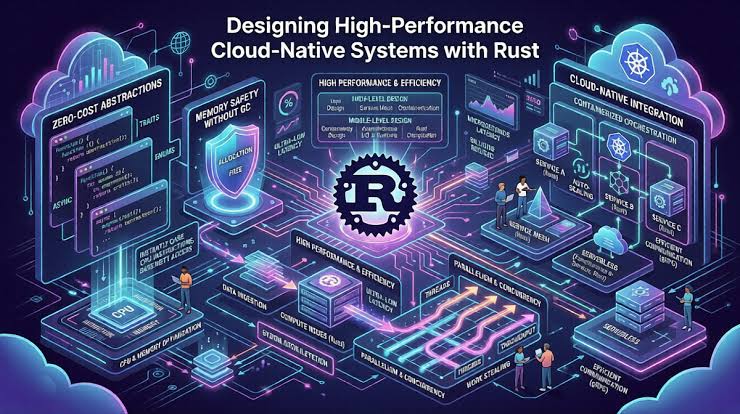
The catalyst arrived in two quiet waves: Rust’s async runtime (Tokio) matured into a production-grade foundation, and WebAssembly targets let Rust compile down to small, fast modules that slot into any host.
Suddenly you could write a hot-path parser or a rate limiter in Rust, compile it to a tiny native binary or WASM module, and call it from your existing Python, Node, or Java stack without a rewrite. No greenfield project required.
The after-state looks like this: your orchestration layer stays in the language your team already knows, while Rust handles the narrow, performance-critical slices — request validation, token verification, payload transformation, and high-frequency logging. It is a hybrid architecture, and it works. Here is how to build it.
Step 1: Identify the Hot Path
Start by profiling your existing integration stack. Look for functions that run on every request, consume disproportionate CPU, or trigger the worst cold-start penalties. Common candidates include JSON schema validation, JWT verification, and regex-heavy log parsing. If a function runs more than a few thousand times per minute, it is a candidate. If it also blocks your event loop, it is a priority.
Step 2: Wrap Rust in a Foreign Function Interface
The fastest route into an existing stack is a single shared library. Compile your Rust code with cargo build --release and expose a #[no_mangle] extern function.
Python calls it via ctypes or PyO3; Node uses napi-rs; Java reaches it through JNI. Keep the interface narrow — pass bytes in, get bytes out — and let your orchestration language handle the rest. This is the same pattern that How Prompt Caching Reduces latency in LLM pipelines: cache the expensive computation, reuse the result.
Step 3: Or Go Serverless with WebAssembly
If you run on AWS Lambda, Cloudflare Workers, or a Kubernetes sidecar, compile Rust to wasm32-wasi and deploy it as a standalone function. The module boots in milliseconds, uses a fraction of the memory of a Node runtime, and integrates through the same HTTP or queue interfaces you already use.
Your existing cloud integration stack treats it as just another service. The learning curve is shallow: Rust’s ownership model does the heavy lifting, and the compiler catches most mistakes before they reach production.
Step 4: Bridge with Message Queues
For asynchronous workloads, skip the FFI entirely. Deploy Rust as a dedicated worker consuming from Kafka, RabbitMQ, or SQS. Your Python or Node services publish events; the Rust worker transforms, enriches, and republishes.
This decouples the performance-critical logic from your main stack, and it makes rollbacks trivial — you can revert the Rust worker without touching the orchestration layer. Think of it as Tracing Four Cinematic Milestones in an actor’s career: each phase builds on the last, but each is independently reviewable.
Step 5: Measure, Then Scale
Before and after every change, measure latency, memory, and cost. Use your existing observability tools — Prometheus, Datadog, or CloudWatch — and compare the same endpoint under the same load. The numbers will tell you whether the migration earned its keep. If the hot path drops from 120ms to 8ms, you have your answer. If it does not, revert and move on.
| Aspect | Python/Node (Before) | Rust Hybrid (After) |
|---|---|---|
| Cold start | 300–1000ms | 1–10ms |
| Memory per function | 128–512MB | 10–50MB |
| Throughput | Moderate | High |
| Team familiarity | High | Medium |
| Rollback complexity | Low | Low |
The verdict is straightforward. If your integration stack handles modest traffic and your team has no Rust experience, stay put. But if you are paying for scale, fighting cold starts, or watching CPU bills climb, move the hot path to Rust and keep the rest untouched. Much like Irrfan Khan: Tracing Four distinct phases of a career, each layer of your stack has its own strengths — and Rust earns its place in the performance-critical one. And if you are weighing long-term reliability, consider how AB de Villiers: Five defining innings each changed the game; a single well-placed Rust module can do the same for your pipeline.
Start with one function. Measure it. Then decide.
Related Articles
- Five Defining Statistical Milestones That Illustrate Ravichandran Ashwin’s Test Match Dominance
- Five Defining Statistical Milestones That Illustrate Virat Kohli's Batting Evolution
- AI-Powered Fusion Reactor Milestones and 2026 Reality
FAQs
Why does my Rust library crash when called from Python?
The most common cause is a mismatched memory allocator. Ensure you compile with the same allocator your host uses, or return data via a buffer you allocate in Rust and free explicitly. Never pass stack-allocated pointers across the FFI boundary.
Can I use Rust with my existing CI/CD pipeline?
Yes. Add a Rust build stage that produces the shared library or WASM module, then publish it as an artifact your existing deployment consumes. Your current pipeline stays intact.
Is Rust worth it for low-traffic integrations?
Probably not. The overhead of a second language, a second build system, and a second set of debugging tools only pays off when the hot path is genuinely hot. Start with profiling, not enthusiasm.
Was this article helpful?
Your feedback directly improves future articles on this site.


