 ALS0
 AHL0
 WAS3
 AQAJ1
 TRA0
 NEF0
 SAS
 FIO
 ATA
 PAR
 LOR
 BRE
 NEW
 EVE
 DEP
 OSA
 WI-A
 LIONS
 Galatasaray
 Stuttgart
 Shakhtar
 Sporting
 NED183/3 (36/50 ov, target 183)
 OMA182
 Athletic2
 Real Sociedad1
 Juventus2
 Napoli0
 Marseille2
 Toulouse0
 NZ-A424
 IND-A346 & 32/0 (11 ov)
 QLD280
 VIC307 & 136/6 (66 ov)
 SYL218 & 218
 CHATT210 & 126/1 (37 ov, target 227)
 MYMS108 & 315/9 (91 ov) (f/o)
 KHU288
 DHA
 BAR266/8 (70 ov)
 RAN256
 RAJ231 & 110/3 (27 ov)
 ASSAM135
 KNTKA180/2 (36 ov)
 MEGHA
 NAGA244/8 (67 ov)
 TPURA219/7 (74.3 ov)
 SAU
 BENG143
 MAHA21/2 (8 ov)
 ODSA
 JHK37/3 (25 ov)
 CHD
 TN320/4 (86 ov)
 NZ
 IND
 TOK
 MOW
 BIK
 JAB
 LUL
 POA
 DOLPH
 WPR
 CD
 AUCK
 OTAGO
 CANT
 AFG81/3 (8.1/20 ov, target 80)
 ZIM79
 NAM131/5 (21.2/50 ov, target 130)
 IRE129
 MS-W109 (18.1/20 ov, target 125)
 PS-W124/9
 KSS0
 ZEN3
 OVI1
 LPA3
 ATRO1
 VOL0
 ALLB0
 EST0
 SHO0
 MGR0
 Atlético
 Bayern
 Elche0
 Valencia1
 Lecce1
 Genoa2
 Liverpool0
 Arsenal1
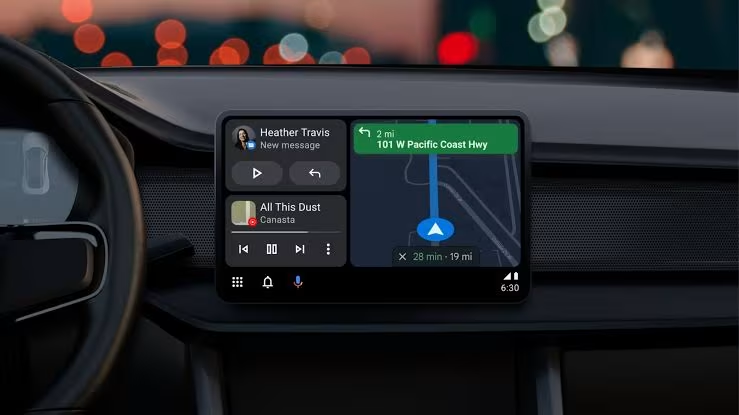
Google Maps on Android Auto can make everyday commutes easier by bringing navigation into your vehicle’s systems. The platform projects a smartphone interface onto the dashboard, with safer driving in mind. Both ecosystems offer core routing tools, but their specific capabilities differ. As Engadget first reported, some interfaces simply feel more intuitive in their native environments. Here’s why Google’s experience often has the edge.
How Does Google Maps Android Auto Voice Control Differ?
Google Assistant handles voice commands with less friction than Siri does in Apple Maps. Drivers can request real-time route changes without taking their hands off the wheel.
The integration gives immediate, context-aware responses at complex intersections, easing the mental load when traffic changes unexpectedly. You can explore the BEST Google Play library as the system reroutes you automatically. Seamless audio feedback also makes listening easier than tapping through menus. What if you need to manage several tasks at once?
Why Do Split-Screen Layouts Matter For Navigation?
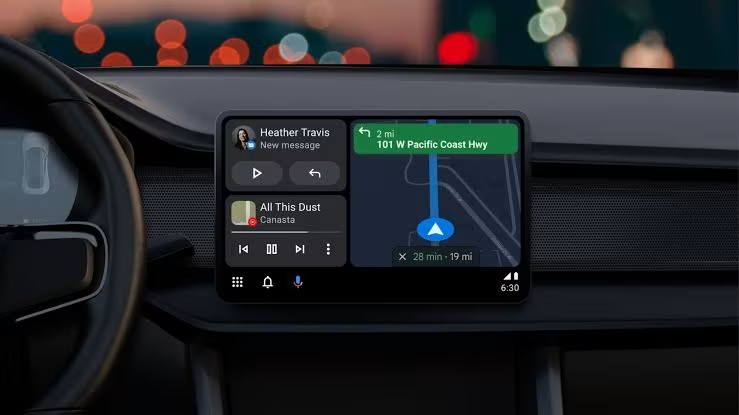
Android Auto supports split-screen layouts on compatible dashboard displays. Drivers can follow navigation and control media playback at the same time. The screen prioritizes critical information, so users are less likely to miss turn prompts. Competing platforms offer less flexibility, restricting interactions with multiple apps at once. You get a clearer route view without constantly switching apps. Does dynamic scaling make highway driving safer?
How Does Vehicle Speed Impact Map Display?
Dynamic zoom adjusts automatically to your current driving speed. The interface shows more road detail during slow city maneuvers, then pulls back for highway cruising.
Similar projection technologies are evolving rapidly across manufacturers. The scaling prevents visual clutter when traveling reportedly above sixty miles per hour. Competing platforms may require manual adjustments or lack intelligent scaling altogether. That makes quicker responses to changing road conditions standard practice. Do electric vehicle drivers get special treatment?
What Advantages Exist For Electric Vehicles?
Live EV charging station availability appears on the dashboard, along with connector compatibility. Drivers can check exact plug types and current occupancy before arriving. That detail helps ease range anxiety on cross-country trips. Rival interfaces show generic station icons without confirming hardware support. Verified infrastructure data lets you plan stops with confidence. How do the platforms compare offline?
Which Platform Handles Offline Mapping Better?
Within the Android ecosystem, drivers can download offline maps before connecting to the car. They can preload entire regions for rural areas with poor cellular reception. Maps sync effortlessly over Bluetooth or USB, and cached routes load instantly without searching for satellite signals. Preloaded data helps keep journeys uninterrupted. Who benefits most from these differences?
Who Should Choose Android Auto Over CarPlay?
The Google Maps Android Auto experience offers modern drivers several distinct advantages. Voice recognition, split-screen multitasking, and automatic scaling make for a smoother workflow. EV owners get precise charging data that rivals can’t match, while deep system integration supports robust offline functionality. The right projection system depends on your daily commute and vehicle type. Choose the ecosystem that works natively with your devices, and you’ll face fewer distractions behind the wheel.
FAQs
What is the main difference between Apple Maps and Google Maps on dashboards?
Voice control and split-screen multitasking are the main differences between the two navigation platforms. Can I download offline maps for my upcoming road trip? Android Auto lets users preload detailed regional maps before leaving areas with connectivity. Does dynamic zoom affect fuel efficiency calculations? Automatic scaling improves visual clarity without changing the underlying route optimization algorithms.
| Feature Category | Android Auto Capability | Apple CarPlay Limitation |
|---|---|---|
| Voice Commands | Native Google Assistant | Standard Siri |
| Screen Layout | Simultaneous split-screen | Single focused window |
| EV Data | Live connector verification | Generic station icons |
| Offline Access | Pre-synced regional maps | Manual cache requirements |
Source: Engadget
Read Next
- iPhone 17 Pro Max Swap for iPhone Duo: The Good, Bad and Baffling After Two Weeks
- OpenAI Pledges to Buy Google AI Chips in First Move Away From Google, Nvidia, and Reliance
- Apple iPhone Duo vs iPhone Air: Which Should You Choose?
Was this article helpful?
Your feedback directly improves future articles on this site.