LAZ2
LAZ2 PAR0
PAR0 RCL2
RCL2 PAR1
PAR1 MEX-W
MEX-W ARG-W
ARG-W ATM1
ATM1 DEP0
DEP0 ADO1
ADO1 HEE2
HEE2 CLB2
CLB2 TOR0
TOR0 GVFC0
GVFC0 FCP0
FCP0 Internacional2
 Botafogo0
 UAE
UAE NED
NED PAK
PAK ENG
ENG IND-W
IND-W ZIM-W
ZIM-W GMB
GMB LES
LES MOZ
MOZ ZMB
ZMB Inter Milan
 Fiorentina
 Churchill
 Punjab FC
 NGA
NGA UGA
UGA RIY2
RIY2 TAA1
TAA1 CHE0
CHE0 TOT2
TOT2 VAL1
VAL1 VIL2
VIL2 DOR1
DOR1 SGE0
SGE0 NZ-A135/3 (41 ov)
 IND-A113
 SYL
SYL KHU
KHU MYMS299/4 (87 ov)
 CHATT
CHATT DHA293/3 (84.1 ov)
 RAJ
RAJ RAN320/5 (80 ov)
 BAR
BAR DEN
DEN PNG
PNG NAM321/6
 IRE290 (47.3/50 ov, target 322)
 NZ180/5
 IND181/6 (19.5/20 ov, target 181)
 Mirassol1
 São Paulo1
 Vitória1
 Athletico-PR1
 Athletic
 Getafe
 C Palace
 Newcastle
 Hull
Hull Brentford
 Liverpool
 Brighton
 Man United
 Bournemouth
 Atalanta
 Frosinone
 NAP3
NAP3 ROMA3
ROMA3 KHO0
KHO0 ETT3
ETT3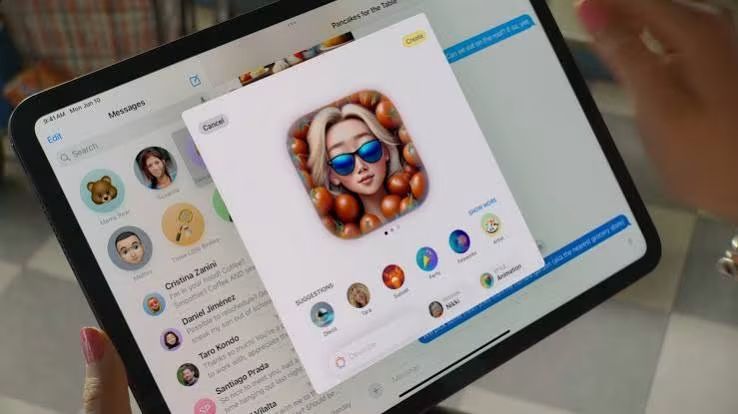
Apple announced Image Playground at its Worldwide Developers Conference on June 10, 2024. The app brings text-prompted image generation to Apple Intelligence. Reports about device eligibility and an 8GB memory requirement remain unconfirmed.
What the App Does
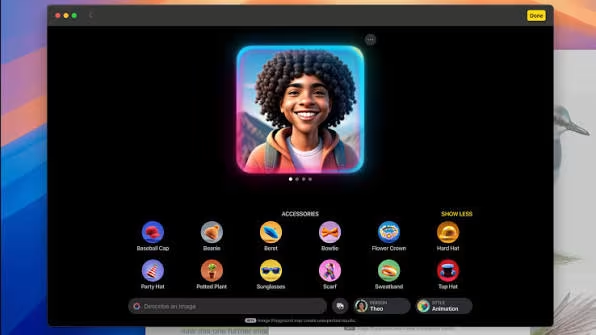
Image Playground creates images in three styles: Animation, Illustration and Sketch. Users can customize, save and share their creations, or reportedly turn them into Genmoji—personalized emoji generated with Apple Intelligence.
It’s designed as a creative tool for messages and other projects, not as a general-purpose photo editor. Apple reportedly built Image Playground features into apps such as Messages, Keynote and Freeform, letting people create images without opening the standalone app. Engadget’s guide to Image Playground describes it as a way to make a specific image when an emoji or existing photo doesn’t fit. Image Playground is part of Apple Intelligence, not a separately paid service.
Compatible Devices and Software
Image Playground works natively on iOS 18.2, iPadOS 18.2 and macOS Sequoia 15.2. Reportedly, compatible iPhones include the iPhone 16, 16 Plus, 16 Pro and 16 Pro Max, along with the iPhone 15 Pro and 15 Pro Max, which have the A17 Pro chip or newer.
Apple Intelligence needs at least 8GB of random-access memory (RAM). Apple hasn’t officially confirmed these hardware requirements.
| Detail | Requirement or feature |
|---|---|
| iPhone models | the iPhone 16 lineup and iPhone 15 Pro models with A17 Pro or newer |
| Operating systems | iOS 18.2, iPadOS 18.2, macOS Sequoia 15.2 |
| Apple Intelligence memory | minimum 8GB of system RAM |
| Image styles | Animation, Illustration, Sketch |
| Free for compatible devices |
Compatible-device users can get the app at no additional charge through a system software update. The standalone app and Messages integration were included in the iOS 18.2 developer beta released in November 2024.
How to Use Image Playground
Open Image Playground on a compatible Apple device, or use its integration in a supported app such as Messages, Keynote or Freeform. Describe the image you want, then pick one of its three styles: Animation, Illustration or Sketch.
Include the subject and the details that matter in your description. You can refine the result by changing the description and style, then save or share it when you’re happy with the image. You can also use a creation to make a personalized Genmoji. The controls may vary depending on the Apple app you’re using.
What Image Playground Means for Apple Users
Image Playground builds image generation into Apple’s software, so users don’t need a separate paid service. Its links to Messages and creative apps make quick, personal illustrations a key use, while Genmoji brings the same idea to custom emoji.
The three named styles also make the app’s focus clear: it’s for stylized images, not every kind of visual output. Apple’s system-level approach ties access to supported hardware and operating systems. Apple Image Playground AI is free, but access depends on having a compatible Apple device and software.
FAQs
Is Image Playground free?
Yes. Apple offers it at no additional charge to users with compatible devices as part of a system software update.
Which image styles can it generate?
It offers three styles: Animation, Illustration and Sketch.
Can I use Image Playground in Messages?
Apple includes Image Playground integration in Messages, and users can also make Genmoji from their creations. Source: Engadget
Was this article helpful?
Your feedback directly improves future articles on this site.