SA292/6 (71.1 ov)
 AUS
AUS AFG31/3 (6/20 ov)
 ZIM
ZIM SAS
SAS LAZ
LAZ ROMA
ROMA CAG
CAG TOR
TOR COMO
COMO BAN
BAN WI
WI IND-W
IND-W ZIM-W
ZIM-W GOA
GOA SC Delhi
 Milan
Milan Bologna
 Parma
Parma Udinese
 ABH0
ABH0 ALF1
ALF1 PAK110
 SL114/2 (18.1/50 ov, target 111)
 NAM316/7
 IRE253 (44.5/50 ov, target 317)
 NZ198/3
 IND199/4 (13.2 ov)
 JER
JER KUW
KUW JAB113 (19.3/20 ov, target 133)
 KAY132/9
 SIKM184
 NAGA187 & 46/4 (34 ov)
 JHK131/4 (47 ov)
 DELHI515/5d
 ODSA194
 SVCS13/0 (5 ov)
 BRODA616
 J & K6/0 (4 ov)
 CHD685/5d
 HP49/0 (14 ov)
 CGR216/8 (95 ov)
 AP231
AP231 HYD193/2 (54 ov)
 PNJB431
 KNTKA297/7 (95 ov)
 TPURA194
 AUCK
AUCK CANT
CANT CD
CD ND
ND DEN
DEN QAT
QAT KENYA
KENYA POA
POA SPR
SPR BRB
BRB VAG
VAG NED371/5
 OMA265 (49.3/50 ov, target 372)
 BIK149 (19.3/20 ov, target 158)
 CHR157/3
 PNG155
 Venezia
 Inter Milan
 Genoa
Genoa Juventus
 Sevilla2
 Osasuna0
 PSG2
PSG2 Lyon0
Lyon0 Mohun Bagan1
 Chennaiyin0
 BEI2
BEI2 JHM2
JHM2 RCH0
RCH0 KRE0
KRE0Android Auto and Android Automotive sound like twins, but they behave like two very different products—one depends on your phone, the other lives inside the car. In 2026, this confusion matters more because buyers increasingly expect “native” features like climate control and battery status without fiddling with apps, cables, or connections.
Worth noting: this explainer is based on a real-world differences breakdown published by Jalopnik, using the verified facts provided. We’ll keep it practical—what to use, what to expect, and why the difference changes your daily driving routine.
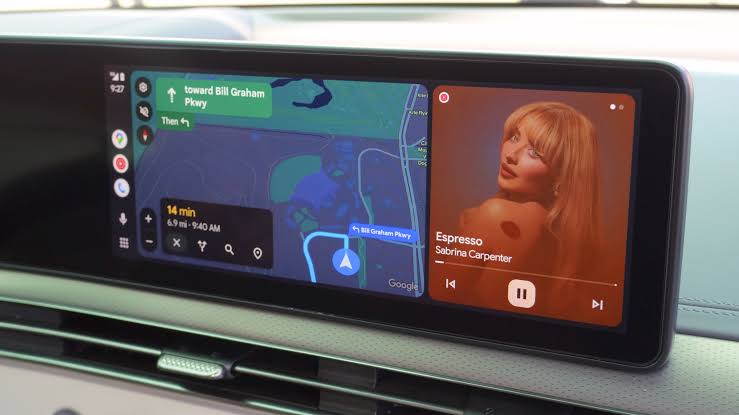
What’s the simplest difference between Android Auto and Android Automotive?
Android Auto is a projection system that runs apps on a connected smartphone and casts the user interface to the vehicle’s dashboard screen. Android Automotive is an embedded, native ope
Here’s the key takeaway: Android Auto is phone-led infotainment; Android Automotive is car-led infotainment. That single shift affects setup time, how reliable the experience feels in weak-signal areas, and how seamlessly vehicle functions connect to the OS. For buyers, that means fewer “why doesn’t this work?” moments—if they buy the right system for their habits.
How do they handle phone connection, and what does it mean day to day?
Android Auto requires a compatible smartphone connection via a USB cable or a wireless Wi‑Fi and Bluetooth link to function. In practice, this turns your phone into the controller for apps, content, and much of the experience on the car screen. If your phone is low on battery, mispaired, or simply out of reach, Android Auto can quickly become unusable or frust
Android Automotive, by contrast, integrates deeply with native vehicle hardware, managing climate control, seat adjustments, and battery status natively without needing a phone. That means your car can operate core functions as an OS feature, not an app feature. Worth noting: this doesn’t just change convenience—it changes what feels “always there,” because the infotainment and vehicle systems don’t rely on a live phone session to stay functional.
Which system feels more “native” inside the car—and why?
Android Automotive is built into the vehicle as a native embedded OS. That gives it access to deeper car functions, including the ability to manage climate control, seat adjustments, and battery status directly through the vehicle’s systems. Instead of asking your phone to mirror something onto the screen, the car can run those features as part of its own ope
Android Auto still provides a great dashboard experience, but it’s fundamentally an extension of your smartphone apps via projection. So even if the interface looks polished, the underlying architecture is different: Android Auto mirrors; Android Automotive runs. According to Jalopnik, automakers have used Android Automotive under different setups, including versions with or without Google Automotive Services. That distinction can affect which Google apps and services you see, but the core difference remains: phone-dependent projection versus embedded OS control.
Which vehicles use Android Automotive, and how should buyers verify compatibility?
The verified facts provided say vehicles using Android Automotive include models manufactured by Volvo, Polestar, and General Motors, though that list is marked unconfirmed in your source set. Even without leaning on brand promises, buyers should verify the specific vehicle’s infotainment system details before assuming “Android OS” means the same thing as “Android Auto.”
A useful way to check is simple: if the car advertises Android Automotive as an in-car ope If the listing emphasizes smartphone pairing, projection, and “works with Android/iPhone,” then it’s likely Android Auto territory. For the most confident purchase decision, match your expectations: do you want phone-led convenience with casting-style interaction, or do you want an embedded platform that manages vehicle functions without ongoing phone dependency?
What’s next for drivers: practical choices to avoid the “sound-alike” trap?
The biggest practical risk isn’t misunderstanding a logo—it’s buying a feature you expect, then discovering your setup changes the result. If you rely on your phone for music, navigation, and messaging every day, Android Auto often delivers a familiar experience fast, especially with USB or wireless Wi‑Fi and Bluetooth connectivity. But if you want an infotainment experience that behaves like a real in-car system—especially around climate, seating, and battery status—Android Automotive aligns better with that expectation.
Here’s a forward-looking way to decide: choose based on where the “control” lives—your phone or the car’s OS. Worth noting: as automakers continue pushing native UI and vehicle integration, the Android Automotive experience tends to better support “always-on” car behavior. Android Auto will remain compelling where you want your phone’s ecosystem consistently reflected in the dashboard.
Related Articles
FAQs
1) What are the core differences between Android Auto and Android Automotive?
Android Auto is a projection system that runs apps on your connected smartphone and shows the interface on the vehicle screen. Android Automotive is an embedded, native opeThat’s why Android Automotive can manage climate control, seat adjustments, and battery status without needing a phone.
2) Does Android Auto work without a phone?
No. Android Auto requires a compatible smartphone connection using USB or wireless Wi‑Fi and Bluetooth to function. If the phone link fails, the Android Auto experience can’t continue in the same way.
3) Does Android Automotive need my phone to control vehicle functions?
No. Verified facts state Android Automotive integrates deeply with native vehicle hardware and can manage climate control, seat adjustments, and battery status natively without needing a phone. Your phone may still be useful for apps and services, but core vehicle functions aren’t dependent on it.
4) Why do they sound so similar if they’re so different?
They share the “Android” naming, which creates expectations about shared behavior and compatibility. But their architecture is different: Android Auto mirrors a phone experience, while Android Automotive runs as a car-installed OS.
5) Where can I learn more about infotainment systems and setups?
For additional context on car connectivity and infotainment, you can follow reporting from technology and auto editors such as CNET Roadshow and Car and Driver for coverage on how different vehicles implement smartphone projection and native platforms.
Closing takeaway: Don’t judge “Android” by name—judge it by control, because Android Auto mirrors your phone while Android Automotive runs inside the car.
Was this article helpful?
Your feedback directly improves future articles on this site.