Microsoft can’t help itself. On January 21, 2026, the company rolled out yet another wave of AI-powered updates to Notepad and Paint for Windows 11 Insiders, despite growing backlash against “Copilot all the things” fatigue. The headline features? AI-generated coloring books in Paint (yes, really) and streaming AI results in Notepad so you can watch rewrites appear word-by-word like ChatGPT. Oh, and both require you to sign in with a Microsoft account, because of course they do.
This comes weeks after Windows Central reported that Microsoft internally admitted Windows 11 “went off track” with AI overload, and that several Copilot integrations are now under review — features in Notepad and Paint may be removed, redesigned, or stripped of Copilot branding. Yet here we are, getting more AI features in the very apps Microsoft supposedly regrets AI-ifying.
What’s Actually New: Features Nobody Asked For (Except Maybe One)
Notepad Gets Streaming AI Rewrites & More Markdown
Notepad version 11.2512.10.0 introduces:
| Feature | What It Does | Catch |
|---|---|---|
| Streaming AI Results | Write, Rewrite, Summarize now stream word-by-word (like ChatGPT) instead of waiting for full response | Requires Microsoft account sign-in |
| Strikethrough Formatting | Markdown support for ~~crossed out text~~ | Finally, after 40 years |
| Nested Lists | Markdown indented lists (bullet points within bullet points) | Useful for outlining |
| “What’s New” Welcome Dialog | Popup explaining Notepad’s features on first launch | Cannot be permanently dismissed |
The streaming AI results are the headline change — instead of waiting 5–10 seconds for Copilot to finish rewriting your paragraph, you now see it appear incrementally. This is genuinely useful if you’re already using Notepad’s AI features. But The Register reports Microsoft couldn’t provide evidence that users actually requested these AI enhancements when asked.
The strikethrough and nested lists are legitimately good updates for Markdown users. The “What’s New” dialog is annoying and cannot be permanently closed — it just gets minimized to a megaphone icon in the toolbar, ready to nag you again later.

Paint Gets AI Coloring Books & Fill Tolerance Slider
Paint version 11.2512.191.0 introduces:
| Feature | What It Does | Catch |
|---|---|---|
| Coloring Book (AI) | Generate outline-style coloring pages from text prompts (e.g., “cute fluffy cat on a donut”) | Copilot+ PC only + Microsoft account required |
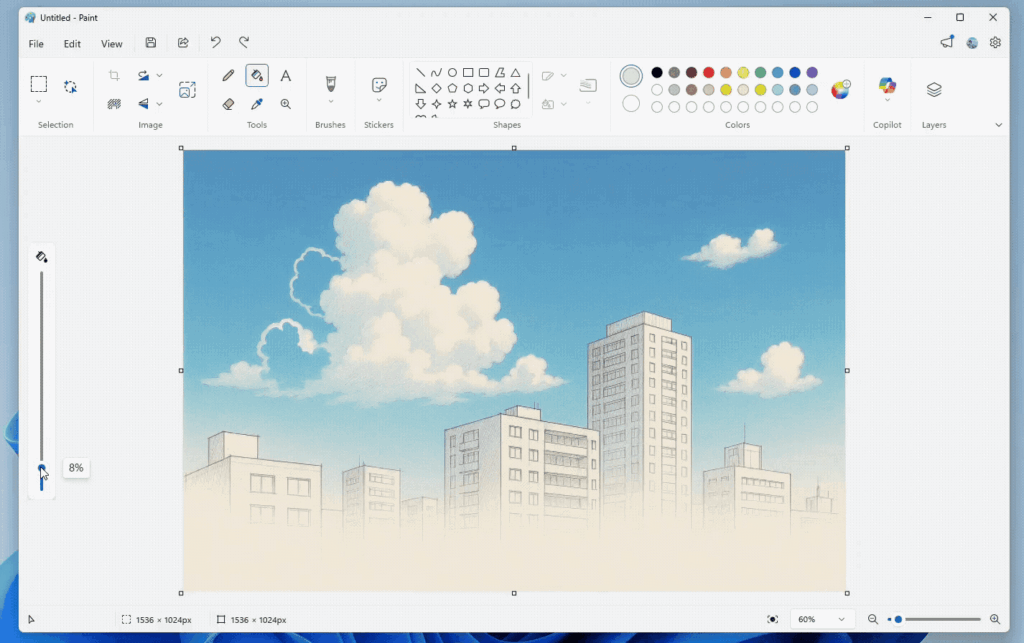
| Fill Tolerance Slider | Control how precisely the Paint Bucket tool applies color (8% vs 18% tolerance) | Actually useful, no AI required |
The Coloring Book feature is Microsoft’s attempt to make AI feel “fun and creative” rather than “corporate productivity slop.” You type a prompt, hit Generate, and get several outline drawings suitable for printing and coloring. It’s… fine? Useful for parents, teachers, or hobby artists, but locked behind Copilot+ PC hardware (meaning you need a PC with an NPU neural processor) and a Microsoft account.
The Fill Tolerance Slider is the genuinely useful addition — finally giving Paint users control over how the bucket fill tool behaves when dealing with anti-aliased edges or gradients. This should’ve existed 25 years ago, but better late than never.
The Broader Context: Microsoft Can’t Decide What It Wants
Here’s the uncomfortable timeline:
November 2025: Windows president Pavan Davuluri publicly talks about turning Windows into an “agentic OS.” Thousands of negative replies force him to turn off replies on his X post.
December 2025: Microsoft internally admits Windows 11 needs serious performance improvements, especially for gaming. Announces “Performance Fundamentals” approach focused on making Windows stop interfering when games run.
January 2026: Microsoft confirms Windows 11 is “hitting the brakes” on aggressive feature expansion to focus on reliability and performance. Sources say Copilot integrations in Notepad and Paint are “under review” and may be removed or redesigned.
January 21, 2026: Microsoft releases more AI features in Notepad and Paint, including AI coloring books requiring Copilot+ PCs and Microsoft account sign-ins.
January 24, 2026: Microsoft accidentally crashes Notepad, Paint, and Snipping Tool via a server-side bug affecting Store-based app activation, triggering 0x803F8001 errors across Windows 11.
This isn’t a strategy. This is organizational chaos.

The User Backlash: “Just Let Notepad Be Notepad”
The reception to these updates has been… mixed, at best. Here’s a sampling of the community response:
From Reddit (r/Windows11):
- “I just want a text editor that opens instantly and doesn’t phone home.”
- “Why does Notepad need a Microsoft account? This is insane.”
- “The fill tolerance slider is great. Everything else is bloat.”
From The Register’s coverage:
- “Microsoft is meddling with Notepad again, this time adding a ‘What’s New’ screen so users know the latest indignities heaped on the once-humble text editor.”
From Windows Central:
- Multiple articles questioning whether Microsoft should “reinvent, retire, or let Paint quietly linger”
The core tension? Microsoft wants Notepad and Paint to be modern, AI-powered productivity tools. Users want them to be fast, lightweight, reliable apps that do one thing well. These are fundamentally incompatible visions.
What Microsoft Should Have Done: Separate the Apps
The obvious solution — which Microsoft refuses to implement — is create separate apps:
Option 1: Fork the Apps
- Notepad Classic — Lightweight, no AI, no account, instant startup
- Notepad AI — Full Copilot integration, Markdown, cloud sync, account required
Option 2: Make AI Opt-In Only
- Install Notepad and Paint with zero AI features by default
- Add a “Try AI Features” button that downloads AI models and enables Copilot
- Users who want lightweight apps never see bloat; power users get AI on-demand
Instead, Microsoft is forcing every Windows 11 user to carry the weight of AI features whether they want them or not. The result? Slower app startup, telemetry concerns, account sign-in requirements, and backlash.
The Features That Actually Matter (And Nobody’s Talking About)
Buried in the noise are two genuinely good non-AI updates:
Paint: Freeform Rotate (Coming Soon) Windows Central reports Paint is finally getting freeform rotation — the ability to rotate shapes, text, and selections to any angle. This has been missing for 25+ years despite being standard in every image editor since the 1990s.
Paint: Collapsible Toolbar Paint now lets you auto-hide the toolbar to maximize canvas space. This is a basic UX improvement that should’ve existed a decade ago.
These updates make Paint genuinely better for actual image editing. They just get overshadowed by AI gimmicks.
The Verdict: Good Updates Buried in AI Bloat
If Microsoft had released:
- Strikethrough & nested lists for Markdown (Notepad)
- Fill tolerance slider (Paint)
- Freeform rotation (Paint)
- Collapsible toolbar (Paint)
…users would’ve celebrated. These are meaningful improvements to 40-year-old apps.
Instead, the headline is “AI coloring books” and “streaming rewrites” — features locked behind Copilot+ PCs and Microsoft account sign-ins that most users will never touch.
Microsoft’s AI strategy isn’t failing because AI is bad. It’s failing because Microsoft is shoving AI into apps where users explicitly don’t want it, then acting confused when people complain.
Notepad should be a text editor. Paint should be an image editor. If Microsoft wants AI creative tools, make separate apps. Don’t bloat the classics.
Follow the latest Windows 11 updates, Microsoft AI developments, and software news at Technosports.