FLA2
FLA2 CAM2
CAM2 NED
NED OMA
OMA NZ
NZ IND
IND NAM
NAM IRE
IRE PAK
PAK SL
SL SA
SA AUS
AUS Abha
Abha Al Faisaly
 AFG
AFG ZIM
ZIM Sassuolo
 Lazio
Lazio SEV2
SEV2 OSA0
OSA0 PSG2
PSG2 LYON0
LYON0 MBSG1
MBSG1 CFC0
CFC0 Barcelona1
 Real Madrid2
 NZ-A317 & 59/3 (18.3 ov, target 313)
 IND-A113 & 516
 SYL575/4 (167.3 ov)
 KHU
KHU MYMS465/7d
 CHATT424/6 (121 ov)
 DHA521
 RAJ162 & 215/5 (59.1 ov) (f/o)
 RAN402 & 5/0 (2.3 ov)
 BAR443/9d
 SIKM30/1 (15 ov)
 NAGA187
 JHK
JHK DELHI309/5 (90 ov)
 ODSA194
 SVCS13/0 (5 ov)
 BRODA259/6 (86 ov)
 J & K
J & K CHD363/2 (87 ov)
 HP
HP CGR35/1 (14 ov)
 AP231
AP231 HYD
HYD PNJB289/6 (90 ov)
 BAN
BAN WI
WI IND-W
IND-W ZIM-W
ZIM-W MEX-W51 (12.5/20 ov, target 187)
 ARG-W186/7
 BRB149/5 (16.2/20 ov, target 148)
 MIS147
 MOW107/9
 TOK111/5 (18.4/20 ov, target 108)
 LUL88/3 (9.5/20 ov, target 88)
 SPR87
SPR87 VAG169/4
 COR1
COR1 LLA0
LLA0 TOR1
TOR1 HAL1
HAL1 MICH0
MICH0 WASH1
WASH1 ISU0
ISU0 BYU3
BYU3 JUV2
JUV2 NAU0
NAU0 BOL0
BOL0 UDV1
UDV1 IACC0
IACC0 RIE0
RIE0 AS Roma
 Cagliari
 Torino
 Como
Como Daejeon
 Vissel Kobe
 Darul Ta'zim
 Port FC
 Kyoto Sanga
 Newcastle Jets
 Shanghai Port
 Cong An Ha Noi
 Udinese0
 Milan2
 Real Sociedad2
 Levante1
The Logitech MX Master 3S continues to be a favorite in the workspace, serving as the go-to tool for power users three years since its initial announcement on May 26, 2023.
After a successful market launch on June 17, 2023, this device has solidified its status as a gold standard for professionals who need both precision and comfort. Priced at $99.99 USD, it’s a worthwhile investment for anyone spending long hours navigating complex software.
Unmatched Ergonomics and Design
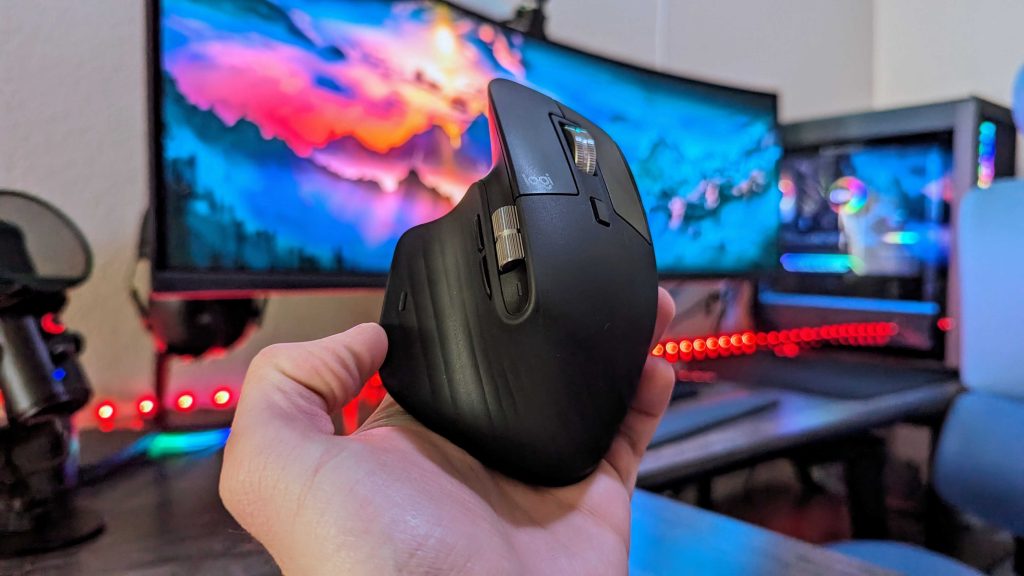
The Logitech MX Master 3S boasts a sculpted, ergonomic design that prioritizes comfort for users putting in long hours at their desks. By mimicking the natural curve of the human hand, it reduces wrist strain significantly compared to standard office mice. This thoughtful design is a big reason why creative professionals and coders love it — it’s a reliable, fatigue-resistant pointer.
Comfortable grip for long hours of use
The mouse features a textured surface that prevents slipping, even during intense work sessions. Some enthusiasts might argue that lighter, symmetrical mice work better for gaming, but the MX Master 3S is built for productivity. Its weight distribution feels intentional, offering just enough resistance to ensure precise cursor placement without feeling clunky.
Multi-device connectivity for seamless transitions
Here’s the thing: Connectivity is where this device truly shines. It supports up to three devices at once. You can easily switch between a Windows workstation, a macOS laptop, and a Linux server with just a press of a button on the underside of the mouse. This seamless integration, highlighted in extensive hardware reviews, keeps your workflow uninterrupted regardless of the operating system.
Advanced Features for Enhanced Productivity
Beyond its physical form, the hardware specs define its utility. The mouse features a 10,000 DPI sensor for hyper-precise tracking on nearly any surface, even glass.
It runs on a rechargeable battery that lasts up to 70 days on a single charge, minimizing downtime for busy professionals. While some internet rumors suggest hardware specs like 16GB of RAM or 512GB of drive space, those claims don’t hold water; the device works solely as an input peripheral, so display specs don’t apply here.
Customizable buttons for personalized workflows
With 8 customizable buttons, users can map specific macros to their frequently used applications. Whether you’re scrubbing through video timelines in Premiere Pro or managing spreadsheets in Excel, assigning shortcuts to the thumb-operated gesture button or the side buttons is incredibly useful. You manage these settings through Logi Options+, allowing for app-specific profiles that switch automatically as you hop between windows.
Smooth scrolling with MagSpeed technology
The scroll wheel utilizes electromagnetic MagSpeed technology, making it nearly silent while remaining incredibly fast. You can switch between line-by-line precision and free-spin mode with a simple flick, covering 1,000 lines in just one second. If you check out professional workspace setups, you’ll see this scroll wheel design is popular for its effectiveness in handling long documents or code repositories.
FAQs
What makes the MX Master 3S different from its predecessors?
The 3S model introduces “Quiet Click” buttons that are 90% quieter than the previous generation and upgrades the sensor from 4,000 DPI to 10,000 DPI for better tracking on high-resolution monitors.
How does the battery life compare to other productivity mice?
With up to 70 days per charge, it outperforms most in its category. Many competitors need charging every two to four weeks, while the MX Master 3S is designed to last over two months with standard office use.
Is it compatible with both Windows and Mac?
Absolutely, the device fully supports Windows, macOS, and Linux, with dedicated software for each to handle button remapping and Flow cross-computer control.
What are the key software features for customization?
The Logi Options+ software is central to the experience, allowing users to create app-specific profiles, adjust scroll sensitivity, and configure the thumb-wheel and gesture button for specific tasks. Understanding the Logitech MX Master 3S fully means keeping up with these developments.