SA329 & 140/4 (47 ov)
 AUS429
 BAN272
 WI134/4 (48 ov)
 NZ
NZ IND
IND NAM
NAM IRE
IRE Abha
Abha Al Ittihad
 NorthEast
 Bengaluru
 Al Diriyah
 Neom SC
 Le Havre AC
 PSG
PSG Nice
Nice Rennes
 Al Shabab
 Al Ahli
 FIO2
FIO2 ATA2
ATA2 NSR5
NSR5 KHO3
KHO3 RIY0
RIY0 QAD6
QAD6 FRO5
FRO5 LEC1
LEC1 PAK81/2 (4.3/6 ov)
 UAE
UAE SBP172 & 165/7 (59.4 ov, target 237)
 MITS112 & 296
 SOA154
 WA406/5d & 169 (61.5 ov)
 TAS137/3 (42.5 ov)
 NSW
NSW NED
NED SL
SL BH-W
BH-W SS-W
SS-W AS-W
AS-W MS-W
MS-W PS-W
PS-W MR-W
MR-W OMA
OMA AFG221/7
 ZIM202/5 (20 ov, target 222)
 ENG386/5
 HH-W174/8 (20 ov, target 193)
 ST-W140/4 (17/20 ov, target 139)
 SCOT97 (6 ov, target 95)
 NAL2
NAL2 SFE0
SFE0 Elversberg
 Mainz
Mainz Villarreal
 Espanyol
 KHA4
KHA4 HAZ2
HAZ2 Genoa2
 Juventus0
If you’re a journalist, activist, executive, or just someone who values privacy, Apple’s Lockdown Mode is the digital fortress you’ve been waiting for. In this easy-to-follow guide, you’ll learn what Lockdown Mode is, who it’s for, how to enable it on your iPhone, iPad, or Mac, and what to expect once it’s on. Let’s unlock the secrets to Apple’s strongest security yet!
What is Lockdown Mode on iPhone and Mac?
Lockdown Mode is Apple’s answer to the world’s most sophisticated digital threats. Think of it as a high-security vault for your data—designed for people who might be targeted by spyware, hackers, or government surveillance. While most users won’t need it, Lockdown Mode is a game-changer for those who do.
Who should use Lockdown Mode?
- Journalists working in sensitive regions
- Activists and human rights defenders
- Politicians and government officials
- Anyone at risk of targeted cyberattacks
How Does Lockdown Mode Protect You?
When you enable Lockdown Mode, your device becomes a digital fortress. Here’s what changes:
- Messages: Most attachments are blocked to prevent malware.
- FaceTime: Only people you’ve contacted in the last month can call you.
- Photos: Shared albums are hidden and can’t be created.
- Safari: Advanced web technologies are disabled, making it harder for hackers to exploit your browser. Some websites may not display correctly.
- Device Connections: New devices can only connect when your iPhone, iPad, or Mac is unlocked.
- Wi-Fi: Unsecured networks are blocked.
- Game Center: Disabled for extra protection.
- Configuration Profiles: You can’t install new ones, reducing risk from malicious software.
Heads up: Lockdown Mode is enabled per device. Turning it on for your iPhone won’t automatically enable it on your Mac or iPad.
How to Turn On Lockdown Mode (Step-by-Step)
On iPhone or iPad
- Open Settings.
- Tap Privacy & Security.
- Scroll down and select Lockdown Mode.
- Tap Turn On Lockdown Mode. Review the summary, then tap again to confirm.
- Tap Turn On & Restart.
- Enter your passcode. Your device will reboot with Lockdown Mode enabled.
On Mac
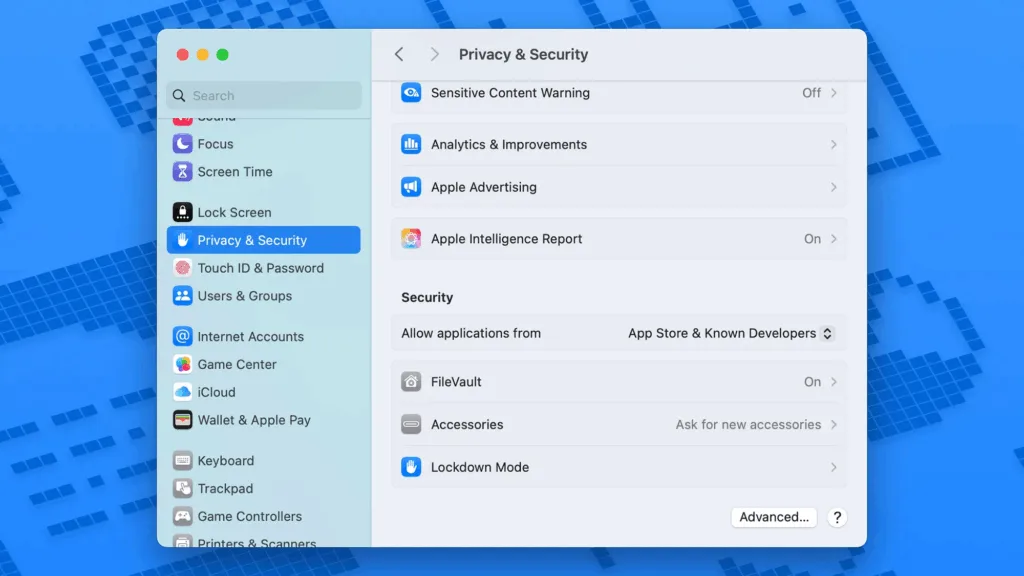
- Click the Apple menu and open System Settings.
- Go to Privacy & Security.
- Click Lockdown Mode.
- Select Turn On. Review the summary, then click again to confirm.
- Click Turn On & Restart.
- Enter your Mac password. Your Mac will restart with Lockdown Mode active.
Can You Customize Lockdown Mode?
While Lockdown Mode is strict, Apple lets you make a few tweaks—especially in Safari. If a website you trust isn’t working, you can exclude it from Lockdown Mode:
- On iPhone/iPad: In Safari, tap the menu button next to the URL, tap the three dots, and disable Lockdown Mode for that site.
- On Mac: Go to Safari > Settings for [website] and uncheck Enable Lockdown Mode.
To review or edit your exclusions:
- iOS/iPadOS: Go to Settings > Privacy & Security > Lockdown Mode > Configure Web Browsing.
- macOS: Open Safari, then Safari > Settings > Websites > Lockdown Mode.
How to Turn Off Lockdown Mode
If you no longer need the extra protection (or find the restrictions too limiting), disabling Lockdown Mode is just as easy:
- Go back to Privacy & Security > Lockdown Mode.
- Tap or click Turn Off Lockdown Mode.
- Restart your device.
Is Lockdown Mode Right for You?
Lockdown Mode isn’t for everyone. Most users will never need this level of security. But if you’re at risk of targeted attacks, it’s the most powerful protection Apple offers—right in your pocket or on your desk.
Pros:
- Maximum security for high-risk users
- Easy to enable and disable
- No special account required
Cons:
- Some features and websites may not work as expected
- Not ideal for everyday use unless you truly need it
Final Thoughts
Apple’s Lockdown Mode is a bold step in digital security, offering peace of mind for those who need it most. Whether you’re a journalist, activist, or just want to be extra safe, now you know how to lock down your iPhone, iPad, or Mac in minutes.