NED
NED OMA
OMA NAM316/7
 IRE121/5 (24/50 ov, target 317)
 SA216/4 (51.1 ov)
 AUS
AUS ABH0
ABH0 ALF0
ALF0 BEI1
BEI1 JHM1
JHM1 RCH0
RCH0 KRE0
KRE0 AFG
AFG ZIM
ZIM SAS
SAS LAZ
LAZ ROMA
ROMA CAG
CAG TOR
TOR COMO
COMO BAN
BAN WI
WI IND-W
IND-W ZIM-W
ZIM-W GOA
GOA SC Delhi
 Milan
Milan Bologna
 PAK110
 SL114/2 (18.1/50 ov, target 111)
 NZ198/3
 IND199/4 (13.2/20 ov, target 199)
 Sevilla2
 Osasuna0
 PSG2
PSG2 Lyon0
Lyon0 JER
JER KUW
KUW PNG
PNG QAT
QAT JAB
JAB KAY132/9 (20 ov)
 SIKM184
 NAGA187 & 46/4 (34 ov)
 JHK131/4 (47 ov)
 DELHI515/5d
 ODSA194
 SVCS13/0 (5 ov)
 BRODA616
 J & K6/0 (4 ov)
 CHD685/5d
 HP49/0 (14 ov)
 CGR216/8 (95 ov)
 AP231
AP231 AUCK
AUCK CANT
CANT CD
CD ND
ND DEN
DEN KENYA
KENYA POA
POA SPR
SPR BIK149 (19.3/20 ov, target 158)
 CHR157/3
 BRB149/5 (16.2/20 ov, target 148)
 MIS147
 MOW107/9
 TOK111/5 (18.4/20 ov, target 108)
 LUL88/3 (9.5/20 ov, target 88)
 Parma
Parma Udinese
 Venezia
 Inter Milan
 Genoa
Genoa Juventus
 Mohun Bagan1
 Chennaiyin0
 DHC0
DHC0 VIS1
VIS1 JDT3
JDT3 PORT0
PORT0 KYO5
KYO5 NEW2
NEW2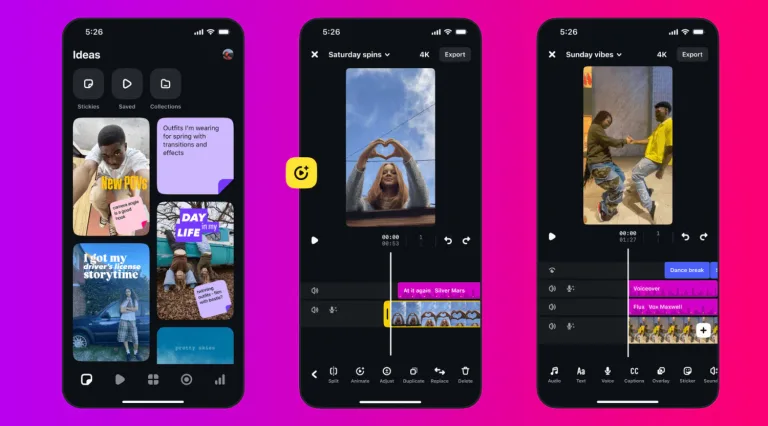
One year ago, Instagram quietly dropped something that creators had been begging for: a dedicated mobile video editor built around how they actually work. Today, Edits by Instagram marks its first anniversary — and the numbers, the features, and the community behind it make a compelling case that this is only the beginning.
Instagram Edits App — One Year in Numbers
| Milestone | Detail |
|---|---|
| Launch Date | April 22, 2025 |
| Features Shipped | 130+ since launch |
| Update Frequency | Every week |
| Built By | Instagram / Meta (led by Brett Westervelt) |
| Platform | Mobile (iOS & Android) |
| Key Differentiator | All-in-one creative studio for video creators |
From Friday Morning Doubts to a Global Launch?
What makes the story of Edits genuinely human is how reluctant the team was to ship it. Every Friday, the team would gather, look at what they’d built, and ask themselves the same question every creative asks: “Is this good enough?” Many times, they decided it wasn’t.
When April 22, 2025 finally came, the team knew the app wasn’t perfect — but they also knew the best way to make it better was to put it in creators’ hands and listen. That instinct paid off. The response humbled and pushed them to ship over 130 additional features in just one year, with updates landing every single week.
What Makes Edits Different: 3 Pillars?
1. Powerful Tools, Zero Overwhelm
Creators flagged a real pain point early: reading scripts while filming was a nightmare. The team’s response was an in-app teleprompter — adjustable text size, adjustable speed, no more fumbling between apps. Year two promises bilingual captions, advanced color tools, speed curves, and fully customisable workflows. Learn more about video editing tools and techniques on Wikipedia.
2. A Creative Workspace That Learns You
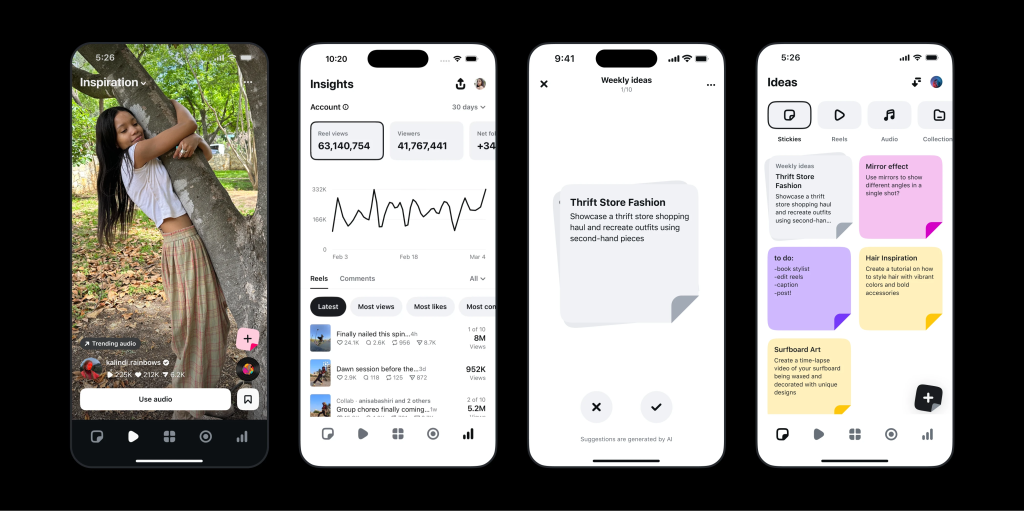
The Ideas tab is where Edits separates itself from basic editing apps. Saved reels, audio clips, sticky notes for brainstorming, a personalised inspiration feed, comment summaries, and weekly AI-generated ideas — all in one place. Year two adds follower insights, pinnable favourite tools, and project themes. It’s not just an editor; it’s a creative OS.
3. Community-Led Learning
Templates in Edits aren’t just copy-paste starting points. Tap any template and you can open the project file to see exactly how it was made — including the audio used. Creators like @ethanbarber.co and @colebennett have already brought their workflows into Edits for others to learn from. Soon, more complex templates with overlays, keyframes, and video effects are on the way.
Also read: Best video editing apps for creators in 2026 — Technosports
What’s Coming in Year Two
- Bilingual captions and advanced color adjustments
- Speed curves for smoother motion editing
- Customisable tool layouts — pin what you use most
- Deeper follower and audience insights
- More community templates with overlays and keyframes
- Easier ways to share creative building blocks between creators
If year one was about building the foundation, year two is about making it feel like yours.
For more on the latest in content creation tools and tech, keep visiting Technosports.