SA329 (82.3 ov)
 AUS
AUS AFG177
 ZIM11/0 (1.4/20 ov, target 178)
 SAA0
SAA0 EST0
EST0 SAS
SAS LAZ
LAZ ROMA
ROMA CAG
CAG TOR
TOR COMO
COMO BAN
BAN WI
WI IND-W
IND-W ZIM-W
ZIM-W GOA
GOA SC Delhi
 Milan
Milan Bologna
 Parma
Parma Udinese
 ABH0
ABH0 ALF1
ALF1 PAK110
 SL114/2 (18.1/50 ov, target 111)
 NAM316/7
 IRE253 (44.5/50 ov, target 317)
 NZ198/3
 IND199/4 (13.2 ov)
 SIKM184
 NAGA187 & 46/4 (34 ov)
 JHK131/4 (47 ov)
 DELHI515/5d
 ODSA194
 SVCS13/0 (5 ov)
 BRODA616
 J & K6/0 (4 ov)
 CHD685/5d
 HP49/0 (14 ov)
 CGR216/8 (95 ov)
 AP231
AP231 HYD193/2 (54 ov)
 PNJB431
 KNTKA297/7 (95 ov)
 TPURA194
 KER101/6 (35 ov)
 BENG350
 MAHA278/9 (100 ov)
 GUJ223
 AUCK
AUCK CANT
CANT CD
CD ND
ND DEN
DEN QAT
QAT KENYA
KENYA KUW
KUW POA
POA SPR
SPR BRB
BRB VAG
VAG NED371/5
 OMA265 (49.3/50 ov, target 372)
 JAB113 (19.3/20 ov, target 133)
 KAY132/9
 JER224
 SEEB0
SEEB0 EBFC0
EBFC0 Venezia
 Inter Milan
 Genoa
Genoa Juventus
 Sevilla2
 Osasuna0
 PSG2
PSG2 Lyon0
Lyon0 Mohun Bagan1
 Chennaiyin0
 BEI2
BEI2 JHM2
JHM2 RCH0
RCH0 KRE0
KRE0As of Wednesday, September 16, 2026, Apple’s Final Cut Pro remains a professional video-editing option for Mac users, with the Mac App Store $299.99. The RAM, storage, display and pricing details in this checklist are based on supplied unconfirmed information, not officially confirmed Apple specifications.
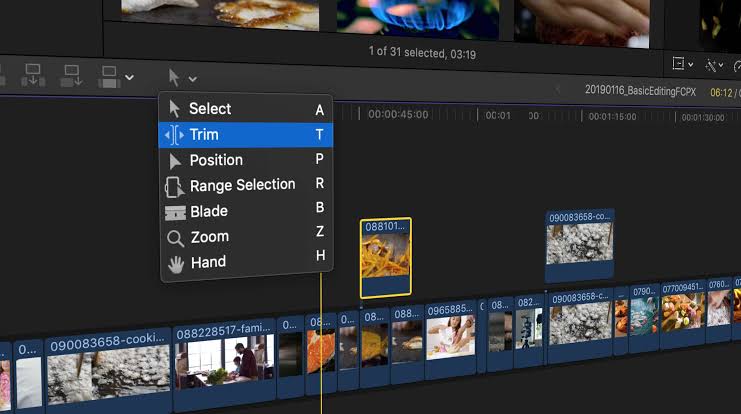
What should video editors check before buying Final Cut Pro?
The first Final Cut Pro checklist item is hardware compatibility. Editors should confirm that their Mac uses Apple silicon, has enough unified memory for their usual projects, and includes sufficient internal storage for applications, cache files and temporary renders.
A system that handles short social videos may struggle with long 4K timelines, multicamera edits or high-resolution effects. The right purchase decision depends on the complete editing workflow, not the application Video editors should also budget for external storage, a fast backup drive and a colour-accurate display. A Mac with limited free space can slow media management even when the processor is capable of handling the timeline. Editors in India should convert the $299.99
How much RAM and storage does Final Cut Pro need?
The supplied specification brief places 16 GB of RAM as the minimum for optimal Final Cut Pro performance on Apple Silicon. It also says Apple recommends at least 512 GB of internal SSD storage for media caching.
These figures create a practical baseline, but editors working with large libraries should consider more capacity or a dedicated external workflow. The 512 GB figure should not be treated as total project storage. Ope
Does Final Cut Pro need an Apple Pro Display XDR?
The supplied information says Final Cut Pro performance benchmarks are optimised for Apple Pro Display XDR technology. That reference matters most to editors working on colour-sensitive projects, where brightness, contrast and wider display capabilities influence monitoring decisions. A Pro Display XDR is not automatically necessary for every Final Cut Pro user.
YouTube creators, students and social-media editors can begin with a suitable calibrated monitor, while professional post-production teams may need a display designed for consistent colour evaluation. The correct choice depends on delivery targets, including web video, broadcast production or cinema. This display question also affects desk planning. Editors should check connection standards, available ports and monitor placement before building a workstation. The ColorOS Promotional Video coverage shows why polished visual work depends on both creative software and accurate presentation hardware.
What workflow should editors follow after installing Final Cut Pro?
Start by creating a clear library structure for projects, events, original media, proxies and exports. Use descriptive folder names, maintain at least two copies of important footage, and label final versions with dates or revision numbers. This reduces the risk of overwriting an approved cut. A disciplined Final Cut Pro checklist protects footage as much as it improves editing speed.
Editors should verify audio levels, frame rates, colour settings and export resolution before delivery. They should also watch a complete exported file rather than assuming that a successful render guarantees a flawless result. Cloud services can support collaboration, but they should not replace a local backup. Editors exploring adjacent workflows can read the Google Rolls Video report for a separate view of video-related software tools, while the Run DeepSeek Complete guide covers local computing considerations for another demanding workload. For more detail, see Gizmodo.
What should Final Cut Pro users verify next?
Editors should verify Apple’s current system requirements, Mac App Store pricing and regional availability before making a purchase. The $299.99
FAQs
Is Final Cut Pro free?
No. The supplied pricing information lists Final Cut Pro at $299.99 on the Mac App Store as of September 2026.
Is 16 GB RAM enough for Final Cut Pro?
The supplied checklist places 16 GB as the minimum for optimal performance on Apple silicon, but larger projects can require a more capable configuration.
How much SSD storage should editors plan for?
The supplied information lists 512 GB of internal SSD storage as the recommended starting point for media caching.
Is Apple Pro Display XDR required?
No requirement is established here, but the supplied benchmark information references Apple Pro Display XDR technology for performance optimisation.
Was this article helpful?
Your feedback directly improves future articles on this site.