NAM321/6 (50 ov)
 IRE
IRE AVL
AVL MNC
MNC RAY
RAY ELC
ELC GMB
GMB ZMB
ZMB NGA
NGA LES
LES CAG
CAG BOL
BOL COMO
COMO SAS
SAS FCA
FCA FCU
FCU KOE
KOE S04
S04 MOZ19
MOZ19 UGA23/0 (0.5/20 ov, target 20)
 NZ180/5
 IND181/6 (19.5/20 ov, target 181)
 Ipswich1
 Nottm Forest1
 Alavés1
 Málaga1
 WA105/3 (18.5/50 ov, target 372)
 NSW371/8
 DEN
DEN KUW
KUW KENYA
KENYA QAT
QAT SWD-W
SWD-W EPR-W
EPR-W TTN-W
TTN-W WPR-W
WPR-W BOR
BOR WAR15/1 (2.5/20 ov)
 LIONS
LIONS Limpo21/1 (2.5/20 ov)
 NZ-A135/3 (41 ov)
 IND-A113
 DHA293/3 (84.1 ov)
 RAJ
RAJ MYMS
MYMS CHATT
CHATT RAN320/5 (80 ov)
 BAR
BAR MEX-W
MEX-W ARG-W
ARG-W UAE
UAE NED
NED PAK
PAK ENG
ENG IND-W
IND-W ZIM-W
ZIM-W AFG170/3 (34.3/50 ov, target 170)
 ZIM169
 CHE0
CHE0 DYI0
DYI0 CHO1
CHO1 QIN0
QIN0 HEN1
HEN1 BEI0
BEI0 LIA1
LIA1 ZHE0
ZHE0 QWC1
QWC1 YUN0
YUN0 SHX0
SHX0 Shanghai Shenh0
 TIG0
TIG0 SHP0
SHP0 WTT1
WTT1 SHT3
SHT3 M05
M05 SVW
SVW RBL
RBL ELV
ELV Torino3
 Monza2
 Brest1
 Nice2
Nice2 Stuttgart2
 Gladbach3
 Al Ahli4
 Al Khaleej1
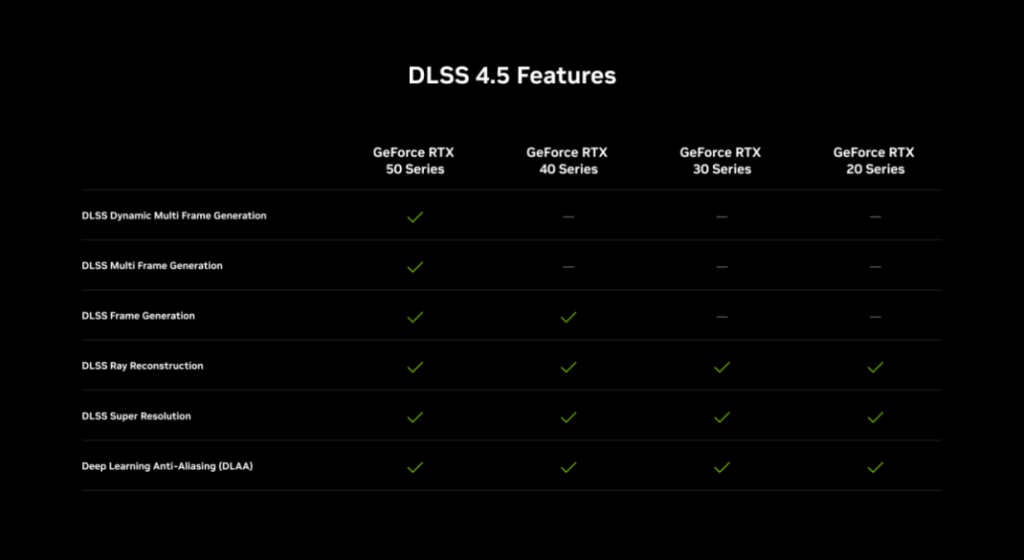
NVIDIA opened Gamescom 2026 with its biggest DLSS update in a while. DLSS 4.5 Ray Reconstruction is now available for all GeForce RTX gamers, arriving alongside RTX Mega Geometry for Gears of War: E-Day, path tracing for 007 First Light, and a wave of new trailers across nearly a dozen upcoming titles.
What DLSS 4.5 Ray Reconstruction Actually Fixes
Ray Reconstruction replaces traditional hand-tuned denoisers with an AI network trained on NVIDIA’s own supercomputers, aimed at generating cleaner pixels in the noisy areas of a ray-traced frame where rays weren’t fully sampled. The new second-generation transformer model brings several concrete improvements. For more on how NVIDIA’s RTX technology stack is evolving, check our GPU and gaming hardware coverage.
| Improvement | Detail |
|---|---|
| Compute capability | +35% |
| Parameters processed | +20% |
| Training dataset | Larger, more diverse |
| Developer control | Finer temporal accumulation tuning |
In practice, NVIDIA says this shows up as cleaner particle effects with reduced ghosting in Indiana Jones and the Great Circle, more responsive lighting in PRAGMATA, and sharper, more stable fine detail in scenes like the CRT television sequence in Alan Wake 2.
How to Get It Right Now
DLSS 4.5 Ray Reconstruction is available today through the NVIDIA app, ahead of an official release in September. To enable it, opt into Early Access under Settings > About in the NVIDIA app (GeForce Game Ready Driver 580.88 WHQL or newer required), then head to Graphics settings, select a supported game or apply it globally, open Driver Settings, click DLSS Override – Model Presets, choose Custom, and select “Recommended” or “Preset F” under Ray Reconstruction.
At launch, the update covers 30 games, including Cyberpunk 2077, Alan Wake 2, Call of Duty: Black Ops 7, DOOM: The Dark Ages, Hogwarts Legacy, and Marvel’s Spider-Man 2, with more titles adding support via their own updates over time.
RTX Mega Geometry Arrives in Gears of War: E-Day
Perhaps the more technically significant announcement is RTX Mega Geometry, debuting in Gears of War: E-Day on October 6. After six years of R&D, NVIDIA says it has solved a longstanding limitation in Unreal Engine 5’s Nanite system, where highly detailed geometry gets swapped for a low-detail static mesh specifically for ray tracing — causing visible mismatches between what a game renders and what its shadows and reflections actually show.
RTX Mega Geometry fixes this by enabling full-detail Nanite objects to be accurately ray traced, and the technology will later be adopted into Microsoft’s DirectX Raytracing 2.0 (DXR 2.0) standard, meaning the fix eventually extends to all Unreal Engine 5 titles, not just this one. Full technical details are available via NVIDIA’s official GeForce news page.
More Titles Getting the DLSS 4.5 Treatment
| Game | What’s New |
|---|---|
| CONTROL Resonant | Path tracing + DLSS 4.5, launches Sept 24 |
| 007 First Light | Path tracing update launches Sept 15 |
| AION 2 | DLSS 4.5 support, Western launch Sept 30 |
| Aniimo | NVIDIA ACE for natural creature interaction, early 2027 |
| Black State, CINDER CITY | Upgraded from DLSS 4 to DLSS 4.5 |
| Silver Palace, Beautiful Light | Launching with DLSS 4.5 and ray tracing |
Why This Matters
Between a genuinely improved denoising model, a fix for one of Unreal Engine 5’s most persistent ray tracing limitations, and nearly a dozen upcoming titles adding support, NVIDIA is using Gamescom to reinforce DLSS as the backbone feature across its entire GeForce RTX lineup — not just a checkbox on the spec sheet. Keep following our PC gaming and GPU coverage section as more DLSS 4.5 integrations roll out through the rest of 2026.