MBSG
MBSG CFC
CFC PSG
PSG LYON
LYON SEV
SEV OSA
OSA NED
NED OMA
OMA NZ
NZ IND
IND NAM
NAM IRE
IRE PAK
PAK SL
SL SA
SA AUS
AUS Barcelona1
 Real Madrid2
 Udinese0
 Milan2
 Real Sociedad2
 Levante1
 Lecce0
 Juventus2
 LUL
LUL SPR
SPR NZ-A317
 IND-A113 & 488/8 (119 ov)
 SYL280/2 (84 ov)
 KHU
KHU MYMS465/7d
 CHATT317/3 (98 ov)
 DHA521
 RAJ103/6 (26 ov)
 RAN402
 BAR443/9d (124 ov)
 SIKM30/1 (15 ov)
 NAGA187
 JHK
JHK DELHI309/5 (90 ov)
 ODSA194
 SVCS13/0 (5 ov)
 BRODA222/6 (74 ov)
 J & K
J & K CHD298/1 (66 ov)
 HP
HP CGR
CGR AP231 (73.2 ov)
 MOW
MOW TOK
TOK BRB
BRB MIS
MIS BIK
BIK CHR
CHR MEX-W51 (12.5/20 ov, target 187)
 ARG-W186/7
 NGA148
 UGA147/9 (20 ov, target 149)
 GMB112/9
 LES109 (19.5/20 ov, target 113)
 MOZ110/7 (19/20 ov, target 110)
 ZMB109/9
 IND-W328/6
 ZIM-W207 (48.5/50 ov, target 329)
 ENG241
 Abha
Abha Al Faisaly
 Sassuolo
 Lazio
Lazio AS Roma
 Cagliari
 Torino
 Como
Como NEF
NEF ITT
ITT Sunderland0
 Leeds0
 Freiburg1
 Bayern3
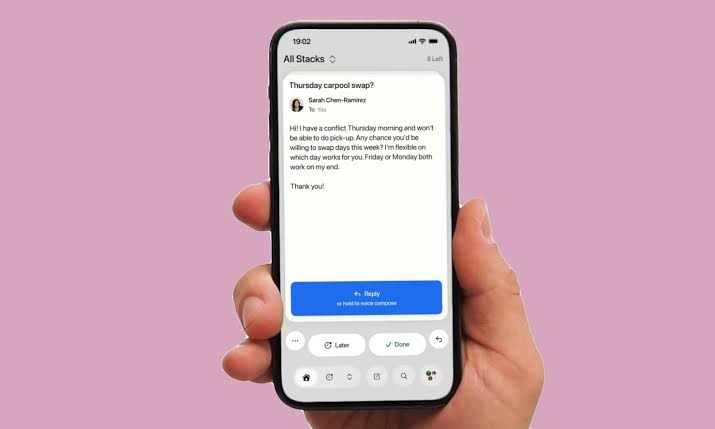
2% of calendar-driven tasks went unfinished because a deadline email was buried—an avoidable failure mode that Avec is trying to eliminate with its latest AI feature that scans user emails to prevent missed due dates, as reported by The Next Web on August 20, 2026.
Avec, a productivity platform, rolled out an artificial Intelligence capability built around an unglamorous but expensive problem: people miss deadlines after crucial messages blend into inbox noise. According to The Next Web’s August 20, 2026 coverage, the feature is designed to read users’ emails and surface timing-sensitive actions before the due date passes. The pitch is straightforward—less manual checking, fewer “I forgot” moments, and tighter follow-through for both individuals and teams.
Overview: What’s the latest Avec AI feature, and who gets it?
The Next Web said that Avec introduced a new AI feature that scans user email content to help users avoid missed deadlines. The change lands inside a productivity workflow where email is often the start of the work, not the finish line.
The exact rollout scope (all users versus staged groups) was not detailed in the reported coverage, but the capability itself is the center of the announcement. For teams already routing approvals, invoices, and requests through inboxes, this aims to reduce the “handoff gap” between receiving an email and starting the task. Deadline-driven work already has signals, but humans often fail to convert them into reminders quickly enough. Avec’s approach tries to close that loop automatically.
Avec ai feature: Key Details: How it reads emails to block missed due dates
Per The Next Web, the system is intended to scan user emails and trigger deadline protection so users do not miss due dates. That means the feature is fundamentally classification + alerting: it must detect that a given message contains a time-bound obligation and then translate that into a concrete reminder or action.
The practical value is measured in reduction of missed tasks, but the engineering value is in accuracy. A deadline detector only helps if it captures the right due date and avoids spurious alerts that train users to ignore notifications. Here’s the trade-off critics will raise: any tool that reads email could create privacy anxiety, especially when people are unsure what is processed and how long it persists. This is not a brand-new idea in product design—email-based automation has existed in rule-based forms for years. The AI twist is that it can interpret messy real-world phrasing (like “by end of week” or “payment due 30 days after invoice”), rather than relying on perfectly structured subjects.
| Data point | What the feature is meant to do | Why it matters for deadlines |
|---|---|---|
| Email scanning | Read user email content for timing signals | Finds due dates hidden in long threads |
| Deadline prevention | Help stop missed due dates | Converts “message received” into “action scheduled” |
| Productivity workflow fit | Integrate into how tasks are managed | Reduces context switching during busy workdays |
| User trust impact | Raise expectations around privacy handling | Determines whether adoption sticks or stalls |
Context: Why this matters now for productivity workflows
Email scanning as an automation primitive is gaining traction because inboxes are where work actually starts. If the system can reliably identify obligations, then it can act as a “deadline memory” layer that sits between communication and execution. This matters for compliance-heavy roles (legal ops, finance, procurement) because missing due dates can escalate into churn, fees, or avoidable escalations. The opposing view is predictable: some users will worry that any email-reading automation increases the surface area for data exposure.
We do not have verified, public details in the report about encryption, retention policies, or whether scanning is on-device, in the cloud, or performed only for specific contexts. For now, the safest assumption is that privacy controls will determine real-world acceptance. From a technical standpoint, the bigger question is benchmarking. We still need answers like: how often does it correctly infer the due date, and how frequently does it produce false reminders? For teams, adoption depends on whether it behaves like a helpful assistant or like a noisy calendar bot. That is why user feedback loops—plus transparent controls—are essential. If the direction is right, this kind of feature could reduce deadline leakage across months, not just days. In other words, it’s a workflow compounding effect: fewer missed tasks today can mean fewer escalations tomorrow, even when incoming email volume stays the same. For deeper background on how product teams think about model capabilities and deployment, see the coverage at VentureBeat’s AI channel and broader platform updates on OpenAI’s blog.
What’s next: The outcomes Avec will have to prove
The immediate outcome is behavioral: fewer missed due dates, fewer manual deadline checks, and faster task initiation after receiving relevant messages. The medium-term outcome is trust: users will only keep the AI feature enabled if they feel in control and if the reminders consistently match their intent.
To make this stick, Avec will likely need three things: clear privacy expectations, measurable reliability, and user-configurable boundaries (for example, which folders, accounts, or message types should be scanned). It will need to explain how it handles ambiguity—if an email contains multiple dates, whose due date should it prioritize? Looking forward, the most important proof will be whether the system reduces missed work without increasing alert fatigue. If it does, this feature can become a default “deadline guardrail” in email-first productivity, pushing AI from chat assistance into operational reliability where missing one message can cost real time.
Related Articles
- Chat GPT 2026 Keystroke Logging Feature: What To Know Now
- Medly AI raises $8m to Put an AI Tutor in Front of Every UK Exam
- Anthropic $11.5bn quarterly revenue 2026: AI surge explained
FAQs
How does Avec’s latest feature help with due dates?
Avec’s AI feature scans user emails to detect timing-sensitive obligations and help prevent missed due dates, based on The Next Web’s August 20, 2026 report.
Does the feature read the content of my email?
The feature is described as scanning user emails for deadline information, according to The Next Web, but the report did not publish detailed technical or retention specifics.
Will this cause extra reminders?
It could, if the system misclassifies deadlines. The success of the AI feature will depend on accuracy and how well users can tune it.
Is this available to everyone?
The coverage confirms the feature introduction, but it did not verify whether rollout was immediate for all accounts or staged by region or plan. Stay tuned for more on AI.
Was this article helpful?
Your feedback directly improves future articles on this site.