LAFC0
LAFC0 LA0
LA0 Mohun Bagan
 Chennaiyin
 PSG
PSG Lyon
Lyon Sevilla
 Osasuna
 NED
NED OMA
OMA NZ
NZ IND
IND NAM
NAM IRE
IRE PAK
PAK SL
SL SA
SA AUS
AUS BAR1
BAR1 RMA2
RMA2 UDI0
UDI0 MIL2
MIL2 RSO2
RSO2 LEV1
LEV1 LEC0
LEC0 JUV2
JUV2 BRB76/3 (9/15 ov)
 MOW
MOW NZ-A317
 IND-A113 & 280/4 (74.3 ov)
 SYL280/2 (84 ov)
 KHU
KHU MYMS465/7d
 CHATT134/2 (40 ov)
 DHA521
 RAJ103/6 (26 ov)
 RAN402
 BAR179/3 (56.1 ov)
 LUL
LUL SPR
SPR TOK
TOK MIS
MIS MEX-W51 (12.5/20 ov, target 187)
 ARG-W186/7
 NGA148
 UGA147/9 (20 ov, target 149)
 GMB112/9
 LES109 (19.5/20 ov, target 113)
 MOZ110/7 (19/20 ov, target 110)
 ZMB109/9
 IND-W328/6
 ZIM-W207 (48.5/50 ov, target 329)
 ENG241
 Abha
Abha Al Faisaly
 Neftchi Fergana
 Al Ittihad
 Besiktas
 Istanbul BB
 Caykur Rizespor
 Trabzonspor
 Al Ahli
 Al-Gharafa
 SUN0
SUN0 LEE0
LEE0 SCF1
SCF1 MUN3
MUN3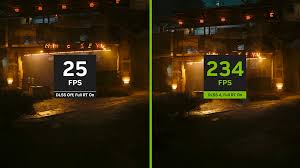
Imagine this: NVIDIA’s DLSS just bumped frame rates by up to 60% in the latest AAA hit, letting gamers crank up settings without needing the priciest hardware. We’re talking about 30–60% higher FPS—and that’s exactly why everyone’s talking about DLSS after the Arknights Endfield Update.
Arknights Endfield Update: What is NVIDIA DLSS and How Does It Work?
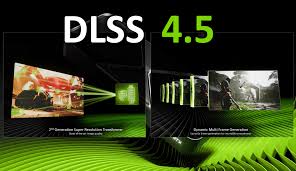
NVIDIA’s Deep Learning Super Sampling (DLSS) turned into a hot topic once the Arknights Endfield Update put upscaling tech in the spotlight. Instead of making your GPU work overtime by rendering every single pixel, DLSS taps into AI to rebuild crisp, high-res images from lower resolutions. Here’s what you get: Higher frame rates without maxing out your graphics card. PC Gamer calls this tech a must-have for new games that push visuals to the edge. And with each tweak, DLSS gets better—though yeah, it’s not flawless every time.
Key Advantages: 30–60% Performance Boost and Accessibility
Let’s get real. DLSS, especially in games featured during the Arknights Endfield Update, pushes frame rates up by 30–60% on compatible GPUs. That means smoother action, even if you’re not rocking a high-end card. You’ll notice lower temps, less power use, and—if you’re gaming on a laptop—longer battery life. Those are tough perks to beat. DLSS can turn barely-playable frame rates into buttery-smooth 60 FPS, a real win for anyone battling stutter. With more games jumping onboard, this feature is quickly becoming essential. Still, it’s not a magic fix (just ask folks who’ve noticed ghosting in twitch shooters). DLSS won’t turn a budget GPU into a monster, but it does make top-tier graphics way more accessible. Think of it as a performance “cheat code” that’s actually legit. Want to see how other games handle performance? Check out our BGMI Update April coverage.
Drawbacks: Visual Artifacts and Compatibility Issues in Fast-Paced Games
Here’s something most outlets skip. Even after the Arknights Endfield Update, DLSS isn’t perfect. You might spot blurrier textures, jagged edges, or ghosting—especially when the action gets hectic. And not every game works with DLSS. Developers have to build it in, and sometimes, it just doesn’t look great. Some players even mention fuzzy UI elements that take you right out of the moment (not what you want if you’re chasing high scores). On older GPUs, DLSS might not even be an option. GameSpot notes that these problems mean not everyone gets the same boost. Plus, if you play something unusual—like modded titles or a less common game engine—DLSS might not work at all. Want to read about other games with mixed tech rollouts? Take a look at our Free [April Update] article for more details.