SA329 (82.3 ov)
 AUS
AUS BAN123/3 (38 ov)
 WI
WI IND-W
IND-W ZIM-W
ZIM-W GOA
GOA SC Delhi
 Milan
Milan Bologna
 Parma
Parma Udinese
 Venezia
 Inter Milan
 Genoa
Genoa Juventus
 Monza
Monza Napoli
 UAE
UAE OMA
OMA ROMA4
ROMA4 CAG2
CAG2 TOR1
TOR1 COMO3
COMO3 SAS2
SAS2 LAZ6
LAZ6 AFG177
 ZIM140 (19.1/20 ov, target 178)
 SIKM184
 NAGA187 & 168/9 (79.4 ov)
 JHK131/4 (47 ov)
 DELHI515/5d
 ODSA194
 SVCS13/0 (5 ov)
 BRODA616
 J & K70/2 (26 ov)
 CHD685/5d
 HP173/0 (50 ov)
 CGR216/8 (95 ov)
 AP231
AP231 HYD268/3 (83 ov)
 PNJB431
 KNTKA412/8 (128 ov)
 TPURA194
 KER141 (51.3 ov)
 BENG350
 MAHA330
 GUJ223 & 45/1 (11 ov)
 ENG
ENG SL
SL DEN
DEN QAT
QAT KENYA
KENYA KUW
KUW POA
POA SPR
SPR BRB
BRB VAG
VAG PAK110
 NAM316/7
 IRE253 (44.5/50 ov, target 317)
 NZ198/3
 IND199/4 (13.2/20 ov, target 199)
 NED371/5
 AUCK361/5 (50 ov)
 CANT311 (44.1/46 ov, target 345)
 Al Khaleej
 Al Hazem
 Frosinone
 Lecce
Lecce ABH0
ABH0 ALF1
ALF1 Sevilla2
 Osasuna0
 PSG2
PSG2 Lyon0
Lyon0
The latest Arknights Endfield Update just dropped, and AMD FidelityFX Super Resolution (FSR) is changing the way millions play their favorite games. We’re talking about up to 2x frame rate boosts in games that support the tech. Let’s look at how FSR stacks up, why it matters, and what you need to keep in mind before you turn it on.
Arknights Endfield Update: What is AMD FidelityFX Super Resolution?
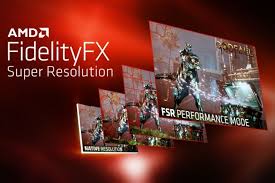
AMD FidelityFX Super Resolution—most folks just call it FSR—is an open-source upscaling tech that pushes frame rates higher by letting your games render at a lower resolution, then upscaling the image so it matches your display’s native resolution. Here’s the thing: FSR isn’t tied down to just one brand. It runs on tons of GPUs, whether you’re rocking AMD or Nvidia. The Arknights Endfield Update has made it clear—everyone wants smoother gameplay, and FSR makes that possible. Its biggest perk? There’s no hardware gatekeeping. If you’re gaming on a budget build or trying to squeeze more life out of older gear, FSR can make a huge difference.
Key Benefits of FSR for Gamers and Developers
FSR packs some strong upsides, especially if you’re chasing better frame rates without shelling out for new gear. First off, it’s platform-agnostic. You don’t need a fancy graphics card to get FSR working, and that’s a big deal in India, where everyone’s using something different. According to PC Gamer, FSR can deliver up to 2x performance boosts in games that support it.
Now, developers like FSR too. The SDK is simple to drop into games, so support spreads quickly across everything from massive blockbusters to indie favorites. Gamers love that FSR keeps frame rates up in demanding titles. Take the Arknights Endfield Update: flip on FSR, and mid-range PCs suddenly handle the game a lot smoother.
Since FSR is open-source, developers don’t have to mess with licensing, which keeps costs in check and adoption fast. Want to see how this stacks up to other improvements? Check out our BGMI Update April coverage—it shows just how important it is for optimizations to work everywhere.
Limitations and Trade-Offs to Consider
Don’t get the wrong idea—FSR isn’t magic. Sometimes, image quality dips, especially if you crank it up to “Performance” mode. That’s when you might spot shimmering or a bit of softness. Eurogamer points out that FSR doesn’t use AI-powered reconstruction like Nvidia’s DLSS, so you might see some artifacts, especially around small details or on-screen text. Even with the new Arknights Endfield Update graphics options, some scenes just won’t look as sharp as native rendering.
Here’s something else: results aren’t always the same everywhere. FSR works on most newer graphics cards, but the quality really depends on the game and how the developer set it up. Not all devs nail the implementation, and some older games might never get updated. While input lag is barely noticeable for competitive players, graphics purists could notice minor differences. Still, for a whole lot of gamers, a little less sharpness in exchange for better performance is a trade they’ll happily make.