NAM321/6 (50 ov)
 IRE
IRE GMB
GMB ZMB
ZMB NGA
NGA LES
LES CAG
CAG BOL
BOL COMO
COMO SAS
SAS FCA
FCA FCU
FCU KOE
KOE S04
S04 M05
M05 SVW
SVW RBL
RBL ELV
ELV MOZ19
MOZ19 UGA23/0 (0.5/20 ov, target 20)
 NZ180/5
 IND181/6 (19.5/20 ov, target 181)
 Ipswich1
 Nottm Forest1
 Alavés1
 Málaga1
 WA105/3 (18.5/50 ov, target 372)
 NSW371/8
 DEN
DEN KUW
KUW KENYA
KENYA QAT
QAT SWD-W
SWD-W EPR-W
EPR-W TTN-W
TTN-W WPR-W
WPR-W BOR
BOR WAR15/1 (2.5/20 ov)
 LIONS
LIONS Limpo21/1 (2.5/20 ov)
 NZ-A135/3 (41 ov)
 IND-A113
 DHA293/3 (84.1 ov)
 RAJ
RAJ MYMS
MYMS CHATT
CHATT RAN320/5 (80 ov)
 BAR
BAR MEX-W
MEX-W ARG-W
ARG-W UAE
UAE NED
NED PAK
PAK ENG
ENG IND-W
IND-W ZIM-W
ZIM-W AFG170/3 (34.3/50 ov, target 170)
 ZIM169
 SCP
SCP HSV
HSV ARS
ARS EVE
EVE Torino3
 Monza2
 Brest1
 Nice2
Nice2 Stuttgart2
 Gladbach3
 Al Ahli4
 Al Khaleej1
Most marketing teams do not have a creativity problem. They have a production problem.
A product launch needs social clips, sales visuals, landing page images, email graphics, internal enablement assets, paid ad variations, and probably three last-minute versions because someone changed the positioning. The work is not always glamorous, but it has to get done. And in a small team, the same two or three people usually carry most of it.
That is why AI video is becoming more interesting as a content operations tool. Not because every business suddenly needs cinematic AI clips. Many do not. The real value is that teams can prototype an idea, see it, revise it, and test it before spending the full production budget.
Microsoft’s 2026 Work Trend Index makes a useful point: as AI takes on more execution, people can spend more time directing outcomes. That is exactly how AI video should be used in marketing. The tool should not decide the strategy. It should make the first draft less painful.
For teams looking at revenue, content output, or campaign testing, APOB AI’s AI money generator can help frame the monetization side of the workflow, while the AI video generator handles the visual production layer.
The business case is iteration
The old way of producing campaign visuals often forces teams to choose a direction before they have seen enough options. AI changes that a bit. A team can create three rough directions, compare them, and only then decide what deserves polish.
HubSpot’s 2026 State of Marketing report says 80 percent of marketers use AI for content creation and 75 percent use it for media production. That does not mean all AI content is good. It means AI has already moved into the workflow, so the real question is whether teams are using it with discipline.
A simple content ops workflow
Imagine a B2B company launching a new service. The marketing team needs a LinkedIn video, a landing page visual, a short ad variation, and something the sales team can drop into a deck.
Instead of starting with a large production request, the team can run a small test.
Step 1: Define the job of the asset
Do not start with “we need AI content.” Start with the job:
We need a short visual concept that explains how our service saves time for small marketing teams.
That is more useful than asking for a generic business video. It gives the asset a purpose.
Step 2: Create a grounded visual prompt
Open APOB AI and start with a realistic business scene. In B2B content, boring is often better than overproduced. A clean desk, laptop, phone, storyboard cards, and people reviewing work can communicate the idea faster than a futuristic control room.
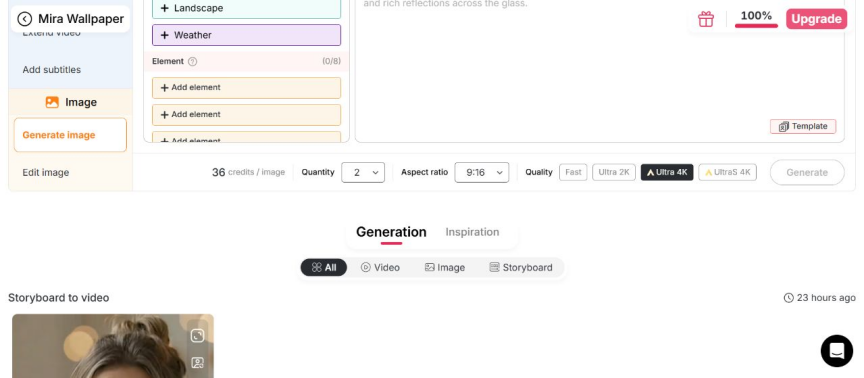
Screenshot: prompt and generation controls inside APOB AI.
Example prompt:
Realistic business marketing scene with a laptop, phone, storyboard cards, and a small team reviewing short video assets. Clean office lighting, professional tone, no text, no logos, no fake numbers.
The “no fake numbers” part is important. Business visuals with random dashboard text can look untrustworthy very quickly.
Step 3: Turn the best still into motion
Once the still image works, move to image-to-video. Keep the motion understated:
Slow camera push-in, slight movement on the desk, soft screen glow, realistic motion, professional marketing video style.

Screenshot: using a generated image as the base for video creation.
This kind of asset can support:
· A LinkedIn post
· A landing page hero
· A webinar teaser
· A sales deck
· A short paid social test
The goal is not to make the final campaign in one click. The goal is to make a version the team can react to.
Step 4: Review before anyone publishes
This is where human judgment matters. Before using the asset, check:
· Does the visual match the brand?
· Is the claim accurate?
· Is there any fake text or fake logo?
· Does the first frame make sense without sound?
· Can captions be added cleanly?
· Does the asset support a real CTA?

Screenshot: generated visual result preview for review before reuse.
The review step is what keeps AI content from feeling careless. It is also what makes the workflow easier to defend internally.
Step 5: Measure something simple
If a team wants to know whether AI-assisted content is useful, it should track a few basic things:
· Time from idea to first visual
· Number of usable variations
· Cost per asset
· Engagement rate
· Click-through rate
· Sales team usage
· Which idea gets reused
You do not need a complicated dashboard at first. A simple spreadsheet is enough to show whether the workflow is saving time or just creating more assets to manage.
A practical five-day test
Here is a small test that a lean team could run:
Day 1: Write three campaign angles.
Day 2: Generate still concepts for each one.
Day 3: Turn the strongest stills into short clips.
Day 4: Add captions, CTAs, and tracking links.
Day 5: Publish small tests and compare the results.
After that, the team can decide which concept deserves a designer, editor, or paid media budget.
The lesson for B2B teams
AI video is not automatically strategic. It becomes strategic when it shortens the distance between an idea and a measurable test.
The strongest teams will not be the ones generating the most content. They will be the ones using AI to learn faster, keep the brand intact, and spend human attention where it matters most: positioning, judgment, and the decision to publish or not.