
 SA329 (82.3 ov)
 AUS
AUS BAN9/0 (6.3 ov)
 WI
WI IND-W
IND-W ZIM-W
ZIM-W GOA
GOA SC Delhi
 Milan
Milan Bologna
 Parma
Parma Udinese
 Venezia
 Inter Milan
 Genoa
Genoa Juventus
 Monza
Monza Napoli
 UAE
UAE OMA
OMA ROMA4
ROMA4 CAG2
CAG2 TOR1
TOR1 COMO3
COMO3 SAS2
SAS2 LAZ6
LAZ6 AFG177
 ZIM140 (19.1/20 ov, target 178)
 AUCK
AUCK CANT
CANT CD
CD ND
ND SIKM184
 NAGA187 & 79/5 (50 ov)
 JHK131/4 (47 ov)
 DELHI515/5d
 ODSA194
 SVCS13/0 (5 ov)
 BRODA616
 J & K6/0 (4 ov)
 CHD685/5d
 HP49/0 (14 ov)
 CGR216/8 (95 ov)
 AP231
AP231 HYD193/2 (54 ov)
 PNJB431
 KNTKA297/7 (95 ov)
 TPURA194
 ENG
ENG SL
SL DEN
DEN QAT
QAT KENYA
KENYA KUW
KUW POA
POA SPR
SPR BRB
BRB VAG
VAG PAK110
 NAM316/7
 IRE253 (44.5/50 ov, target 317)
 NZ198/3
 IND199/4 (13.2/20 ov, target 199)
 NED371/5
 JAB113 (19.3/20 ov, target 133)
 KAY132/9
 Al Khaleej
 Al Hazem
 Gamba Osaka
 Buriram
 ABH0
ABH0 ALF1
ALF1 Sevilla2
 Osasuna0
 PSG2
PSG2 Lyon0
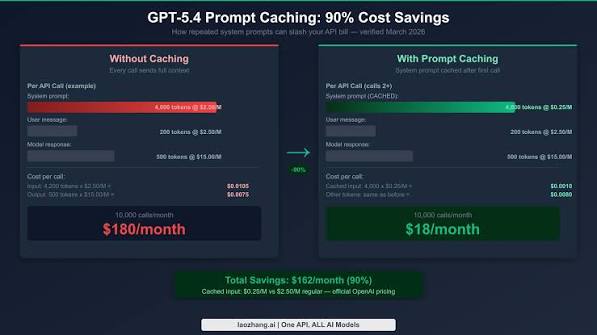
Lyon0OpenAI rolled out prompt caching for the ChatGPT API, and it’s available to API users starting October 2024. This new feature helps developers cut costs significantly when using the API, especially for longer prompts. In this article, we’ll dive into how to implement prompt caching effectively, what prerequisites you need, and the steps to optimize your API costs.
Chat GPT: Understanding Prompt Caching
Prompt caching serves as a handy tool that lets developers cache parts of prompts longer than 1,024 tokens. When using these cached segments, you’ll benefit from a discounted rate — specifically, 50% off the standard input token price.
Keep in mind that cached content must be a prefix of the prompt. This means only the beginning of your message qualifies for caching. On top of that, OpenAI’s caching system works automatically, so you don’t need to add any extra API parameters to turn it on. You can check cache hits by looking at the cached_tokens field within the usage object in the API response.
Step-by-Step Guide to Implementing Prompt Caching
- Set Up Your API Environment
Make sure your development environment is ready to use the ChatGPT API. You’ll need an API key from OpenAI, which you can get through your OpenAI dashboard.
- Understand Your Prompt Structure
To get the most out of cache hits, arrange your prompts with static system instructions first and dynamic user content last. This setup helps ensure that the static parts can be cached efficiently.
- Determine Which Prompts to Cache
Look for prompts that go beyond 1,024 tokens and are used often. Focusing on these can lead to significant savings through caching.
- Implement the Logic
Since caching happens automatically, your main focus should be on structuring your prompts correctly. Ensure the first part remains consistent across multiple requests. For instance:
“python“
prompt = "You are a helpful assistant. " + user_dynamic_input
- Test for Cache Hits
Once you’ve put your prompt structure in place, run tests to see if cache hits occur as expected. Check the cached_tokens field in the API response to confirm whether your static parts were successfully cached and billed at the discounted rate.
- Monitor and Optimize
Keep an eye on your API usage and costs regularly. If you find that certain prompts aren’t hitting the cache, take a moment to reevaluate their structure. Adjust your static and dynamic content placement as needed to improve caching efficiency.
- Review OpenAI Resources
Stay informed by checking OpenAI’s documentation and community forums for any updates or improvements to the caching system. This will help ensure you’re using the best practices available.
Conclusion
To wrap things up, implementing prompt caching in the ChatGPT API can lead to notable cost savings, particularly for apps that rely on longer prompts. By effectively structuring your prompts and keeping tabs on cache hits, developers can optimize their API costs without compromising service quality. For more detailed insights, be sure to visit the OpenAI Blog for the latest updates and guidance.
FAQs
How does prompt caching work in the ChatGPT API?
Prompt caching lets you reuse parts of prompts longer than 1,024 tokens at a discounted rate, offering cost savings.
Can I cache any part of my prompt?
No, only the prefix of the prompt can be cached. Make sure static instructions are at the beginning.
How can I verify if my prompt was cached?
You can check the cached_tokens field in the API response to confirm cache hits.
What’s the best way to structure my prompts for caching?
Arrange your prompts with static system instructions first, followed by dynamic user content to maximize cache hits.
prompt caching


