UDI0
UDI0 ROMA3
ROMA3 TOT0
TOT0 CRY0
CRY0 BET0
BET0 MCF0
MCF0 MUN0
MUN0 DOR0
DOR0 Fenerbahce1
 Goztepe0
 CLT1
CLT1 ORL0
ORL0 HIL
HIL FAT
FAT MIL
MIL INT
INT TRY
TRY MNS
MNS AVL
AVL FUL
FUL BAR
BAR ALA
ALA NZ
NZ IND
IND NAM
NAM IRE
IRE Como
Como Venezia
 RAY3
RAY3 CEL0
CEL0 BOU2
BOU2 LEE0
LEE0 BRE2
BRE2 NFO0
NFO0 COV3
COV3 SUN1
SUN1 JER
JER QAT
QAT KENYA
KENYA PNG
PNG WAR
WAR WPR118/7 (19/20 ov)
 TAS427
 NSW174/8 (60 ov)
 NZ-A
NZ-A IND-A291/7 (88 ov)
 QLD
QLD VIC282/9 (84 ov)
 DHA
DHA BAR
BAR SYL218
 CHATT64/1 (15 ov)
 MYMS
MYMS KHU280/8 (82 ov)
 RAN
RAN RAJ155/6 (59 ov)
 AFG
AFG ZIM
ZIM NED
NED OMA
OMA ST-W
ST-W BH-W
BH-W SS-W
SS-W HH-W
HH-W OTAGO
OTAGO CD
CD BRB
BRB MIS
MIS PAK331/7 (48.3/50 ov, target 326)
 SL325/8
 UAE266/5 (49/50 ov, target 264)
 PS-W138/1 (13.3 ov)
 MR-W136/6
 AS-W185/2
 MS-W164/7 (20 ov)
 MCF0
MCF0 DEP1
DEP1 LENS0
LENS0 F910
F910 MON1
MON1 LYON0
LYON0 STR0
STR0 HAC0
HAC0 TOU1
TOU1 SAI1
SAI1 STL0
STL0 KVK0
KVK0 Mumbai City
  SC Delhi
 Getafe
 Sevilla
 HUL2
HUL2 IPS2
IPS2 MNC0
MNC0 BHA1
BHA1
Most people end up with a collection. One tool that handles Instagram, another for Facebook, a website bookmarked for the odd link neither of them reads, and something else again when you want the audio instead of the video. Each one has its own quirks, its own ads, and its own way of failing.
An all-in-one downloader is supposed to end that. The fair question is whether breadth costs you anything — whether a tool covering fifty platforms handles each one as well as a specialist would. The six below are ranked on how much they actually cover and how well the coverage holds up, with Snaptube at the front.
1. Snaptube
Snaptube is an Android video and music downloader built to be the only one you need. You paste a link or search inside the app, it works out what you handed it, and you pick a resolution and format. The same flow covers a short clip, a full playlist, and an audio-only save.
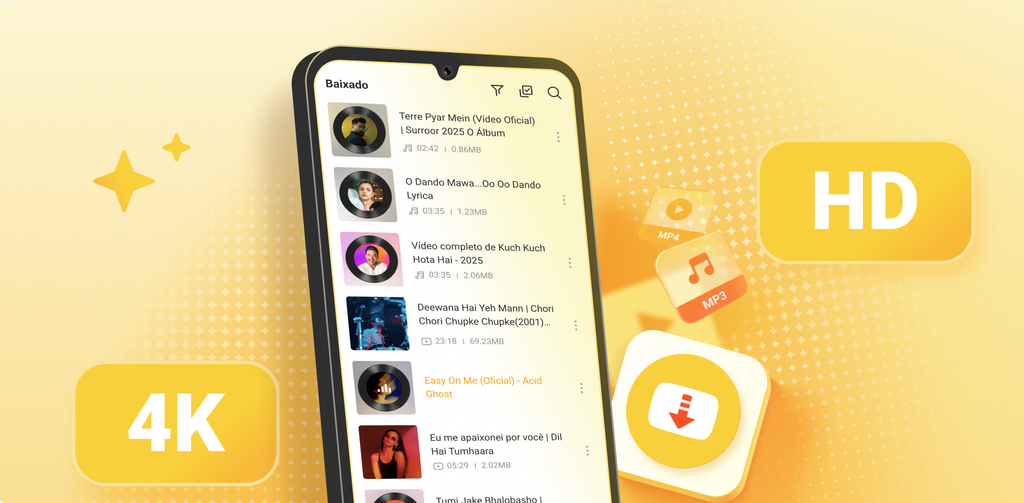
Key Features
- More than 100 supported platforms, plus general detection of video in web pages
- Video and music in one app: MP4, MP3, and M4A output
- Resolution from 144p to 8K, and audio from 70kbps to 320kbps
- Format memory, so the app stops asking once you have chosen
- Batch and full-playlist downloads, with background transfers, pause and resume
- Built-in player with picture-in-picture, plus a private vault for saved files
- Subtitle downloads, and subtitles convertible to lyrics for saved music
- Night mode and a storage cleanup tool
- Around 20MB installed, storage permission only, completely free
How to Use One App Instead of Five
- Install Snaptube from the official site or from your phone’s own store — Xiaomi GetApps, Huawei AppGallery, OPPO App Market, vivo V-Appstore, HONOR App Market, Samsung Galaxy Store, or Palm Store. It is not carried on Google Play.
- Paste any link, or use the search inside the app to find something by name rather than hunting for its page first.
- Pick the format and resolution once. Format memory applies your choice to everything after that, so switching between saving a video and pulling out the audio is a single tap rather than a trip through settings.
Why Snaptube Stands Out
The honest test of an all-in-one tool is whether the extras are real or just a longer feature list. Here the breadth shows up in three places that matter.
Content types, first. Most downloaders do video and treat audio as a conversion afterthought. Snaptube handles video, music, and playlists as first-class jobs, with its own music search across sources including Deezer, Tidal, Shazam, and Spotify content — so finding a track means typing its name, not locating the page it sits on.
Range, second. 144p to 8K is a genuine ladder in both directions: the bottom of it saves storage on a cheap phone, the top takes whatever a source actually holds. Audio spans 70kbps to 320kbps. A tool that only offers a cluster of options around 720p is making the choice for you.
Then the housekeeping. A built-in player means saved files do not need a second app. The private vault keeps things out of a shared gallery. The cleanup tool reclaims space after a binge. Subtitles come down with the video and can become lyrics for saved music. None of that is headline material, but it is the difference between one app replacing five and one app plus five workarounds. The Snaptube download application delivers all of it free, at around 20MB, asking only for storage permission.
2. VidMate
VidMate is the biggest all-rounder here by cumulative installs, with over half a billion. It claims support for 1000-plus sites — the company’s own figure rather than a verifiable list — and outputs MP4 and MP3 at up to 1080p, with background downloading and resume.
Its genuinely distinctive addition is over 200 built-in live TV channels, which no other tool on this list attempts. A 2026 update added AI-driven content recommendations, pushing it further toward being a discovery app that also downloads.
The cost of that breadth is the experience around it. Reviews consistently single out heavy advertising: launch screens, banners, and pop-ups placed around the download flow. It is not on Google Play, so you take the APK from vidmateapp.com and allow installs from unknown sources first. Security firm Upstream previously reported hidden background ad activity and collection of device identifiers including IMEI in VidMate builds, which is part of why it sits outside the store. Counterfeit APKs are widespread, so the official site is the only source worth using.
3. Videoder

Videoder had one of the strongest versatility stories in this category: a claimed 1000-plus sites, batch downloads across multiple links, multi-threaded acceleration, format conversion, a night mode, an internal browser, and support for regional streaming services that broader tools skipped. It supports 1080p and extracts audio as MP3, and it ran on Windows as well as Android.
The reason it sits third rather than higher is upkeep. Uptodown has marked the project as discontinued, with catalogued releases stopping in 2023, and newer builds only surface on third-party APK sites. For an all-in-one tool that matters more than for a specialist: the more platforms a downloader claims, the more parsers there are to fall out of date, and an unmaintained one degrades quietly rather than all at once. Modified and cracked builds circulate widely. If you try it, take it from videoder.net and treat it as a legacy option rather than the tool you build a habit around.
4. InsTube

InsTube covers over 100 sites and is one of the few tools here that treats music as a real second job rather than a checkbox. It outputs MP4, MP3, and M4A, supports 1080p, and includes a built-in music downloader you can search directly. No login is required at any point.
The app is small and the interface close to bare, which is a reasonable trade if you want breadth without a discovery feed attached. Video Lock, an encrypted space that hides downloaded files, is a useful extra on a shared phone. Install it from instube.com since it is not on Google Play, so the unknown-sources step applies. Advertising is the most frequent complaint in reviews, and some sources need a retry when a parse fails.
5. Hitube

Hitube approaches versatility from the other direction: instead of one app claiming everything, it gives you a web version and an Android APK, and you pick whichever fits the moment. The web version runs in any browser with nothing installed and covers Instagram, Facebook, TikTok, Twitter/X, and Pinterest, handling video, Stories, Reels, photos, and audio. Every content type has its own entry point rather than sharing one generic box.
Output spans MP4 in HD or SD, plus MP3, M4A, and JPG, so video, audio, and images all come from one place, and it supports 1080p. The APK from the official site extends coverage to what the developers say is 50-plus platforms and adds batch downloading, resume support, a built-in player, and a download manager. The developers describe the whole thing as HD quality, completely free, no ads, and no signup, with no cap on download count or file size. If you want app-like access without installing anything, the web version can be added to your home screen.
6. BitDownloader

BitDownloader is the generalist web tool of the group. One input field accepts links from a broad spread of platforms — Facebook, Instagram, TikTok, Twitter, Vimeo, Twitch, SoundCloud and more — with a dedicated page for each. It supports HD output up to 1080p, needs no registration, and sets no usage cap. A bookmarklet lets you fire off a download from whatever page you are already on, which is the fastest workflow here once set up.
Its breadth is real but shallow: platform-specific features like Stories, private videos, or photo albums are mostly absent, so it reads links rather than understanding each service. It is also a small operation, with traffic in the tens of thousands of visits a month, and reliability reports are mixed — several reviewers note the site is occasionally unreachable. Use bitdownloader.io specifically, since similarly named sites on other domains are unrelated products.
Does All-in-One Mean Worse at Everything?
Not necessarily, but the failure mode is worth knowing. Two things separate a tool that genuinely replaces several from one that merely lists a lot of logos:
- Whether each content type has its own handling. Stories, Reels, playlists, and audio behave differently from a plain video. A tool with one generic input box tends to manage plain videos and stumble on the rest.
- Whether the parsers are maintained. Every platform a downloader claims is a parser that breaks when that platform changes. A big claimed number with slow updates ages worse than a smaller list kept current — which is the practical reason a maintained tool with 100 well-handled platforms beats an unmaintained one claiming ten times as many.
Which One Should You Use?
Snaptube is the pick for replacing a collection of tools: the widest genuinely useful coverage, video and music both treated properly, the full resolution and bitrate ladder, playlists and batches, and the housekeeping features that stop you reaching for something else — free, at 20MB, one permission.
Hitube is the best option if you would rather not install anything, since the web version covers five social platforms with per-content-type entry points and the APK adds batching when you need it. VidMate makes sense if the live TV channels appeal and you accept the advertising and the sideloading. InsTube is a solid lighter alternative with real music support. BitDownloader is useful breadth-first for odd links, and Videoder is worth knowing about historically rather than depending on.
Read more: ‘North of North’ Season 2 Is Coming — New Faces, New First Looks!