SA329
SA329 AUS330/4 (90 ov)
 BAN253/6 (90 ov)
 WI
WI SJ2
SJ2 COL2
COL2 SEA0
SEA0 HOU1
HOU1 VAN4
VAN4 SD1
SD1 MR-W5/0 (2/20 ov)
 ST-W
ST-W UAE
UAE OMA
OMA ENG
ENG SL
SL AFG
AFG ZIM
ZIM Al Khaleej
 Al Hazem
 Frosinone
 Lecce
Lecce Al Nassr
 Al Kholood
 Al Riyadh
 Al Qadsiah
 Fiorentina
 Atalanta
 GEN2
GEN2 JUV0
JUV0 MON1
MON1 NAP4
NAP4 MIL2
MIL2 BOL4
BOL4 PAR0
PAR0 UDI0
UDI0 WELL
WELL OTAGO
OTAGO SIKM184 & 112/5 (43 ov, target 212)
 NAGA187 & 208
 JHK131/4 (47 ov)
 DELHI515/5d
 ODSA194
 SVCS13/0 (5 ov)
 BRODA616
 J & K303 & 8/1 (6 ov) (f/o)
 CHD685/5d
 HP340/3 (104 ov)
 CGR216/8 (95 ov)
 AP231
AP231 HYD380
 PNJB431 & 57/0 (24 ov)
 KNTKA490/9d
 TPURA194 & 98/3 (38 ov)
 NZ
NZ IND
IND NAM
NAM IRE
IRE MS-W
MS-W HH-W
HH-W BH-W
BH-W SS-W
SS-W JAB
JAB KAG
KAG IND-W133/2 (17/50 ov, target 132)
 ZIM-W131
 MIS153/5
 TOK111 (19.3/20 ov, target 154)
 LIONS204/1 (18/20 ov, target 199)
 EASTN198/6
 BRB81 (12.1/20 ov, target 178)
 VAG177/7
 POA145/7
 SPR148/4 (16.5/20 ov, target 146)
 DEN120
 QAT68 (16.2/50 ov, target 121)
 Abha
Abha Al Ittihad
 NorthEast
 Bengaluru
 Al Diriyah
 Neom SC
 VEN0
VEN0 INT2
INT2 FC Goa1
 SCD1
SCD1
If your team stores CSVs, PDFs, or reports in Google Drive, you’re sitting on data that could be flowing automatically into your warehouse. Here’s how to make that happen.
The Airbyte Google Drive source connector pulls data from a single folder in Google Drive — with subfolders recursively included in the sync, meaning every file inside nested folders gets picked up automatically. airbyte It’s a simple but powerful way to automate data pipelines from your cloud storage.
Google Connector Overview
| Detail | Info |
|---|---|
| 🔌 Connector | Google Drive Source |
| 📦 Current Version | 0.5.10 |
| 🔐 Auth Methods | OAuth (Cloud) / Service Account Key (Open Source) |
| 📁 File Formats | CSV, JSON, Parquet, Avro, PDF, Docx, TXT |
| 🔄 Sync Modes | Full Refresh & Incremental |
| 🌍 Availability | Cloud, Self-Managed, Enterprise |
Setting It Up — Easier Than You Think
For Airbyte Cloud users, OAuth is highly recommended as it significantly simplifies the setup and lets you authenticate directly from the Airbyte UI. For Airbyte Open Source users, Service Account Key Authentication is the recommended approach.
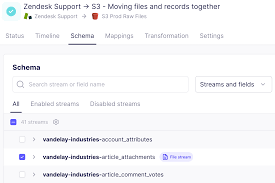
Cloud setup in 3 steps:
- Log in to Airbyte Cloud → Sources → New Source → select Google Drive
- Authenticate via Google OAuth
- Paste your Google Drive Folder URL and hit Set up source
For Open Source, you’ll need to create a GCP Service Account, generate a JSON key, and enable the Google Drive API in your project first.
What File Formats Are Supported?
An experimental Document file type format allows you to extract text from Markdown, TXT, PDF, Word, PowerPoint, and Google documents — outputting it as a single field named content. This is a game-changer for teams dealing with unstructured content.
Standard structured formats like CSV, Parquet, Avro, and JSONL are also fully supported with customizable parsing options.
Smart Path Patterns = Powerful Syncing
One underrated feature is glob-style path patterns. Instead of syncing everything, you can target exactly what you need — for example **/*.csv to only pull CSV files, or myFolder/**/*.csv for folder-specific syncs. This saves processing time and avoids format conflicts.
Learn more about how Extract, Transform, Load (ETL) pipelines work on Wikipedia to better understand where this connector fits in your data stack.
For more data integration tips and tech guides, check out TechnoSports. You can also explore our coverage on data automation tools at TechnoSports to stay ahead of the curve.