Imagine having a capable AI assistant that understands text, images, and audio — and it runs entirely on your laptop, no cloud required. Google just made that a reality.
On June 3, 2026, Google DeepMind officially introduced Gemma 4 12B, its most capable mid-sized open model yet. The launch marks a significant shift in how everyday developers and power users can interact with advanced AI — locally, privately, and without a hefty GPU.
Table of Contents
What Is Google Gemma 4 12B?
Gemma 4 12B sits in a sweet spot within Google’s open model lineup — more capable than the lightweight E4B but leaner than the 26B Mixture of Experts model. It’s the first mid-sized Gemma model to natively process text, images, and audio in a single unified architecture.
The entire Gemma 4 family has now crossed 150 million downloads, with developers having built everything from wearable robotic arms to enterprise-grade AI security tools. That’s a staggering vote of confidence from the global developer community.
If you’ve been following the evolution of on-device AI, also check out our coverage on how Google Pixel is pushing AI boundaries on-device.
Gemma 4 12B: Key Specs at a Glance
| Feature | Details |
|---|---|
| Model Size | 12 Billion Parameters |
| Minimum VRAM / RAM | 16GB (laptop-ready) |
| Multimodal Inputs | Text, Images, Audio |
| Architecture | Encoder-free, Unified Transformer |
| License | Apache 2.0 (Open Source) |
| MTP Drafters | Yes (reduces output latency) |
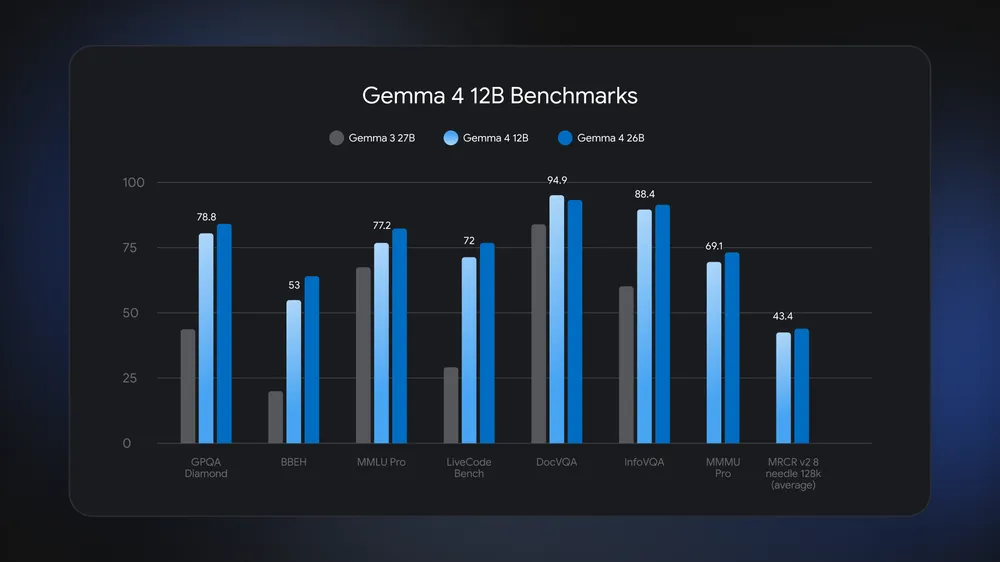
| Benchmark Performance | Nears the 26B MoE model |
The Real Innovation: No Encoders
Here’s what makes Gemma 4 12B genuinely different from older multimodal models. Traditional systems use separate encoders to “translate” images or audio before feeding them to the language model — adding latency and eating memory.
Google stripped that away entirely:
- Vision: A lightweight single-matrix embedding module replaces the vision encoder, letting the LLM backbone handle visual processing directly.
- Audio: Raw audio signals are projected straight into the same dimensional space as text tokens — no encoder at all.
The result? A leaner, faster model that still punches well above its weight class on standard benchmarks.
Can It Really Run on a Laptop?
Yes — and that’s the headline here. With just 16GB of VRAM or unified memory (think Apple M-series MacBooks or a mid-range gaming laptop), you can run a state-of-the-art multimodal AI model locally. No API keys. No cloud bills. No data leaving your device.
For developers building agentic workflows or privacy-conscious applications, this is a game changer. Google has also released an official Skills Repository on GitHub — a curated library of skills specifically designed to help agents build with Gemma models.
Want to understand how AI chips are reshaping what’s possible on consumer devices? Read our deep-dive on AI chip advancements in 2025 and beyond.
How to Get Started with Gemma 4 12B
Google has made the model accessible across the entire developer ecosystem:
- Try immediately via LM Studio or Ollama — just a few clicks
- Download weights from Hugging Face or Kaggle
- Deploy at scale through Google Cloud’s Model Garden or Cloud Run
- Fine-tune using Unsloth for efficiency
Full developer documentation is available at ai.google.dev/gemma/docs/core.
Why This Matters for the Everyday User
Most AI coverage focuses on the biggest, most expensive models. Gemma 4 12B flips that script. It’s not just for researchers — it’s for the developer building a personal assistant, the student automating study notes, or the startup that can’t afford to send every query to a cloud API.
Open-source, locally runnable, multimodal AI with near-flagship performance is no longer a future promise. It’s here, today.
For more on how AI is reshaping the tech landscape, explore our AI & Technology section on TechnoSports.
Source: Google DeepMind Blog | Authors: Olivier Lacombe & Gus Martins, Google DeepMind