NZ180/5 (20 ov)
 IND
IND NAM95/2 (21.1/50 ov)
 IRE
IRE MOZ
MOZ UGA
UGA AVL
AVL MNC
MNC RAY
RAY ELC
ELC GMB
GMB ZMB
ZMB NGA
NGA LES
LES CAG
CAG BOL
BOL COMO
COMO SAS
SAS FCA
FCA FCU
FCU Ipswich1
 Nottm Forest1
 Alavés1
 Málaga1
 Torino3
 Monza2
 Brest1
 Nice2
Nice2 WA
WA NSW290/5 (42.4/50 ov)
 DEN
DEN KUW
KUW KENYA
KENYA QAT
QAT SWD-W
SWD-W EPR-W
EPR-W TTN-W
TTN-W WPR-W
WPR-W NZ-A135/3 (41 ov)
 IND-A113
 DHA
DHA RAJ
RAJ MYMS
MYMS CHATT
CHATT RAN
RAN BAR
BAR SYL
SYL KHU
KHU MEX-W
MEX-W ARG-W
ARG-W UAE
UAE NED
NED PAK
PAK ENG
ENG IND-W
IND-W ZIM-W
ZIM-W AFG170/3 (34.3/50 ov, target 170)
 ZIM169
 TAS137 (25.2/35 ov, target 276)
 VIC304/7 (50 ov)
 CHE0
CHE0 DYI0
DYI0 CHO1
CHO1 QIN0
QIN0 HEN1
HEN1 BEI0
BEI0 LIA1
LIA1 ZHE0
ZHE0 QWC1
QWC1 YUN0
YUN0 SHX0
SHX0 Shanghai Shenh0
 TIG0
TIG0 SHP0
SHP0 WTT1
WTT1 SHT3
SHT3 KOE
KOE S04
S04 M05
M05 SVW
SVW RBL
RBL ELV
ELV Stuttgart2
 Gladbach3
 Al Ahli4
 Al Khaleej1
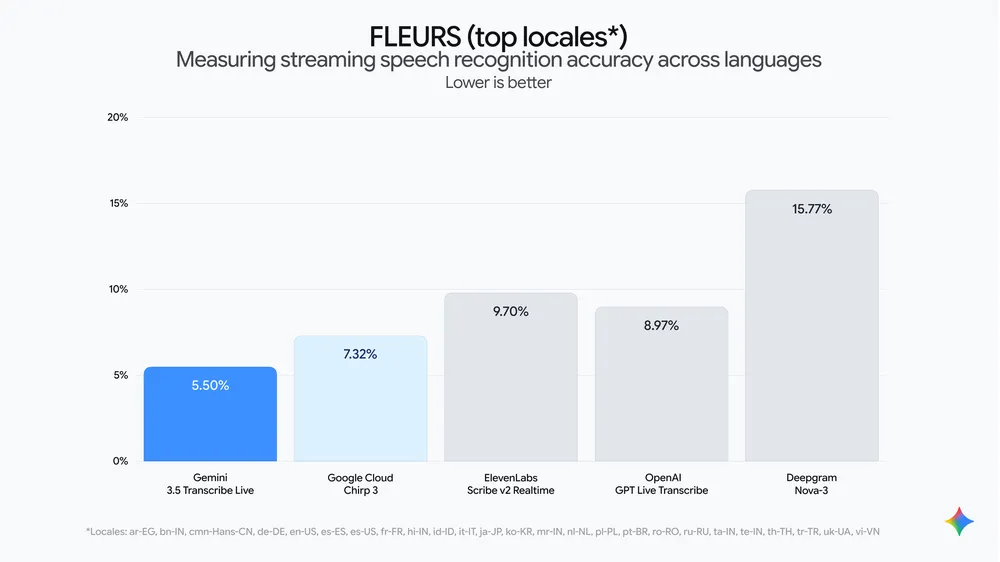
Gemini 3.5 Transcribe Launch: Speech-to-text has quietly been one of AI’s toughest problems — background noise, self-corrections, filler words, and jargon have tripped up even solid transcription models for years. Google’s new Gemini 3.5 Transcribe is built specifically to fix that, converting raw audio directly into clean, formatted text without the usual mess.
What Makes It Different
Unlike conventional speech recognition that transcribes literally — “ums,” stutters, and self-corrections included — Gemini 3.5 Transcribe understands intent. If you say “let’s meet Tuesday — no, Wednesday,” it captures the correction, not the mistake. It also strips filler words and auto-formats output, aiming for text you could paste straight into a document. For more on how Google’s AI models are evolving, check our AI and technology coverage.
Key Capabilities
| Feature | Detail |
|---|---|
| Language support | Auto-detects 85+ languages, including regional accents |
| Speaker identification | Up to 3 speakers with timestamps (3+ experimental) |
| Custom vocabulary | Adapts to specialized jargon and unique spellings |
| Function calling | Delegates tasks (image generation, file analysis) to other Gemini models |
| Streaming Word Error Rate | 4.0% (per Artificial Analysis) |
| Non-streaming Word Error Rate | 2.6% (per Artificial Analysis) |
| Speed improvement vs Chirp 3 | 70% faster time-to-final-transcription |
Two APIs for Two Different Use Cases
Developers get access through two distinct endpoints depending on the job. Real-time streaming (gemini-3.5-transcribe-live) delivers sub-second latency for interactive voice apps via the Live API — ideal for voice agents or live captioning. Pre-recorded processing (gemini-3.5-transcribe) handles recorded meetings and call logs via the Interactions API, complete with speaker attribution and word-level timestamps. Full technical documentation is available on Google’s Gemini API developer page.
Where You Can Already Use It
Gemini 3.5 Transcribe isn’t limited to developers — it’s already live across several consumer surfaces:
- Rambler on Android (via Gboard) — turns spoken thoughts into formatted text and lets you edit or restyle by voice
- Gemini app on macOS — pairs transcription with screen context to summarize files, repurpose text, or generate images hands-free
- Google Antigravity — uses screen and chat context for precise transcription across file names and active documents
- Google AI Studio — lets you vibe-code apps using just your voice
- Chrome (coming soon) — talk-to-type support in any web field
Real-World Adoption Already Underway
Third-party platforms including Agora, Fishjam, LangChain, LiveKit, Pipecat, Vercel, and Vision Agents have already integrated the model via the Gemini Live API, managing the underlying real-time streaming infrastructure so developers can focus purely on the user experience. Companies like vivo, Intellitek Health, and Lingopal have reportedly given positive early feedback on the model’s latency, accuracy, and language coverage.
Availability
Gemini 3.5 Transcribe is now available in public preview via Google AI Studio and Gemini Enterprise Agent Platform for developers, with enterprise access rolling out through Gemini Enterprise for Customer Experience soon. Consumer access is live today in the Gemini app on macOS (English) and Rambler on Android in select countries and languages, with Chrome support arriving later.
Keep following our AI tools coverage section as more Gemini 3.5 Transcribe integrations roll out across Google’s ecosystem.