

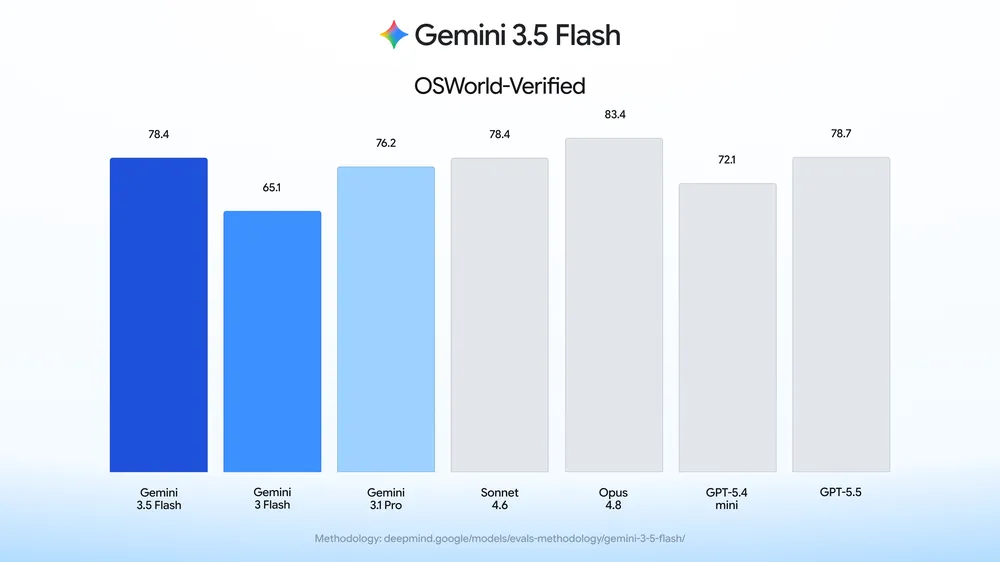
Google just made it significantly easier to build AI agents that can actually operate your screen. Computer use — previously a separate, standalone model — is now built directly into Gemini 3.5 Flash, and it’s Google’s best-performing version of the capability yet.

What’s Actually New
According to Google’s official announcement, computer use was previously only available as a standalone Gemini 2.5 computer use model. It’s now natively integrated into the main Gemini 3.5 Flash model, meaning developers no longer need to juggle a separate model just to give their AI agent the ability to interact with screens.
| Detail | Information |
|---|---|
| Feature | Native computer use tool |
| Model | Gemini 3.5 Flash |
| Previous version | Standalone Gemini 2.5 computer use model |
| Capabilities | See, reason, and act across browser, mobile, and desktop |
| Access points | Gemini API, Gemini Enterprise Agent Platform |
| Use cases | Software testing, enterprise automation, knowledge work |
In simple terms, this lets an AI agent visually understand a screen, decide what action to take, and then click, type, or navigate — much like a human would — across web browsers, mobile apps, and desktop software.
Why This Matters for Developers
Gemini already handled function calling and built-in tools like Search and Maps grounding well. Adding native computer use means developers can now build agents capable of handling long, multi-step tasks — think continuous software testing pipelines or repetitive knowledge-work tasks — without stitching together multiple models.
Early enterprise partners are already reporting real value. Companies like Browserbase, Browser Use, and UiPath have given positive feedback on how the integrated model performs in live automation workflows, according to testimonials shared in Google’s announcement.
Built-In Safety Measures
Google was upfront that giving AI agents control over screens introduces real risks, particularly around prompt injection. To address this, the Gemini API documentation outlines that Gemini 3.5 Flash uses targeted adversarial training specifically for computer use scenarios.
Two optional enterprise safeguards are also rolling out:
| Safeguard | What It Does |
|---|---|
| Explicit confirmation | Requires user approval before sensitive or irreversible actions |
| Auto-stop on injection | Halts tasks automatically if indirect prompt injection is detected |
Google recommends developers pair these with secure sandboxing, human-in-the-loop verification, and strict access controls — a “defense-in-depth” approach rather than relying on any single safeguard.
How to Try It
Developers can test the feature right now through a demo environment hosted by Browserbase, or dive into Google’s reference implementation on GitHub to start building. Access is available via both the Gemini API and the Gemini Enterprise Agent Platform.
For more AI and software updates, check out our AI and tech news section on TechnoSports.
The Bottom Line
Bringing computer use natively into Gemini 3.5 Flash removes a major friction point for developers building agentic tools — no more switching between models for visual screen interaction. With safety guardrails built in from day one, Google is clearly positioning this as enterprise-ready rather than just an experimental feature.


