ATL1
ATL1 CHI0
CHI0 DC0
DC0 CIN0
CIN0 ORL0
ORL0 NYC0
NYC0 PHI0
PHI0 NE0
NE0 Santos0
 Bahia1
 UAE
UAE NED
NED PAK
PAK ENG
ENG IND-W
IND-W ZIM-W
ZIM-W GMB
GMB LES
LES MOZ
MOZ ZMB
ZMB Inter Milan
 Fiorentina
 Churchill
 Punjab FC
 NGA
NGA UGA
UGA MEX-W23 (9.3/20 ov, target 189)
 ARG-W188/5
 ATM1
ATM1 DEP0
DEP0 LAZ2
LAZ2 PAR1
PAR1 RCL2
RCL2 PAR1
PAR1 NZ-A304/9 (88 ov)
 IND-A113
 SYL
SYL KHU
KHU MYMS299/4 (87 ov)
 CHATT
CHATT DHA293/3 (84.1 ov)
 RAJ
RAJ RAN320/5 (80 ov)
 BAR
BAR DEN
DEN PNG
PNG NAM321/6
 IRE290 (47.3/50 ov, target 322)
 WEL0
WEL0 MBV1
MBV1 Athletic
 Getafe
 C Palace
 Newcastle
 Hull
Hull Brentford
 Liverpool
 Brighton
 Man United
 Bournemouth
 Atalanta
 Frosinone
 RIY2
RIY2 TAA1
TAA1 CHE0
CHE0 TOT2
TOT2 VAL1
VAL1 VIL2
VIL2
Galaxy Z Fold 6 owners have something to cheer about: tap-to-pay transactions just got a lot faster and way more secure, all thanks to Samsung’s improved NFC technology. Let’s break down how the Galaxy Z Fold 6 makes tap-to-pay so smooth, how it beats out other phones, and what steps you should take to pay securely. You’ll also find some quick fixes for common problems. Want more details on Samsung’s latest tech? Check out our GPT-6: Samsung Galaxy analysis.
How Galaxy Z Fold 6 NFC Powers Seamless Tap-to-Pay Transactions
NFC, or Near Field Communication, isn’t just another feature—it’s the magic behind speedy mobile payments. Here’s the thing: NFC lets two devices swap encrypted data just by touching, so payments only happen when you mean it. With the Fold 6, Samsung’s upgraded NFC antenna covers more of the huge foldable screen, so you won’t be awkwardly searching for the perfect place to tap at checkout.
Getting started couldn’t be easier. Just open your payment app (Samsung Wallet, Google Pay, or whatever you like), add your cards, and turn on NFC in the settings. One UI overlays Samsung’s own security platform on the Fold 6, and it tokenizes your card info automatically. Merchants never get your real card number. And yes, this process meets EMVCo standards—that’s the global gold standard for payment safety.
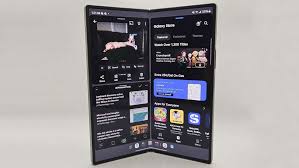
The Fold 6 really shines because it handles multiple payment methods (credit, debit, UPI, transit) with just one tap. That’s thanks to software updates rolled out in late 2025. Android Authority points out that the Fold 6’s NFC module is as reliable as many dedicated POS terminals. Sounds wild, but transactions are honestly that smooth. If you travel, you’ll be glad to know the Fold 6 works with nearly all international NFC payment networks, and it can switch modes to match the region—so you’ll almost never run into compatibility hiccups.
Galaxy Z Fold 6 vs Other Flagships: 3 Key Mobile Payment and Security Differences
By 2026, every top-tier phone has NFC, but Samsung isn’t just keeping up—it’s pulling ahead on security and convenience. Sure, the Samsung Galaxy S26 and Pixel 9 Pro offer strong tap-to-pay, but the Fold 6 goes further with dual-layer biometric authentication—you can use both face and fingerprint for extra security. Most phones make you pick one. Fold 6 lets you use both together.
When it comes to protecting your data, Samsung uses Knox Vault to store payment info in a totally separate, secure chip. Most Android phones don’t go that far; XDA Developers backs this up. Apple’s iPhone 17 Pro has Secure Enclave, but here’s what matters: so far, the Fold 6’s track record for real-world breaches is just as spotless as Apple’s.