NZ113/3 (14.4 ov)
 IND
IND NAM321/6
 IRE208/5 (37.3/50 ov, target 322)
 MEX-W
MEX-W ARG-W
ARG-W ARS
ARS EVE
EVE COV
COV FUL
FUL OFC
OFC NEU
NEU NEOM
NEOM ABH
ABH RAC
RAC ESP
ESP KHO
KHO ETT
ETT NAP
NAP ROMA
ROMA MOZ19
MOZ19 UGA23/0 (0.5/20 ov, target 20)
 Ipswich1
 Nottm Forest1
 Alavés1
 Málaga1
 Torino3
 Monza2
 KENYA
KENYA QAT
QAT SWD-W
SWD-W EPR-W
EPR-W TTN-W
TTN-W WPR-W
WPR-W BOR135/3 (18/20 ov, target 137)
 WAR136/8
 NZ-A135/3 (41 ov)
 IND-A113
 DHA293/3 (84.1 ov)
 RAJ
RAJ MYMS299/4 (87 ov)
 CHATT
CHATT RAN320/5 (80 ov)
 BAR
BAR SYL
SYL KHU
KHU UAE
UAE NED
NED PAK
PAK ENG
ENG IND-W
IND-W ZIM-W
ZIM-W GMB
GMB LES
LES ZMB
ZMB NGA
NGA AFG170/3 (34.3/50 ov, target 170)
 ZIM169
 CHE
CHE TOT
TOT Brest1
 Nice2
Nice2 Stuttgart2
 Gladbach3
 Al Ahli4
 Al Khaleej1
When Valve Corporation revealed the Steam Deck Features on July 15, 2021, many skeptics wondered if a Linux-based handheld could really hold its own against established console titans. However, everything changed when the device officially launched and started shipping to customers on February 25, 2022, bringing PC gaming into living rooms and airport terminals.
Early adopters encountered a tiered storage lineup: the base model kicked off with 64 GB of eMMC storage, while the higher-tier versions offered 256 GB and 512 GB NVMe SSD options. To truly master this versatile hardware, it’s important to look beyond the default settings and dive into advanced software integration. Here are five essential features every mobile gamer should master to enhance their portable gaming experience.
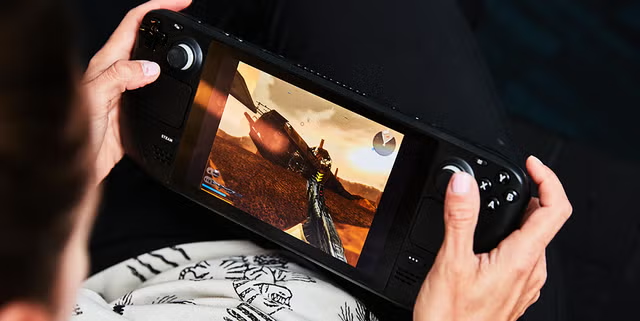
Steam Deck Features: Key Features of the Steam Deck
Hardware capability is crucial to the mobile PC gaming experience. The original Steam Deck comes equipped with a custom AMD Accelerated Processing Unit (APU) utilizing Zen 2 architecture for the CPU and RDNA 2 architecture for the GPU. Alongside this powerful chip, it boasts 16 GB of LPDDR5 RAM, which ensures smooth multitasking even on demanding game engines. You’ll view games on a 7-inch IPS LCD display with a resolution of 1280 x 800 and a 60 Hz refresh rate. Valve expanded the hardware lineup with the Steam Deck OLED, officially launched on November 16, 2023. This version features a 7.4-inch HDR OLED display and a 90 Hz refresh rate. Knowing these specifications can help players optimize the official hardware capabilities for smoother frame rates.
| Hardware Model | Display Specification | Processor Architecture | Memory Configuration |
|---|---|---|---|
| Original Steam Deck | 7-inch IPS LCD (1280×800, 60 Hz) | AMD Zen 2 CPU / RDNA 2 GPU | 16 GB LPDDR5 RAM |
| Steam Deck OLED | 7.4-inch HDR OLED (1280×800, 90 Hz) | AMD Zen 2 CPU / RDNA 2 GPU | 16 GB LPDDR5 RAM |
Mastering Gameplay on the Steam Deck Features
Customizable Controls for Enhanced Gameplay
With advanced touchpads and rear grip buttons, this console stands out from traditional controllers. Players can map complex keyboard macros, mouse movements, and gyro aiming to these physical inputs using Steam Input. This level of customization makes strategy games and shooters far more enjoyable as handheld experiences.
Steam Library Integration for Seamless Access
Thanks to cloud saves and Proton compatibility, you can easily transition between your desktop rig and handheld device. Users can pick up a campaign on Windows and instantly continue on SteamOS without needing to manually transfer files. This kind of synchronization removes any hassle when switching between gaming setups.
Performance Optimization Settings for Better Battery Life
By toggling built-in frame rate limiters and thermal TDP caps, you can significantly extend your mobile play sessions. Lowering refresh rates to 40 Hz or locking games at 30 frames per second helps preserve battery life, especially on long flights. Smart power management keeps your hardware running smoothly without being plugged in.
Portable Design for Easy Transport
Ergonomic grips and balanced weight distribution help reduce hand fatigue during long gaming sessions on the couch or while traveling. The protective carrying cases included with higher storage tiers ensure your device stays safe inside bags or luggage. This thoughtful design makes mobile PC gaming truly practical.
Looking ahead, future firmware updates will likely bring even deeper AI-driven upscaling features and enhanced power profiles, making the line between desktop performance and mobile convenience even blurrier. Valve is dedicated to refining SteamOS, so both early adopters and new owners will enjoy ongoing improvements. By mastering these five key features today, players can get ready for the next wave of portable computing.
Related Articles
FAQs: Steam Deck Features
What games are best suited for the Steam Deck?
Games with native controller support and optimized text scaling perform exceptionally well. Independent platformers, tactical RPGs, and verified blockbuster titles shine on the 800p screen.
How does the Steam Deck compare to other handheld consoles?
Unlike closed ecosystems, the open Linux foundation lets users install alternative storefronts and emulators. This flexibility gives it a big advantage over locked mobile platforms.
Can I use external accessories with the Steam Deck?
USB-C hubs unlock full desktop capabilities by connecting external monitors, mechanical keyboards, and wired mice. You can easily turn your handheld into a fully functional desktop workstation.
What are the best settings for battery longevity?
Setting the frame rate cap to 40 FPS, lowering the screen brightness, and reducing the TDP limit in the quick-access menu will maximize your runtime. These adjustments help cut down on power use during demanding 3D gaming sessions. Stay tuned for more updates on Steam Deck features.