NAM316/7
 IRE229/6 (40/50 ov, target 317)
 SA243/6 (60.2 ov)
 AUS
AUS ABH0
ABH0 ALF1
ALF1 AFG
AFG ZIM
ZIM SAS
SAS LAZ
LAZ ROMA
ROMA CAG
CAG TOR
TOR COMO
COMO BAN
BAN WI
WI IND-W
IND-W ZIM-W
ZIM-W GOA
GOA SC Delhi
 Milan
Milan Bologna
 PAK110
 SL114/2 (18.1/50 ov, target 111)
 NZ198/3
 IND199/4 (13.2/20 ov, target 199)
 NED371/5
 OMA265 (49.3/50 ov, target 372)
 Sevilla2
 Osasuna0
 JER
JER KUW
KUW PNG
PNG QAT
QAT JAB64/5 (10.3/20 ov, target 133)
 KAY132/9
 SIKM184
 NAGA187 & 46/4 (34 ov)
 JHK131/4 (47 ov)
 DELHI515/5d
 ODSA194
 SVCS13/0 (5 ov)
 BRODA616
 J & K6/0 (4 ov)
 CHD685/5d
 HP49/0 (14 ov)
 CGR216/8 (95 ov)
 AP231
AP231 HYD193/2 (54 ov)
 PNJB431
 AUCK
AUCK CANT
CANT CD
CD ND
ND DEN
DEN KENYA
KENYA POA
POA SPR
SPR BIK149 (19.3/20 ov, target 158)
 CHR157/3
 BRB149/5 (16.2/20 ov, target 148)
 MIS147
 MOW107/9
 TOK111/5 (18.4/20 ov, target 108)
 Parma
Parma Udinese
 Venezia
 Inter Milan
 Genoa
Genoa Juventus
 PSG2
PSG2 Lyon0
Lyon0 Mohun Bagan1
 Chennaiyin0
 BEI2
BEI2 JHM2
JHM2 RCH0
RCH0 KRE0
KRE0 DHC0
DHC0 VIS1
VIS1
Have you perceived a difference between an ordinary picture versus an HD (high-definition) picture on a screen? As AI, screens, and cameras continuously evolve, so does the battle between 4k and 8k vs one another.
Unlike the good ole days, resolution now dominates the way we communicate, be it on social media or even design images. But does higher mean better or is there a blurred line?
In this article, we’ll update you on some differences between 4K and 8K images and effortlessly advise you on image formats to choose for your completing design project. We’ll also assist you in enlarging your images with the aid of AI image enlargers— and show you how a modern AI image enhancer can take a 4K photo and lift it to a cleaner, sharper 8K result without the artifacts older upscalers used to leave behind.
What Are 4K and 8K Images
When you show up with 4K and 8K cameras, you are quite pixel savvy. More pixels, as every photographer will always remind you, yield more detail, sharper outlines, and as you would guess, more clarity when viewed on bigger surfaces.
An image captured in standard 4K contains a pixel count of 3840 pixels in width and 2160 pixels in height, a little more than a whopping eight million pixels. This resolution equals what is now considered ultra HD. At this period, a 4K resolution became standard across TVs, cameras, and streaming services.
8K resolution surpasses this by a wide margin, displaying 7680 pixels on width, 4320 pixels on height, and over 33 million pixels, more than quadrupling pixels count compared to 4K. This jump in pixels allows 8K to display inordinate amounts of detail even at close proximity and in huge viewports.
Level-of-detail is the most discussed and most important factor of image realism as it is the dimensionality in an image. The higher the level of detail, the closer the photographic representation to graphical representation is.
This is also why pixel count alone isn’t the whole story. A 4K file with soft edges can still look weaker than a well-processed lower-resolution photo, which is why many creators use AI tools to sharpen image files before — or instead of — upscaling them. Sharpness recovers the perceived clarity that compression and resizing tend to bleed out, and it often does more visible work than raw pixel count by itself.
Key Differences Between 8K and 4K Images
| Feature | 4K Images | 8K Images |
|---|---|---|
| Resolution | 3840 × 2160 pixels | 7680 × 4320 pixels |
| Total Pixels | ~8.3 million | ~33.2 million (4× more than 4K) |
| Image Detail | Very sharp and clear | Extremely detailed and ultra-crisp |
| File Size | Moderate | Very large |
| Performance | Easier to edit and load | Requires more processing power |
| Common Usage | TVs, websites, social media | Professional work, large displays |
| Editing Flexibility | Limited cropping/zooming | High flexibility without quality loss |
| Availability | Widely supported | Still emerging |
Do You Really Need 8K Images?
If you already have 4K images, great, but if you want to take your images even higher, then 8K is definitely the way to go for better images when in production.
How will you use those images? In particular, if you are presenting a high-class portfolio, client work, e-commerce, or other large visual displays, higher-quality images will work better. The 8K images in your content help it appear crisp, professional and forward-looking. So, if you are going to put something in there, that is yet another reason to use them.
It’s clearly easier for creators, designers and marketers to have licensing images of various types, and higher-quality images leave them able to do various things with the extra quality, be it cropping it down or repurposing the extra quality for other projects, considering the extra quality is of 8K and not 4K.
No one is blind to the other benefits: 8K could do things to an image that other graphics formats just cannot. And improving the quality your brand is represented with is one of those things.
So, while 4K is strong, 8K is not a 4K upgrade. Instead, it’s a better image.
How to Upgrade Your Images from 4K to 8K?
Taking image quality a step up doesn’t require complex tools or training anymore. Instead, everything is simplified with Artguru’s AI image upscaler.
Artguru gives users access to various other AI tools, among them a photo enhancer for up to 4K quality and an image upscaler for artifact- and blur-free upscaling to 8K.
Artguru’s image upscaler is unique in that it does the following in four simple steps:
Step 1: Upload Your Image
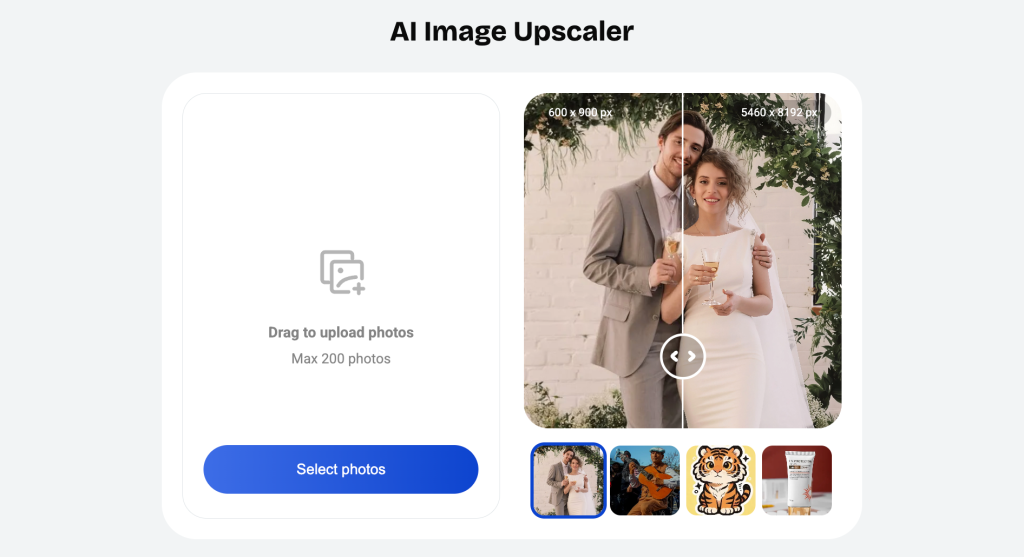
First go to the Artguru image upscaler and press the ‘Upload’ button to upload a 4K image. It supports all common image file types including PNG, JPG, and WebP.
Step 2: Choose the Resolution
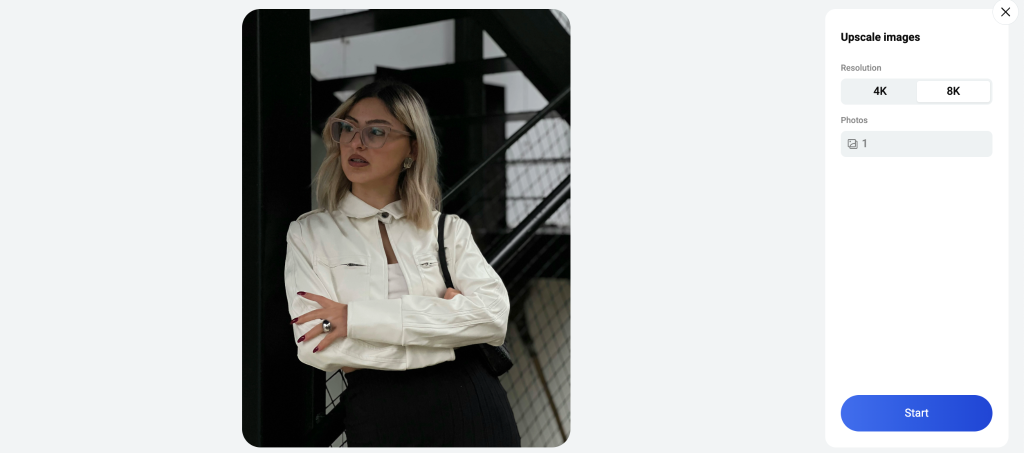
Go for the 8K upscaling. Depending on your selection, you may require more credits for higher resolution.
Step 3: Preview the Result
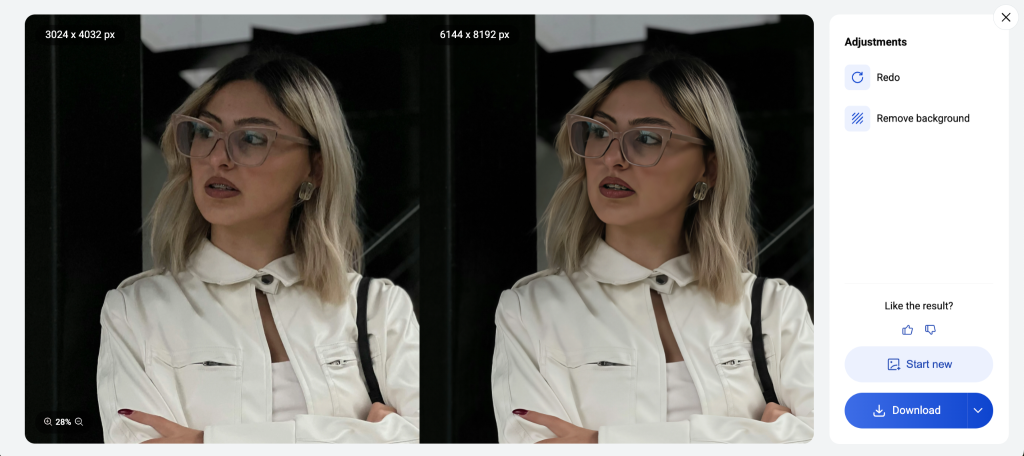
Before allowing you to complete the download, Artguru shows you your original next to the upgraded photo.
Step 4: Download Your Image
Once the preview is to your liking, feel free to download it. You may use the image file type of your choosing (PNG or JPG). The file will retain its original name, and transparent PNGs will remain untouched.
Bonus Tips While Using It
- You can upscale up to 200 images in batch
- No need to register
- Use it on desktop or mobile without ads
Keeps it simple and provides good value for getting images to a higher resolution. This of course, makes it good for a simple, easy, and quick way to strengthen your images.
How to Get the Best Results?
Let’s be clear, getting a clean 8k output is more than a click of the “upscale” button, a few easy decisions can go a long way:
- Start with a good Image: There is a high chance that high-res HD or 4k images will, in fact, yield a better final output. I am sure many will agree with me that low-res images will absolutely not yield good print quality images.
- Choose the right format: PNG for outlines and transparency. JPG is the standard and is fine for smaller images.
- Preview before and after: This is an absolute must, for comparison of the before and after. It gives you the opportunity to see if you are enhancing some areas and losing others in the process.
- Don’t over-upscale: Upscaling an image from 360 to an 8k is absolutely, loss of realism, crazy.
- Batch it right: If you enhance a number of images, combine the same images to achieve consistent results.
Conclusion
4k vs 8k isn’t always just about which number is greater. At the end of the day, depending on how you would like your final images to appear, it is what matters. Generally, 4k should be sufficient for your needs. 8k is better for when you are trying to achieve that extra high definition and clean, crisp appearance for your images.
Read more: GIGABYTE Sweeps COMPUTEX 2026 Best Choice Awards — And These Products Are the Reason Why