
 SA329 (82.3 ov)
 AUS
AUS BAN
BAN WI
WI IND-W
IND-W ZIM-W
ZIM-W GOA
GOA SC Delhi
 Milan
Milan Bologna
 Parma
Parma Udinese
 Venezia
 Inter Milan
 Genoa
Genoa Juventus
 Monza
Monza Napoli
 ROMA4
ROMA4 CAG2
CAG2 TOR1
TOR1 COMO3
COMO3 SAS2
SAS2 LAZ6
LAZ6 AFG177
 ZIM140 (19.1/20 ov, target 178)
 AUCK
AUCK CANT
CANT CD
CD ND
ND SIKM184
 NAGA187 & 46/4 (34 ov)
 JHK131/4 (47 ov)
 DELHI515/5d
 ODSA194
 SVCS13/0 (5 ov)
 BRODA616
 J & K6/0 (4 ov)
 CHD685/5d
 HP49/0 (14 ov)
 CGR216/8 (95 ov)
 AP231
AP231 HYD193/2 (54 ov)
 PNJB431
 KNTKA297/7 (95 ov)
 TPURA194
 KER101/6 (35 ov)
 BENG350
 UAE
UAE OMA
OMA ENG
ENG SL
SL DEN
DEN QAT
QAT KENYA
KENYA KUW
KUW POA
POA SPR
SPR BRB
BRB VAG
VAG PAK110
 NAM316/7
 IRE253 (44.5/50 ov, target 317)
 NZ198/3
 IND199/4 (13.2/20 ov, target 199)
 NED371/5
 JAB113 (19.3/20 ov, target 133)
 KAY132/9
 PEN1
PEN1 CLY1
CLY1 HUE2
HUE2 RAY3
RAY3 Gamba Osaka
 Buriram
 Kashima
 Pohang Steelers
 ABH0
ABH0 ALF1
ALF1 Sevilla2
 Osasuna0
 PSG2
PSG2 Lyon0
Lyon0
Desk organization has become essential for anyone working from home or managing a cluttered workspace. The solution? Mount everything. By clamping, attaching, and securing your accessories directly to your desk surface, you’ll reclaim valuable real estate, reduce cable chaos, and create a professional, distraction-free environment that actually works.
The Mounting Revolution: Why Desk Organization Matters
Desk organization through mounting isn’t just about aesthetics—it’s about productivity. When your monitor sits on an adjustable arm instead of a stand, your keyboard mounts under the desktop, and your cables run through clips, you’ve transformed a chaotic workspace into a functional command center.
Here’s the thing: most workers default to stacking items on their desks because it feels easier at first. But clutter kills focus. According to Wired, mounting accessories is the fastest way to reclaim desk space without sacrificing functionality. Think of it as vertical real estate—you’re moving everything off the surface and onto the structure itself.
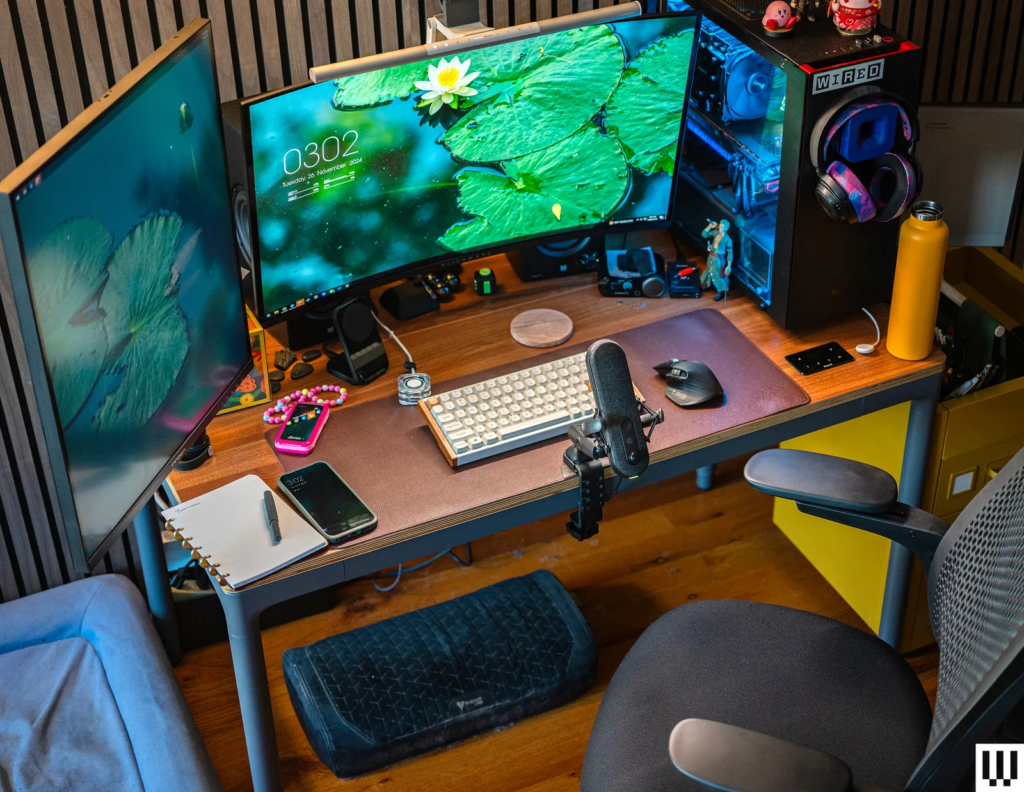
What to Mount: Monitors, Arms & Peripherals
Start with your monitor. A VESA-compatible monitor arm (typically $40–$150) clamps to your desk and eliminates the need for a bulky stand. Next, consider mounting your keyboard and mouse using under-desk trays or adhesive pads.
Cable management clips ($10–$25 for a 5-pack) route wires along the desk edge or through channels built into mounting solutions. Worth noting: desk organization improves dramatically when you mount speakers, webcams, and microphone arms as well. Headphone stands, desk lamps with adjustable arms, and even your phone can attach via magnetic mounts or suction cups.
The key is investing in quality clamps that won’t slip or damage your desk surface.
Essential Mounting Hardware & Costs
Here’s what you’ll actually spend:
| Item | Price Range | Priority |
|---|---|---|
| Monitor arm (VESA) | $45–$180 | High |
| Cable clips & channels | $12–$35 | High |
| Keyboard/mouse tray | $25–$90 | Medium |
| Microphone boom arm | $20–$60 | Medium |
Your total investment for a complete setup? $100–$365. That’s less than most people spend on a single monitor stand—and you’re building a modular, adjustable workspace that actually works for you.
What Tech Experts Are Saying
Productivity experts agree: desk organization through mounting matters for remote workers. Our dell brings desk technology forward, and mounting systems are the backbone of that transformation. When your workspace is organized vertically, you eliminate the friction that kills deep work.
Getting Started: Your Desk Organization Action Plan
Start small. Mount your monitor first—it’s the single biggest space-saver. Then add cable management. Finally, layer in peripheral mounts as your budget allows.
The expert tips setup guides recommend measuring your desk depth and weight capacity before purchasing any mounting hardware. This isn’t a luxury. It’s the foundation of a professional, distraction-free workspace.


