RIY2
RIY2 TAA0
TAA0 LAZ0
LAZ0 PAR0
PAR0 RCL0
RCL0 PAR1
PAR1 MEX-W
MEX-W ARG-W
ARG-W ATM0
ATM0 DEP0
DEP0 ADO0
ADO0 HEE1
HEE1 CLB0
CLB0 TOR0
TOR0 GVFC0
GVFC0 FCP0
FCP0 UAE
UAE NED
NED PAK
PAK ENG
ENG IND-W
IND-W ZIM-W
ZIM-W GMB
GMB LES
LES MOZ
MOZ ZMB
ZMB Inter Milan
 Fiorentina
 Churchill
 Punjab FC
 NGA
NGA UGA
UGA CHE0
CHE0 TOT2
TOT2 VAL1
VAL1 VIL2
VIL2 DOR1
DOR1 SGE0
SGE0 NAP3
NAP3 ROMA3
ROMA3 NZ-A135/3 (41 ov)
 IND-A113
 SYL
SYL KHU
KHU MYMS299/4 (87 ov)
 CHATT
CHATT DHA293/3 (84.1 ov)
 RAJ
RAJ RAN320/5 (80 ov)
 BAR
BAR DEN
DEN PNG
PNG NAM321/6
 IRE290 (47.3/50 ov, target 322)
 NZ180/5
 IND181/6 (19.5/20 ov, target 181)
 Internacional1
 Botafogo0
 Mirassol1
 São Paulo1
 Vitória1
 Athletico-PR1
 VEN0
VEN0 JPN2
JPN2 ZAM0
ZAM0 FRA1
FRA1 Athletic
 Getafe
 C Palace
 Newcastle
 Hull
Hull Brentford
 Liverpool
 Brighton
 Man United
 Bournemouth
 Atalanta
 Frosinone
 KHO0
KHO0 ETT3
ETT3 RAC2
RAC2 ESP1
ESP1![Create Animated Text with Filmora Text Animation Maker [2026]](https://technosports.co.in/wp-content/uploads/2026/07/Filmora-4-768x425.png)
In a fast-scrolling digital world, grabbing viewer attention within seconds is crucial, and text animation plays a major role in making that happen. Animated titles not only enhance visual appeal but also improve storytelling and audience retention.
This guide walks users through creating engaging text animation using Wondershare Filmora. With its user-friendly interface and powerful animation tools, Filmora enables users to design eye-catching text without complex editing skills.
Part 1. Text Animation Basics: What Is an Animated Text Maker
Text animation refers to the process of adding motion and visual effects to words, making them more engaging and dynamic in videos. Instead of static text, animated text moves, fades, or transforms to capture attention and improve storytelling. An animated text maker provides ready-made templates and easy tools to create professional text animation quickly, even without advanced editing skills.
Difference Between Static Text and Animated Text
When users want to create animated text, understanding how it differs from static text is essential. While both serve the purpose of delivering information, animated text adds motion, emotion, and visual appeal that static text simply cannot achieve. Here is a side-by–side comparison between the two functions:
| Feature | Static Text | Animated Text |
|---|---|---|
| Appearance | Plain and fixed | Dynamic with motion effects |
| Engagement | Low viewer interaction | High engagement and attention-grabbing |
| Creativity | Limited styling options | Wide range of effects and transitions |
| Storytelling | Basic information delivery | Enhances narrative and emotional impact |
| Use Cases | Documents, simple captions | Videos, ads, social media content |
How Animation Improves Video Quality
When using a text animation maker, improving video quality becomes more than just visuals. Here’s how text animation enhances overall video performance:
- Visual Engagement Boost: Movement naturally draws the eye, and animated text adds that motion to the content. It makes videos livelier and helps capture attention instantly.
- Clear Message Delivery: Text animation highlights key points using effects like fade, slide, or zoom, making important information easier to notice and understand.
- Professional Presentation: Well-designed animated text gives videos a polished, high-quality feel, even for beginners, making content look more refined and credible.
- Stronger Storytelling Flow: Animated text guides viewers through the content, adding structure and rhythm that improve how the story unfolds.
- Higher Audience Retention: Engaging visuals keep viewers watching longer, reducing drop-offs and increasing the chances of the message being fully received.
Part 2. Text Animation Maker Tools: Why Filmora Is a Strong Choice
Wondershare Filmora offers a powerful text animation feature that helps transform plain words into visually appealing motion graphics. With its built-in presets, users can quickly apply stylish effects like fades, slides, zooms, and typewriter animations to make their content more dynamic and engaging.
As an intuitive text animation maker, this video editor for PC provides a smooth editing experience. Users can customize fonts, colors, timing, and movement with just a few clicks. This makes it ideal for beginners who want professional results without complex editing skills. At the same time, advanced users can fine-tune animations for more creative control.
Text Animation in Filmora: Key Features Explained
- Flexible Text Styling Options: Creators can fully customize their animated text by adjusting fonts, colors, shadows, outlines, and more, allowing complete control over the visual appearance.
- Multiple Animation Layers: Different text animations can be applied within the same video, enabling users to stack effects and design unique motion styles for separate text elements.
- Wide Range of Animation Styles: A diverse collection of animation categories helps match text movement with any video theme, from subtle effects to bold, attention-grabbing transitions.
- Precise Timing Control: Users can easily adjust the duration of each animation, ensuring perfect synchronization with video scenes for smoother pacing and stronger impact.
Part 3. Create Animated Text in Filmora: Step-by-Step Workflow
Now that the basics and benefits of text animation are clear, the next step is applying them in a practical workflow. This section outlines a simple, step-by-step process for creating engaging animated text in Filmora:
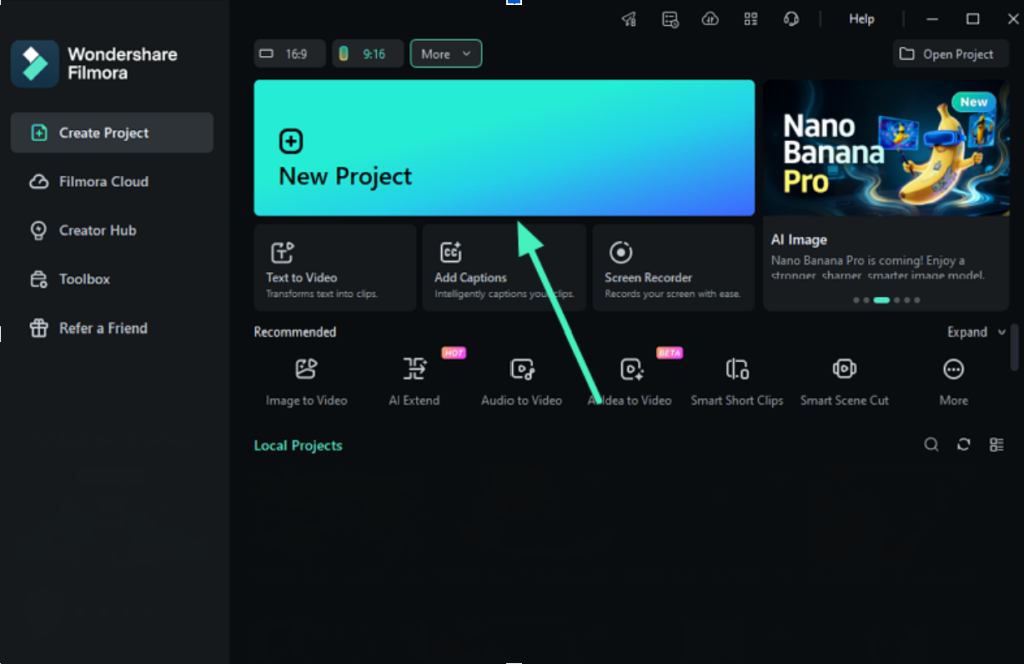
Step 1. Start a New Filmora Project
Begin by opening Filmora on the device and selecting the “New Project” option from the home screen. After that, import the desired video file and place it onto the editing timeline to start working.
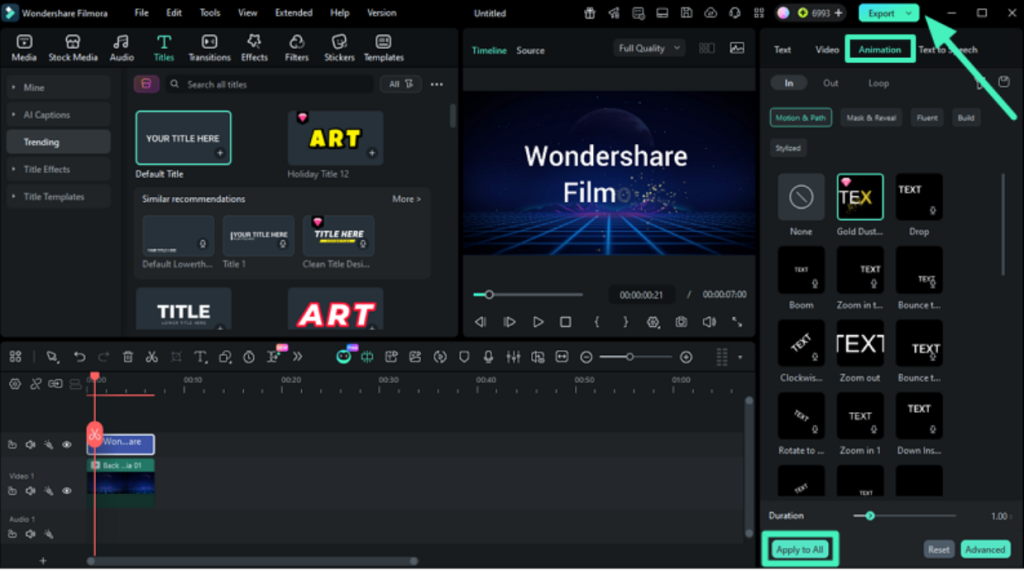
Step 2. Input Desired Text
From the top toolbar, choose the “Title” tab and pick a suitable title style from the available options on the left side. Then, type the required text in the “Text” section located in the right-side properties panel.

Step 3. Add Animation and Export Video
Open the “Animation” section within the same settings panel and select a preferred motion effect. Preview the result in the playback window and fine-tune the timing using the duration slider. To finalize, click the “Apply to All” button at the bottom, and then use the “Export” option to save the completed video.
Part 4. Text Animation Use Cases: Where Filmora Works Best
When learning to create animated text, understanding where it delivers the most impact is essential for producing high-quality content. Here are the key use cases where text animation works best, especially when using Filmora:
- YouTube Videos: Animated titles, intros, and captions help increase viewer engagement, improve watch time, and make content more visually appealing.
- Social Media Content: Short-form videos on platforms like Instagram, TikTok, and Facebook gain more traction when dynamic text is used to capture attention instantly.
- Business Presentations: Filmora’s text animation tools help turn plain slides and promotional videos into professional, polished visual presentations.
- Educational Content: Lessons and tutorials become easier to follow when key ideas are highlighted using animated text effects.
- Marketing and Advertising: Brands use animated text to communicate messages clearly, strengthen identity, and make campaigns more memorable.
Conclusion
All in all, in this article, users learned everything about text animation in video and how to use it. From basic concepts to practical use cases, each section helped build a clear understanding of its importance in modern editing. For those looking for an easy and powerful solution, Filmora is highly recommended for creating professional animated text with ease.
Note to the Reader: This content is created independently for informational purposes only and does not reflect the official views or positions of any publishing media outlet.
Read more: Ronaldo & Messi Leg Insurance Value in INR [UPDATED 2026]