
 WI-A
 LIONS
 NE1
 MIA0
 LAFC0
 MIN0
 NED
 OMA
 Sassuolo
 Fiorentina
 Atalanta
 Parma
 Lorient
 Brest
 Newcastle
 Everton
 Deportivo
 Osasuna
 POR
 HOU
 MS-W
 PS-W
 ATH2
 RSO1
 JUV2
 NAP0
 OLM2
 TOU0
 ELC0
 VAL1
 MOW37/2 (5.3/20 ov, target 120)
 BRB119
 NZ-A338/7 (101.2 ov)
 IND-A346
 QLD279/9 (103.4 ov)
 VIC307
 SYL218 & 89/2 (38 ov)
 CHATT210
 MYMS108 & 57/2 (14 ov) (f/o)
 KHU288
 DHA
 BAR
 RAN122/3 (39 ov)
 RAJ231
 KAY
 KAG
 CHR
 SPR
 BIK
 JAB
 LUL
 POA
 ASSAM
 KNTKA
 MEGHA
 NAGA
 AFG81/3 (8.1/20 ov, target 80)
 ZIM79
 NAM131/5 (21.2/50 ov, target 130)
 IRE129
 NZ195/3 (18/20 ov, target 192)
 IND191/8
 SS-W196/8
 HH-W109 (17.4/20 ov, target 197)
 ST-W180/4 (16.4/20 ov, target 179)
 BH-W178/5
 TOK162/1 (16/20 ov, target 162)
 MIS161/5
 Pakhtakor
 Al Nassr
 Al Sadd
 Al Ahli
 LEC1
 GEN2
 LIV0
 ARS1
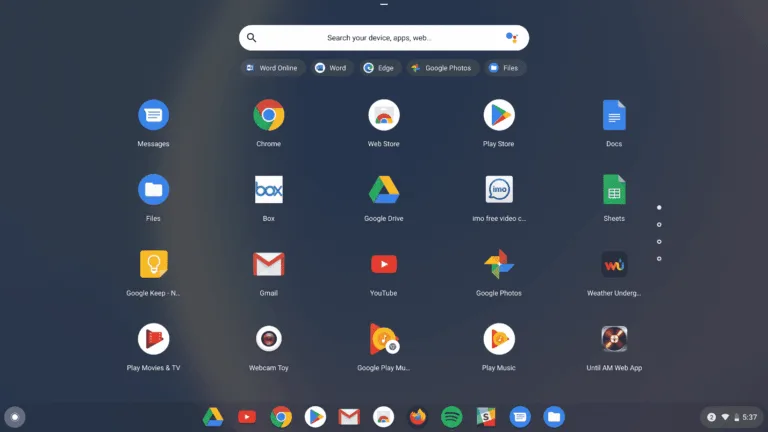
If there is an OS that can be seamlessly and closely connected to Android is the Chrome OS. Well, it’s not a surprise considering that Google develops both the OS. With every OS update, it’s becoming more simple to connect and use an Android phone with a Chromebook.
For those users out there who are using their Android devices and their Chromebooks, this a tutorial to improve your Chrome OS experience by pairing to your Android phone. Let’s discuss on useful this which you can do with these OS’s together.
Connect your Android phone to your Chromebook
There is a basic process to connect your Android to your Chromebook which can be done during the initial setup.
- At the bottom right corner, select the time.
- Select Settings.
- Under Connected devices, next to Android phone, select Set up.
- Enter your password and follow the steps. Once completed, you’ll get a confirmation on your phone.
- On your Chromebook, click Enabled, and select which features you want to turn on.
Enable Smart Lock and Instant Tethering
By enabling this feature it will unlock your Chromebook using your phone. When the OS detects the phone nearby then it will be unlocked, Chrome OS automatically skips the account login screen, so you don’t need to enter your password to get in.
Then we also have Instant Tethering, which gives your Chromebook the option to get online using your phone as a hotspot, if it can’t detect a standard wi-fi connection.
Access Messages from your phone on your Chromebook
This is a pretty handy feature, by accessing the Google Messages web interface, you will be asked to sign in using a QR code. In the Messages app on your phone, just tap on the three dots in the top right-hand corner on the main interface, then Device Pairing to scan the QR code.
However, this feature works with only Google’s Message App, so if you are not using the app kindly download it before checking this feature. Other messaging apps from OEMs like Samsung are not supported for integration with your Chromebook.
Use familiar Android apps on your Chromebook
Modern Chromebooks support Google Play Store and allow you to download and use many of your favorite Android apps. So if you are wondering as to how to enjoy your favorite apps on the Chromebook to enjoy productivity, social media, and streaming content, here’s how you can do it with simple steps.
How to download Android apps on your Chromebook:
- Turn your Chromebook on and log in.
- Open the app drawer. Either tap on the Launcher icon or swipe up from the bottom.
- Find the Google Play Store app and open it.
- Search or browse for your app of choice. If you’re looking for options, see our list of best Android apps coming up in this article.
- Click on Install.
- Wait for the app to install, and it’ll appear in your app drawer shortly after.