UAE18/0 (2.4/50 ov)
 NED
NED PAK
PAK ENG
ENG IND-W
IND-W ZIM-W
ZIM-W GMB
GMB LES
LES MOZ
MOZ ZMB
ZMB Inter Milan
 Fiorentina
 Churchill
 Punjab FC
 NGA
NGA UGA
UGA Athletic
 Getafe
 MEX-W23 (9.3/20 ov, target 189)
 ARG-W188/5
 ATM1
ATM1 DEP0
DEP0 LAZ2
LAZ2 PAR1
PAR1 RCL2
RCL2 PAR1
PAR1 NZ-A317
 IND-A113 & 106/2 (36 ov)
 SYL
SYL KHU
KHU MYMS299/4 (87 ov)
 CHATT
CHATT DHA293/3 (84.1 ov)
 RAJ
RAJ RAN320/5 (80 ov)
 BAR
BAR DEN
DEN PNG
PNG KENYA
KENYA JER
JER NAM321/6
 IRE290 (47.3/50 ov, target 322)
 C Palace
 Newcastle
 Hull
Hull Brentford
 Liverpool
 Brighton
 Man United
 Bournemouth
 Atalanta
 Frosinone
 RIY2
RIY2 TAA1
TAA1 CHE0
CHE0 TOT2
TOT2 VAL1
VAL1 VIL2
VIL2
Google is bringing Gemini’s Personal Intelligence to Android Auto, so you can use your Google apps and personal context through natural voice commands without touching your phone. The cross-app features need to be connected and enabled in the Gemini app, and they have reportedly started rolling out globally.
Your Car Is About to Know You Better
Imagine asking your car for your flight gate and getting the answer from an email you received last week. That is the idea behind this upgrade, first highlighted in a post by Sillycorns.
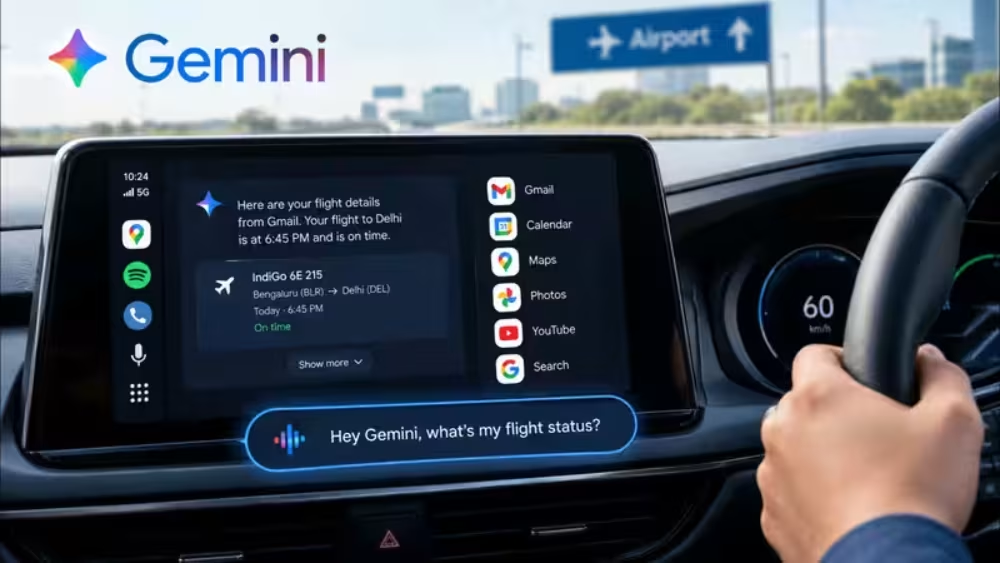
What Your Car Can Reportedly Do
| Feature | What It Means |
|---|---|
| Gmail lookups | Fetch complex details, such as a flight gate number |
| Restaurant suggestions | Find places based on your preferences and history |
| Calendar navigation | Navigate to events saved in Google Calendar |
| Photo-based directions | Identify and navigate to a location from a Google Photos picture |
| Search memory | Remember places you may want to explore from past searches |
Feature list is from the post above. I could not find a separate Google announcement to confirm every item, so check your own Gemini app settings.
How It Fits Into the Bigger Picture
Gemini has been on Android Auto since late 2025, when it began replacing Google Assistant. At that time, Google said the rollout would be global, supporting 45 languages, and keep the familiar “Hey Google” wake word. 9to5Google noted that it would arrive over the coming months. Personal Intelligence adds the next layer: context from your own apps.
What About Privacy?
Giving a car assistant access to your Gmail and photos is a real trade-off. The cross-app features only work after you connect and enable them in Gemini, so they are opt-in. Review which apps you’ve linked, and remember that earlier Android Auto settings already included toggles such as sharing precise location.
How to Get It
- Make sure Gemini is your phone’s assistant.
- Update the Gemini and Android Auto apps.
- Connect your Google apps in Gemini settings and enable the personal features.
Rollouts reach users in waves, so it may take a while to appear. For more on in-car and phone tech, explore our technology section on TechnoSports, including the latest Redmi 17 5G review.
Frequently Asked Questions
What is Gemini Personal Intelligence on Android Auto?
It lets Gemini use your Google apps and personal context through voice commands while you drive.
Do I need to enable anything?
Yes. Cross-app features work only after you connect and enable them in the Gemini app.
Is it available worldwide?
The features have reportedly started rolling out globally, but availability varies by account and region.
What can Gemini Personal Intelligence do in Android Auto?
It can use connected Google apps and personal context through voice commands while you drive. Reported features include Gmail lookups, restaurant suggestions, Calendar navigation, photo-based directions and remembered places.