MEX-W
MEX-W ARG-W
ARG-W ARS2
ARS2 EVE0
EVE0 COV0
COV0 FUL1
FUL1 OFC0
OFC0 NEU0
NEU0 NEOM2
NEOM2 ABH0
ABH0 RAC0
RAC0 ESP1
ESP1 KHO0
KHO0 ETT0
ETT0 BLK2
BLK2 WXM0
WXM0 NAP
NAP ROMA
ROMA CHE
CHE TOT
TOT VAL
VAL VIL
VIL DOR
DOR SGE
SGE RIY
RIY TAA
TAA LAZ
LAZ PAR
PAR RCL
RCL PAR
PAR FCA1
FCA1 FCU1
FCU1 KOE0
KOE0 S040
S040 M052
M052 SVW3
SVW3 RBL4
RBL4 ELV0
ELV0 SWD-W
SWD-W EPR-W
EPR-W TTN-W
TTN-W WPR-W
WPR-W KNGHT45/0 (6/20 ov)
 MPUMA
MPUMA NZ-A135/3 (41 ov)
 IND-A113
 SYL
SYL KHU
KHU MYMS299/4 (87 ov)
 CHATT
CHATT DHA293/3 (84.1 ov)
 RAJ
RAJ RAN320/5 (80 ov)
 BAR
BAR UAE
UAE NED
NED PAK
PAK ENG
ENG IND-W
IND-W ZIM-W
ZIM-W GMB
GMB LES
LES MOZ
MOZ ZMB
ZMB NGA
NGA UGA
UGA NAM321/6
 IRE290 (47.3/50 ov, target 322)
 NZ180/5
 IND181/6 (19.5 ov)
 CAR1
CAR1 BIR0
BIR0 LCN4
LCN4 BUR1
BUR1 PNE1
PNE1 WBA1
WBA1 QPR4
QPR4 SWA0
SWA0 STK0
STK0 BRC0
BRC0 ATM
ATM DEP
DEP SCP1
SCP1 HSV0
HSV0 CAG0
CAG0 BOL2
BOL2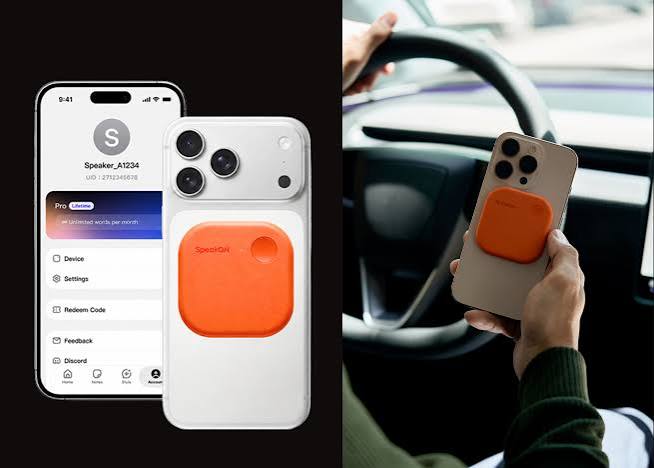
SpeakON announced its voice button with its own microphone for mobile devices on Wednesday, September 23, 2026, reportedly aiming to turn spoken ideas into polished messages and actions across apps. The MagSafe accessory attaches to compatible iPhones, captures speech through dedicated hardware, and is designed to reduce the steps between speaking and sending. Its central pitch is simple: speak once, then let AI prepare the result.
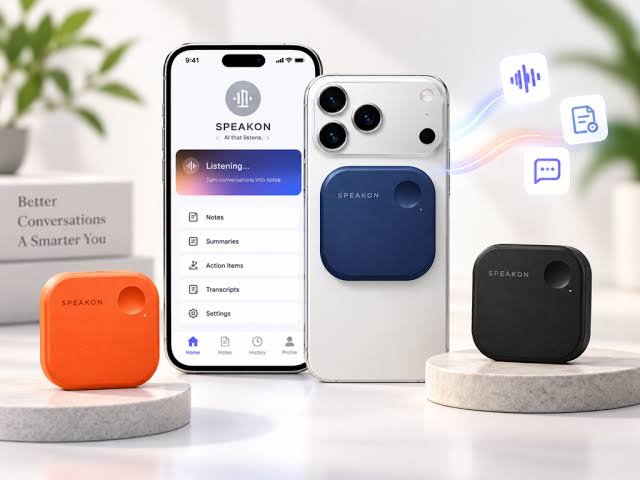
What is SpeakON’s voice button with its own microphone?
SpeakON is positioning the device as an AI Communicator, rather than another dictation application. Traditional phone dictation often preserves filler words, false starts, and unfinished phrasing, leaving users to edit the output before sending. The device is reportedly designed to convert speech into structured text that can be placed inside the mobile application already open on the phone.
The hardware measures 58 × 58 × 6 mm and weighs 25 g, according to details carried in the original coverage from Marktechpost. Its MagSafe mechanism lets it attach to compatible iPhones, while an included magnetic ring reportedly extends compatibility to iPhones without MagSafe. The result is a physical control that can remain attached to the phone instead of requiring users to unlock a screen first. The next question is whether the compact hardware offers enough endurance for daily communication.
How does the SpeakON device capture and process speech?
SpeakON’s reported hardware includes a 220 mAh battery, USB-C charging, and a rated endurance of at least 10 hours of continuous use. Standby life is listed at more than two weeks, while a full charge takes less than 1.5 hours. The unit also includes 128 MB of onboard storage, a capture range of roughly 60 cm, and support for up to five minutes of continuous input per press.
Those figures matter because a voice accessory must be ready when an idea arrives, not just when a phone is carefully positioned. The dedicated microphone may also help separate the product from software that relies entirely on the phone’s built-in microphones. However, the quality of transcription and editing will depend on SpeakON’s AI processing, network requirements, and support for different accents and languages. A hardware button solves access; the more difficult test is what the software does after capture.
Can SpeakON turn a spoken request into actions across apps?
The device is reportedly an AI-powered button that can polish spoken communication and execute actions across mobile applications. Its intended workflow goes beyond converting speech into a note: a user might speak a rough message, have the system structure it, and then direct the result into the app currently in use.
These capabilities are marked as unconfirmed, so the exact list of supported applications and commands remains undisclosed. > SpeakON’s AI Communicator concept treats voice as an input for finished communication and app actions, not merely as raw dictation. That distinction places the product closer to an agent interface than a conventional microphone accessory. Yet reliable cross-app automation requires permission handling, context awareness, and clear confirmation before an action sends a message or changes data. The device’s value will therefore depend less on its button and more on how safely it operates beyond the text field. This leads to the wider question: who benefits most from a separate voice control?
Why could SpeakON matter to mobile professionals?
SpeakON is aimed at people who frequently have ideas but lack the time to stop, unlock a phone, switch applications, and type. Founders, managers, consultants, and field professionals are obvious targets because their communication often begins as spoken notes during travel, meetings, or on-site work.
A physical button can shorten that interaction, especially when the phone is already mounted or stored away. The product also reflects a broader shift in mobile AI design. Instead of making users open a chatbot, SpeakON places capture at the hardware layer and attempts to deliver the result inside existing workflows. That could make voice useful for email, messaging, notes, and task management, but privacy remains a central concern because a dedicated microphone introduces another device that handles personal speech.
What happens next for SpeakON users?
The next proof point will be practical availability and software support. SpeakON has announced the MagSafe form factor and its dedicated microphone, but key AI functions, supported applications, language coverage, and regional pricing still need clearer confirmation.
Buyers should also check whether the device requires a companion app, a subscription, or an internet connection for processing. If SpeakON can reliably transform rough speech into ready-to-send communication, it may appeal to users who find phone dictation too literal. If it only produces another block of text to edit, the extra hardware becomes difficult to justify. The product’s future will be decided by the quality of its app actions, not the novelty of its magnetic attachment.
What is SpeakON?
SpeakON is a MagSafe-compatible AI voice accessory designed to capture spoken input through a dedicated microphone and produce structured text or app actions.
How heavy is the device?
The reported device weighs 25 g and measures 58 × 58 × 6 mm.
Does SpeakON work with every iPhone?
MagSafe-equipped iPhones can attach directly, while iPhones without MagSafe can reportedly use the included magnetic ring. Broader device and application compatibility has not been fully detailed.
Can SpeakON send messages automatically?
Its cross-application action capabilities are described as part of the product concept, but the precise supported commands and confirmation controls remain unconfirmed. Bottom line: SpeakON’s voice button with its own microphone could make AI communication faster, provided its software turns speech into dependable actions rather than merely cleaner dictation. Source: Marktechpost
Was this article helpful?
Your feedback directly improves future articles on this site.