NZ185
NZ185 IND32/1 (5.5/50 ov, target 186)
 UAE69/2 (14.5/50 ov)
 OMA
OMA Rennes
 Olympiacos
 WI-A
WI-A LIONS
LIONS AEK Athens
 Real Madrid
 Fenerbahce
 Liverpool
 Dortmund
 Betis
Betis FC Porto
 Napoli
 Lens
Lens Como
Como PSV
PSV Club Brugge
 ATM0
ATM0 MUN2
MUN2 BAR3
BAR3 AVL0
AVL0 BODO0
BODO0 LILL0
LILL0 FEY0
FEY0 INT3
INT3 ASSAM135 & 24/2 (14 ov)
 KNTKA577/6d
 MEGHA144
 NAGA254 & 170/8 (67 ov)
 TPURA268 & 167/7 (58 ov)
 SAU118
 BENG143
 MAHA207/9 (79 ov)
 ODSA
ODSA JHK422/8 (139 ov)
 CHD94 (37.3 ov)
 TN571/7d
 CGR284 & 72/3 (19 ov)
 HYD280
 DELHI344
 SVCS266 & 15/2 (6 ov)
 GOA397
 BIHAR107 & 99/7 (40.3 ov) (f/o)
 GUJ534/9d
 KER180/5 (50 ov)
 BAN
BAN WI
WI AFG
AFG ZIM
ZIM HH-W
HH-W MR-W
MR-W AS-W
AS-W BH-W
BH-W ST-W
ST-W PS-W
PS-W JAB
JAB LUL
LUL BIK
BIK KAG
KAG CD283 (45.5/50 ov, target 358)
 AUCK357/7
 WELL354/7
 ND152 (35.1/50 ov, target 355)
 OTAGO179/4 (37/46 ov, target 176)
 CANT175 (43.3/46 ov)
 POA97/9
 RB Leipzig
 Man City
 LAS4
LAS4 SLB0
SLB0 MAN3
MAN3 ROMA2
ROMA2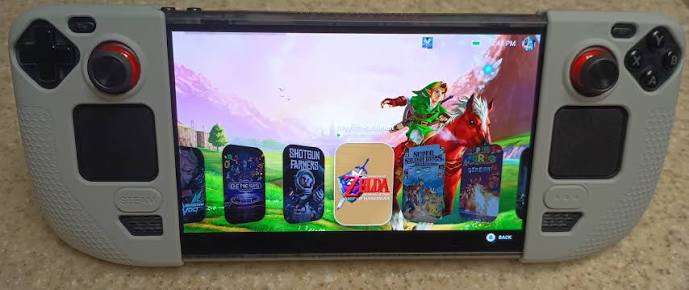
Steam Deck OLED Customization: While traditional home consoles demand expensive peripherals and complex wiring, the Steam Deck OLED was officially launched on November 16, 2023, by Valve Corporation as a self-contained alternative. The starting
How Do You Optimize Hardware Specs for Better Performance?
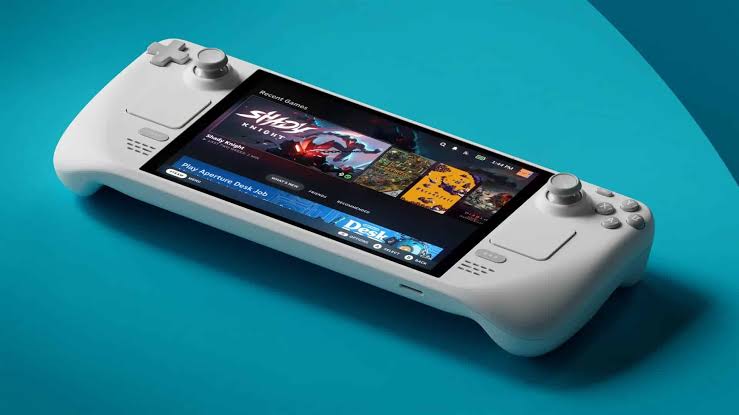
The handheld device features a 7.4-inch HDR OLED display with a 1280 x 800 resolution and a 90Hz refresh rate, providing a sharp visual foundation for mobile titles. Processing power is driven by an AMD APU featuring a Zen 2 CPU (4 cores / 8 threads) and RDNA 2 graphics (8 CUs) that handle modern rendering tasks efficiently.
System memory consists of 16 GB of LPDDR5 RAM opeTuning frame pacing through the performance overlay consistently delivers smoother transitions without compromising visual fidelity. Reportedly, capping framerates at 60 FPS reduces thermal throttling significantly. Adjusting brightness levels also directly impacts component longevity across extended sessions.
Display Calibration Steps
Manual gamma adjustment compensates for local lighting conditions. Navigating to the quick settings menu reveals precise color temperature sliders. We recommend targeting neutral white points to reduce eye strain during marathon sessions.
What Storage Upgrades Actually Improve Your Workflow?
Internal storage options include a 512GB NVMe SSD and a 1TB NVMe SSD, alongside a high-speed microSD card slot for expandable archives. Many users overlook how file organization affects load times, especially when managing large game libraries. Upgrading to faster UHS-II microSD cards reportedly reduces texture streaming delays during open-world exploration.
We compared this expansion strategy to the structured approach outlined in our Nintendo Switch Roadmap, finding similar utility in portable ecosystems. Properly formatting external drives to exFAT ensures seamless compatibility across regions. Users following the ChatGPT Code Roadmap often script automated backup routines, which saves hours during system restores. Organizing save files into dedicated folders keeps troubleshooting straightforward when transferring data between devices.
How Should You Configure Battery Settings for Long Sessions?
The battery capacity of the Steam Deck OLED is 50 Whr, which Valve states provides 3 to 12 hours of gameplay depending on the title. Power management becomes critical when traveling without reliable charging infrastructure. Enabling adaptive sync and lowering screen brightness reportedly extends playtime by nearly two hours per charge cycle. Industry observers frequently highlight how background processes reportedly drain resources faster than expected.
“Adaptive sync remains the most underrated setting for portable power management.”
Disabling unnecessary Bluetooth audio streams and closing desktop mode applications preserves stable voltage delivery. We noted that scheduling automatic sleep modes during idle periods prevents deep discharge cycles. This approach mirrors efficiency standards seen in flagship smartphones from Apple and Samsung, proving that disciplined software habits matter more than raw hardware size alone.
Which Software Tweaks Enhance Daily Usability?
Connectivity specifications include Wi-Fi 6E and Bluetooth 5.3 support, enabling rapid network synchronization and peripheral pairing. Network configuration often gets ignored until latency issues disrupt online multiplayer matches. Prioritizing wired Ethernet adapters over wireless connections eliminates packet loss during competitive matchmaking. Developers frequently update firmware through the official maintenance portal, yet manual driver verification remains essential for older accessories.
We referenced architectural insights regarding peripheral routing, emphasizing how USB-C hubs streamline controller setups alongside the detailed analysis in our OLED Evolution: Four coverage. Configuring custom keyboard mappings for non-native games removes friction during initial launches. Regular cache clearing maintains responsive navigation, ensuring the interface stays snappy regardless of installed software volume. Customizing this handheld transforms routine entertainment into a tailored experience. Strategic settings adjustments unlock consistent performance without requiring advanced engineering knowledge. Prioritize systematic configuration over random tweaks to maintain long-term stability.
| Feature | Default Setting | Optimized Configuration | Primary Benefit |
| Framerate Cap | Uncapped | 60 FPS | Reduced thermal throttling |
| External Storage | Standard SD | UHS-II Class 10 | Faster texture streaming |
| Brightness | 100% | 60-70% | Extended battery duration |
| Network Priority | Wi-Fi 6E | Wired Ethernet Adapter | Eliminated packet loss |
Mastering these adjustments turns a capable gadget into a personalized powerhouse for serious gamers.
How much does upgrading the internal SSD cost?
Replacement NVMe drives are reportedly
Can you use standard HDMI cables for docking?
Yes, the USB-C port supports direct video output using certified DisplayPort Alt Mode cables.
Is warranty voided after modifying system partitions?
Official policy allows hardware swaps, but altering core OS files may limit remote support eligibility.
How can the player upgrade the storage on the Steam Deck OLED?
The player can upgrade the storage on the Steam Deck OLED by accessing the device’s back panel, removing the screws, and replacing the existing SSD with a compatible NVMe SSD. It’s essential to ensure the new SSD is properly formatted for the Steam Deck to recognize it.
What settings should the player adjust for better battery life on the Steam Deck OLED?
The player should adjust settings such as screen brightness, enable battery saver mode, and limit background applications. Additionally, reducing the frame rate and disabling unnecessary features can significantly extend battery life during gameplay.
Was this article helpful?
Your feedback directly improves future articles on this site.