
 SA329 (82.3 ov)
 AUS
AUS ROMA0
ROMA0 CAG1
CAG1 TOR0
TOR0 COMO0
COMO0 ALS3
ALS3 HIL1
HIL1 BRD0
BRD0 PET0
PET0 BAN
BAN WI
WI IND-W
IND-W ZIM-W
ZIM-W GOA
GOA SC Delhi
 Milan
Milan Bologna
 Parma
Parma Udinese
 Venezia
 Inter Milan
 Genoa
Genoa Juventus
 Monza
Monza Napoli
 SAS2
SAS2 LAZ6
LAZ6 AFG177
 ZIM140 (19.1/20 ov, target 178)
 ABH0
ABH0 ALF1
ALF1 PAK110
 SL114/2 (18.1/50 ov, target 111)
 SIKM184
 NAGA187 & 46/4 (34 ov)
 JHK131/4 (47 ov)
 DELHI515/5d
 ODSA194
 SVCS13/0 (5 ov)
 BRODA616
 J & K6/0 (4 ov)
 CHD685/5d
 HP49/0 (14 ov)
 CGR216/8 (95 ov)
 AP231
AP231 HYD193/2 (54 ov)
 PNJB431
 KNTKA297/7 (95 ov)
 TPURA194
 KER101/6 (35 ov)
 BENG350
 MAHA278/9 (100 ov)
 GUJ223
 MNPR364
 ARP111 & 95/2 (36 ov)
 UAE
UAE OMA
OMA ENG
ENG AUCK
AUCK CANT
CANT CD
CD ND
ND DEN
DEN QAT
QAT KENYA
KENYA KUW
KUW NAM316/7
 IRE253 (44.5/50 ov, target 317)
 NZ198/3
 IND199/4 (13.2/20 ov, target 199)
 NED371/5
 JAB113 (19.3/20 ov, target 133)
 KAY132/9
 EXC1
EXC1 ADO1
ADO1 SES2
SES2 ESP2
ESP2 BEN1
BEN1 CAT0
CAT0 SHO0
SHO0 ALH1
ALH1 UDC0
UDC0 ALM0
ALM0 ALC0
ALC0 LPA0
LPA0 TORD2
TORD2 MIR0
MIR0 CDL0
CDL0 MAJ0
MAJ0 FLE
FLE ARS
ARS Gamba Osaka
 Buriram
 Sevilla2
 Osasuna0
 PSG2
PSG2 Lyon0
Lyon0 Mohun Bagan1
 Chennaiyin0
 SAA2
SAA2 EST0
EST0
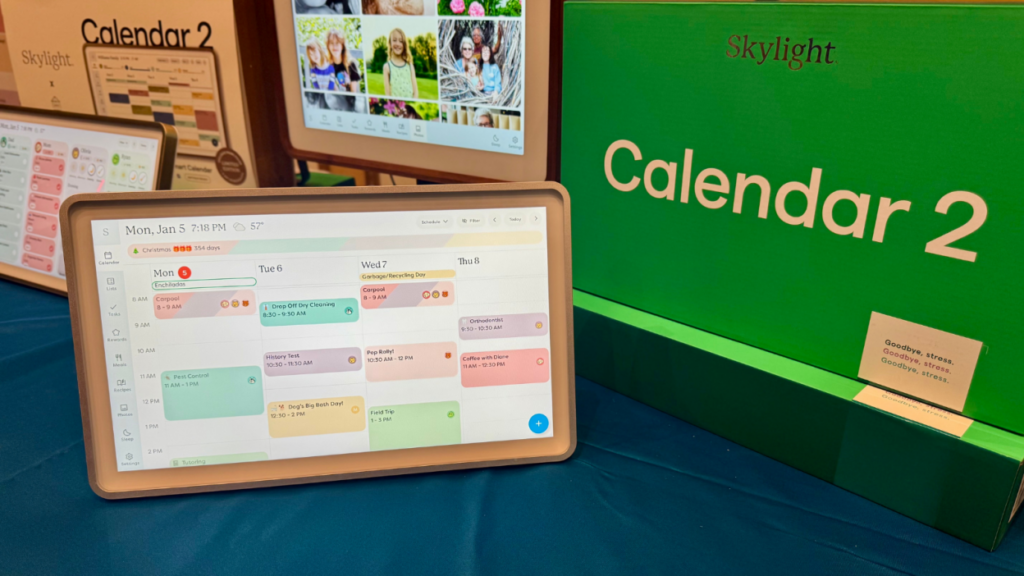
Digital planning just got a serious upgrade. Skylight Calendar 2 is the latest smart display calendar system that combines an intuitive interface with powerful scheduling capabilities—transforming how professionals and families manage their time. You’re looking at a refined aesthetic, smarter AI-driven features, and deeper integration with the productivity platforms you already use. It’s one of the most compelling digital planning solutions available right now.
Design Overhaul and User Experience
Skylight Calendar 2 ditches the bulky look of the original. The new interface features a minimalist display with larger, clearer typography and a thoughtful color palette that’s easier on your eyes during long use. The 7-inch touchscreen now supports gesture controls—just swipe between weeks and months. Wired noted that the redesign nails clarity without stripping away functionality, something many digital planning tools struggle with.
Getting started takes less than five minutes. The onboarding process walks you through calendar synchronization step-by-step, so you’re not fumbling around trying to figure things out.
Digital Planning Features That Matter
This isn’t just a prettier calendar. Skylight Calendar 2 introduces AI-powered scheduling suggestions that learn your habits and recommend the best times for meetings. It connects with Google Calendar, Outlook, and Apple Calendar, pulling all your events into one place.
Voice commands work with 99% accuracy, so you can add events without lifting a finger. Family sharing lets up to six household members view and contribute to shared calendars, with permission controls that give you real flexibility.
Pricing and Availability
Skylight Calendar 2 launched at $299 for the base model. The premium version runs $399 and includes advanced AI features plus extra cloud storage. It’s available starting March 20, 2026, through Skylight’s website, Amazon, and Best Buy.
Pre-orders placed before March 19 got a $50 early-bird discount. Cloud sync subscriptions start at $4.99/month, but basic calendar functionality stays free.
What Smart Display Experts Are Saying
Industry analysts see Calendar 2 as a major move forward for ambient computing. It’s positioned itself against Amazon Echo Show and Google Nest Hub—but with stronger calendar-specific capabilities that actually matter. Early reviewers love the responsiveness and how smoothly everything integrates. Worth noting: it fills a real gap for people who want dedicated scheduling hardware.


