Vivo’s OriginOS 6 marks a massive leap from the dated FuntouchOS, finally bringing the polished China-exclusive experience to global markets. Tested on the iQOO 15, this Android skin delivers stunning visuals, deep customization, and premium features that rival the best in the industry.
Table of Contents
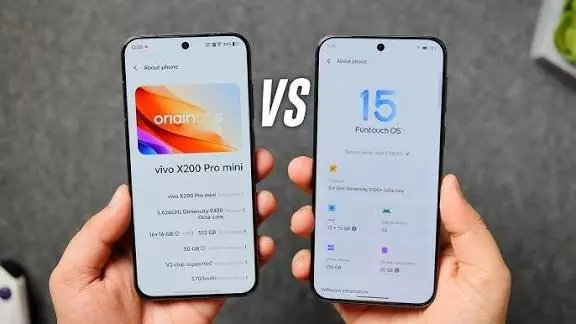
OriginOS 6 vs FuntouchOS: Key Improvements
| Feature | OriginOS 6 | FuntouchOS |
|---|---|---|
| Visual Design | Liquid glass-inspired effects | Boring, dated look |
| Quick Settings | 2 modern styles available | Single merged style |
| Lock Screen | Extensive customization + widgets | Basic options |
| Icon Options | Minimal/Exquisite styles | Limited choices |
| Multitasking | Stage Manager-like feature | Basic split-screen |
| Battery Options | Bypass charging, health monitoring | Standard settings |

Visual Experience That Impresses
OriginOS 6 introduces subtle light border effects around Quick Settings and lock screens, with elements that glow responsively when touched. While not universal across all UI elements, the media player and lock screen implementations feel genuinely premium. The liquid glass-inspired aesthetic maintains its own identity without feeling derivative.
You get two Quick Settings layouts: a modern separated style (similar to ColorOS and iOS) or an upgraded merged style. The visual language—volume sliders, widget shapes, fonts, spacing—is cohesive and polished throughout first-party apps.
Lock Screen Customization Excellence
The lock screen experience is where OriginOS 6 truly shines. Customizable bottom toggles, multiple widgets, Flip Cards feature, font and color options, and buttery-smooth transitions let you create a genuinely personal experience. The partial AOD implementation is excellent, and depth effects on first-party wallpapers work beautifully.
Home Screen: Good, But Room to Grow
The app dock finally arrives with Minimal and Exquisite icon styles, plus adjustable icon shapes, sizes, and label removal for cleaner aesthetics. Layout options extend to 5×6 grids. However, third-party icon pack support remains absent, and Material You theming doesn’t extend to third-party icons—frustrating for customization enthusiasts.
Feature-Packed Practical Tools
Multitasking includes smooth drag-and-drop, solid device interconnectivity, and floating windows. Origin Island proves actually useful (unlike some competitors). Blank Data Authorization stands out as a privacy feature most global skins still lack. The direct drag-and-drop from gallery to apps is incredibly practical.
Battery customization is comprehensive: bypass charging, charging limits, and battery health monitoring are all present. The camera UI offers clean layouts with intuitive slider-based controls and the interesting Humanistic mode.
What Needs Improvement
Haptic feedback is inconsistent—present on unlock but not lock, on volume buttons but mostly absent from Quick Settings. Notifications require tapping to expand rather than swiping. Bloatware and Glance lockscreen ads remain questionable on flagship devices.
For more smartphone reviews, visit TechnoSports.
FAQs
Is OriginOS 6 better than FuntouchOS?
Yes, significantly—OriginOS 6 offers superior visuals, customization, and features compared to the dated FuntouchOS.
Does OriginOS 6 support third-party icon packs?
No, third-party icon pack support is currently unavailable on OriginOS 6.