NZ113/3 (14.4 ov)
 IND
IND NAM321/6
 IRE208/5 (37.3/50 ov, target 322)
 MEX-W
MEX-W ARG-W
ARG-W ARS
ARS EVE
EVE COV
COV FUL
FUL OFC
OFC NEU
NEU NEOM
NEOM ABH
ABH RAC
RAC ESP
ESP KHO
KHO ETT
ETT NAP
NAP ROMA
ROMA MOZ19
MOZ19 UGA23/0 (0.5/20 ov, target 20)
 Ipswich1
 Nottm Forest1
 Alavés1
 Málaga1
 Torino3
 Monza2
 KENYA
KENYA QAT
QAT SWD-W
SWD-W EPR-W
EPR-W TTN-W
TTN-W WPR-W
WPR-W BOR135/3 (18/20 ov, target 137)
 WAR136/8
 NZ-A135/3 (41 ov)
 IND-A113
 DHA293/3 (84.1 ov)
 RAJ
RAJ MYMS299/4 (87 ov)
 CHATT
CHATT RAN320/5 (80 ov)
 BAR
BAR SYL
SYL KHU
KHU UAE
UAE NED
NED PAK
PAK ENG
ENG IND-W
IND-W ZIM-W
ZIM-W GMB
GMB LES
LES ZMB
ZMB NGA
NGA AFG170/3 (34.3/50 ov, target 170)
 ZIM169
 CHE
CHE TOT
TOT Brest1
 Nice2
Nice2 Stuttgart2
 Gladbach3
 Al Ahli4
 Al Khaleej1
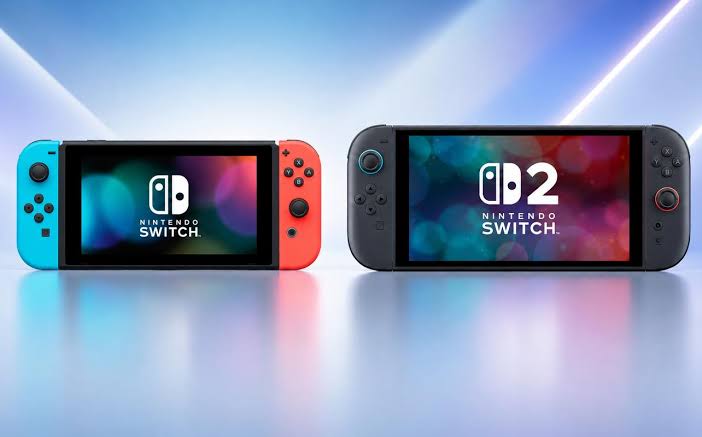
Nintendo Switch Migration: Digital Vault Architecture details come from leaks and supply-chain reports. None of it is officially confirmed yet. Even so, gamers prepping for this hardware shift can map out a reliable way to keep their libraries intact.
Preparing the Legacy Nintendo Switch Console
You need to isolate your existing library before the physical handoff, so do the boring prep first. Owners should verify network stability across both devices to prevent packet loss during wireless synchronization. A stable connection also stops corruption when you’re moving massive game archives.
Check your current account bindings against the new ecosystem’s requirements. That step heads off sync errors later. You might spot parallels to how the Google Save Switch handles cloud redundancy, much like Apple structures its own backup protocols. Charge the console fully, too. The 5,220 mAh battery supports extended local scanning sessions, and nothing kills a long upload faster than a dead battery. Clearing cache files keeps upload size down.
Executing the Digital Vault Sync
The second stage kicks in once both consoles recognize each other. That’s when core migration protocols go live. The destination hardware packs 12 GB of LPDDR5 RAM plus internal storage officially specified at 256 GB of UFS 3.1 flash memory. Those components handle simultaneous read-write operations without choking.
Dig through the initial setup menus and you may find shortcuts that mirror the precision found in an iPhone Action Guide. Specific button combinations open the transfer utility fast. The custom processor is an 8-core ARM Cortex-A78AE CPU paired with an NVIDIA Ampere-based GPU architecture, which gives you the raw compute power to compress and route large volumes of data swiftly. And this architectural leap means background tasks like asset indexing never throttle the primary transfer speed.
Verifying Post-Transfer Integrity on Switch 2
The final checkpoint confirms every save file landed intact inside the new system. Handheld play leans hard on the 8.0-inch LCD screen and its 1080p resolution in handheld mode. Graphical assets have to render perfectly from the first second.
Boot your most-played titles first to validate texture streaming. Run quick diagnostic checks to confirm no corrupted sectors survived the migration. Once verification completes, you can safely archive the legacy hardware. The new console handles resource allocation dynamically.