If you’ve ever given up mid-scroll trying to find something to watch, there’s good news: Netflix’s massive US library now has a much friendlier way to browse it, thanks to a fresh round of site updates focused on speed, clarity, and smarter filtering.
Table of Contents
Smarter, cleaner filters: You can now narrow results by language, genre, release year, IMDb score, and whether a title is a Netflix Original. Active filters appear as removable chips, so you can fine-tune your search without starting over — or wipe everything clean in a single click.
A “Must Watch” shortcut: For anyone who just wants a good recommendation without endless scrolling, a new Must Watch filter surfaces pre-vetted picks instantly.
Sticky A–Z navigation: The alphabet jump bar now stays fixed as you scroll, making it much faster to hop from A to M to Z inside Netflix’s enormous catalog — no more scrolling back to the top every time.
Smoother visual browsing: Pages load with a clean skeleton state, posters ease in as they appear, and each title now carries a simple label — Movie, TV Series, or Podcast — so you can tell content types apart at a glance.
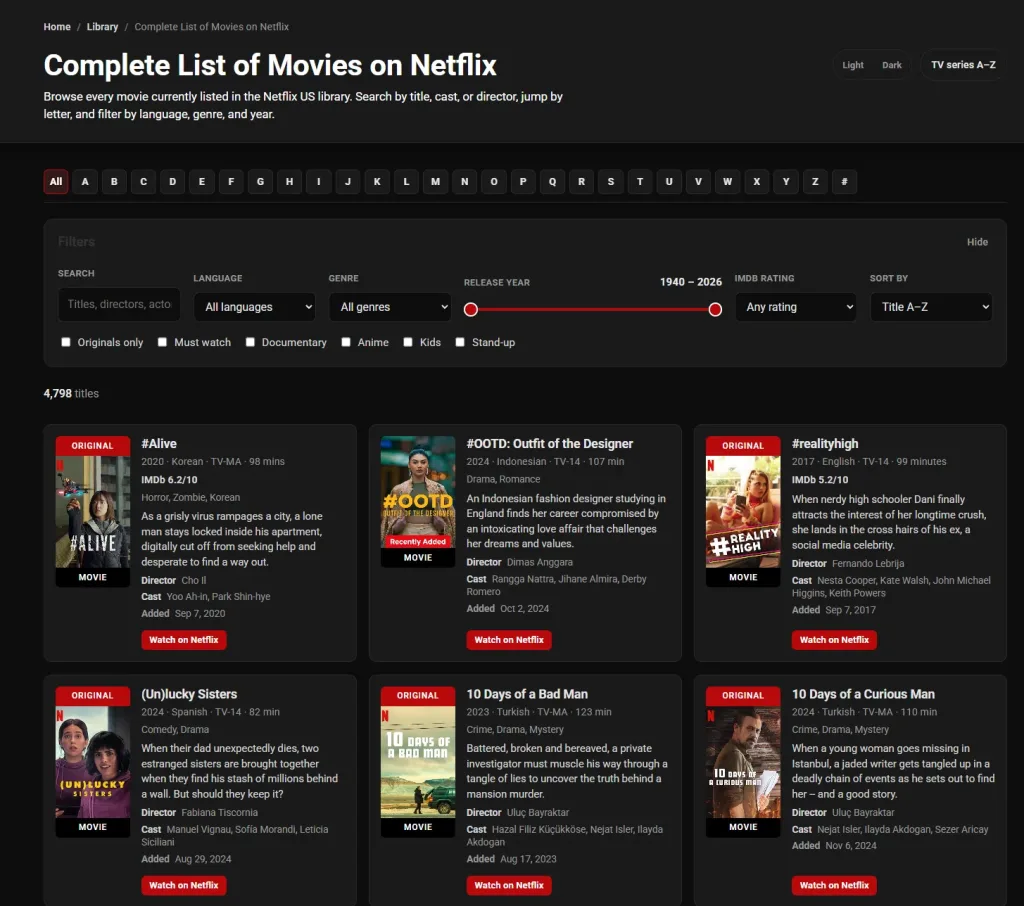
A more consistent library hub: The main lists page has been restyled to match the new A–Z experience, making it easier to jump between different catalogs — movies, series, genres, decades — without the layout feeling disjointed.
This kind of structured, filterable content discovery mirrors how large databases like Wikipedia organize sprawling information into browsable categories (Wikipedia), making massive catalogs far less overwhelming to explore.
Netflix: Overview
| Update | What It Does |
|---|---|
| Filter Chips | Narrow results by genre, year, language, rating |
| Must Watch Filter | Surfaces curated top picks instantly |
| Sticky A–Z Bar | Keeps alphabet navigation visible while scrolling |
| Type Labels | Distinguishes Movies, TV Series, Podcasts |
| Redesigned Hub | Unified look across all library pages |
For more streaming news and platform updates, check out TechnoSports — including recent coverage on Musafir Cafe and other Netflix originals.
FAQs
Q: What’s new in Netflix’s library browsing tools?
Cleaner filters, a Must Watch shortcut, sticky A–Z navigation, and clearer Movie/TV/Podcast labels.
Q: Does this update change what’s available on Netflix?
No — it only improves how existing titles are organized and searched, not the catalog itself.