PAK224/4 (35.2/50 ov, target 326)
 SL325/8
 TAA1
TAA1 ETT0
ETT0 BOL2
BOL2 MON1
MON1 MBSG2
MBSG2 PFC1
PFC1 B041
B041 VFB2
VFB2 BMG0
BMG0 SCP0
SCP0 FCA1
FCA1 SCF0
SCF0 S040
S040 RBL2
RBL2 UDI
UDI ROMA
ROMA TOT
TOT CRY
CRY BET
BET MCF
MCF MUN
MUN DOR
DOR HIL
HIL FAT
FAT MIL
MIL INT
INT TRY
TRY MNS
MNS AVL
AVL FUL
FUL LEV0
LEV0 ATM2
ATM2 CHE2
CHE2 MAN0
MAN0 CFC0
CFC0 KER0
KER0 UAE266/5 (49/50 ov, target 264)
 NED263/4
 JER
JER QAT
QAT KENYA
KENYA PNG
PNG BIK
BIK SPR
SPR MOW160/5 (18.1/20 ov)
 VAG
VAG TAS427
 NSW174/8 (60 ov)
 NZ-A
NZ-A IND-A291/7 (88 ov)
 QLD
QLD VIC282/9 (84 ov)
 DHA
DHA BAR
BAR SYL218
 CHATT64/1 (15 ov)
 MYMS
MYMS KHU280/8 (82 ov)
 RAN
RAN RAJ155/6 (59 ov)
 NZ
NZ IND
IND NAM
NAM IRE
IRE AFG
AFG ZIM
ZIM ST-W
ST-W BH-W
BH-W SS-W
SS-W HH-W
HH-W WAR
WAR WPR
WPR OTAGO
OTAGO CD
CD BRB
BRB MIS
MIS PS-W138/1 (13.3/20 ov, target 137)
 MR-W136/6
 AS-W185/2
 MS-W164/7 (20 ov)
 SVW0
SVW0 TSG0
TSG0 FAY0
FAY0 ALF0
ALF0 BOU0
BOU0 LEE0
LEE0 BRE0
BRE0 NFO0
NFO0 COV1
COV1 SUN0
SUN0 Lille1
 Lens0
Lens0 Villarreal0
 Espanyol1
 Elversberg4
 Mainz1
If your Netflix remote habits are about to change, you’re not imagining it. Netflix has started rolling out a fresh TV player redesign, and it’s all about making playback feel cleaner and more intuitive.
What’s Actually Changing on Netflix?
Starting July 29, Netflix began testing a new video player interface on its TV app, shifting focus from discovery (covered in last May’s homepage redesign) to what happens after you hit play.
Simplified Controls: The on-screen play/pause and back buttons are being removed entirely. Since most smart TVs and streaming devices now behave similarly, Netflix is leaning on your remote’s dedicated buttons instead — the same middle button or back button you’re likely already using out of habit.
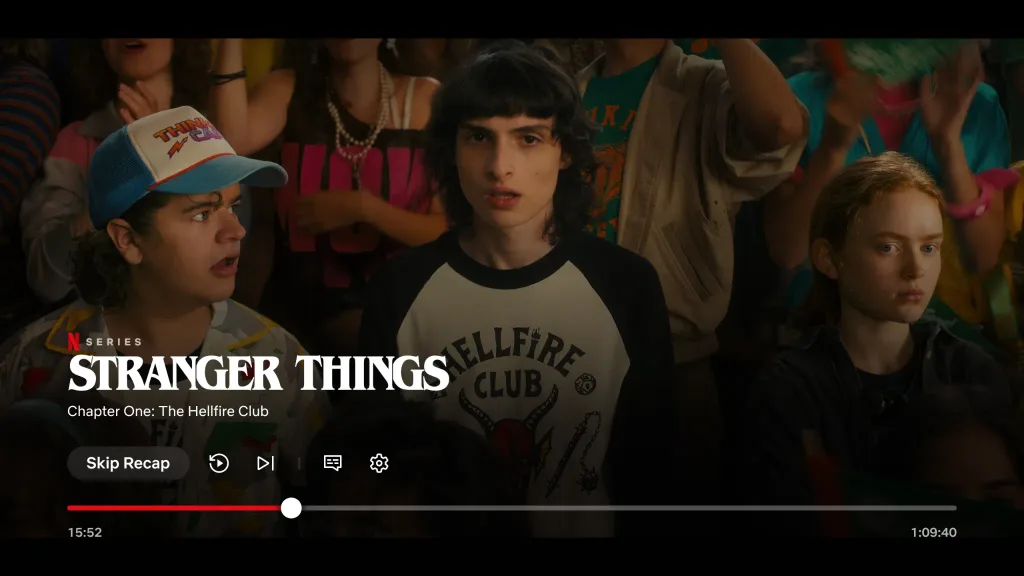
Icon Consolidation: Other icons like “Skip Recap,” “Next Episode,” and settings are being grouped together in the bottom-left corner instead of being scattered across the screen, with a slightly larger scrubber bar for easier navigation.
Unified Audio & Subtitles Menu: Language settings are getting a major simplification — audio, subtitles, and subtitle appearance are now combined into a single overlay menu at the bottom of the screen, letting you adjust everything without pausing your show.
Live Events Prompt: With Netflix pushing further into live programming (including its major WWE deal), clicking into an ongoing live event now gives you a clear choice: start from the beginning or jump straight into the live action, replacing the older “More Info” button.
Quick Facts
| Change | What It Means |
|---|---|
| On-screen play/pause & back buttons | Removed — use remote controls instead |
| Icons (Skip Recap, Next Episode, Settings) | Consolidated to bottom-left |
| Audio & subtitle settings | Merged into one overlay menu |
| Live event prompt | New “start from beginning vs. live” choice |
| Rollout Date | July 29, 2026 (select users) |
For more Netflix UI updates, feature rollouts, and streaming news, check out TechnoSports to stay ahead of the changes.
Part of a Bigger Pattern
This isn’t an isolated tweak — Netflix has also recently updated icons for Games and Podcasts in its TV app, shifted the Top 10 badge from the top-right to top-left of title cards, and reworked its web interface navigation. As with most A/B testing rollouts, Netflix will likely use data from this limited release to decide whether the redesign goes wide.
FAQs
Q1: Is Netflix’s new TV player available to everyone?
No, it’s currently a limited test rolling out to select users starting July 29, 2026.