SA329 & 319/5 (117.4 ov)
 AUS429
 BAN272 & 79/6 (29 ov)
 WI245
WI245 NAM168 (41/50 ov, target 299)
 IRE298/8
 NEU1
NEU1 BFC0
BFC0 KAS1
KAS1 NAG2
NAG2 DIR
DIR NEOM
NEOM HAC
HAC PSG
PSG NICE
NICE REN
REN SHA
SHA AHL
AHL ELV
ELV M05
M05 VIL
VIL ESP
ESP LILL
LILL RCL
RCL UAE
UAE NED
NED ABH1
ABH1 ITT1
ITT1 NZ259/7
 IND172/9 (20 ov, target 260)
 Fiorentina2
 Atalanta2
 Al Nassr5
 Al Kholood3
 DEN
DEN JER
JER RHINO215
 MOUNT203/6 (44.5/50 ov, target 216)
 EAGLE127/9 (39.5/50 ov, target 275)
 TUSK274/9
 BRB
BRB VAG66/1 (7/20 ov)
 SOA154 & 182/1 (48 ov, target 422)
 WA406/5d & 169
 TAS335/5 (96 ov)
 NSW
NSW PAK
PAK SL
SL AS-W
AS-W MS-W
MS-W PS-W
PS-W MR-W
MR-W ND
ND AUCK
AUCK OTAGO
OTAGO CD
CD WELL
WELL CANT
CANT MOW
MOW TOK
TOK AFG221/7
 ZIM202/5 (20 ov, target 222)
 ENG386/5
 OMA196
 BH-W154/5
 SS-W157/6 (20 ov, target 155)
 HH-W174/8 (20 ov, target 193)
 Chennaiyin
 Kerala
 Al Riyadh0
 Al Qadsiah6
 Frosinone5
 Lecce1
 Al Khaleej4
 Al Hazem2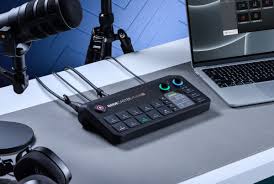
Livestream gear doesn’t need to drain your wallet anymore. Rode just launched the Rodecaster Video Core, a compact audio-video interface priced under $300 that lets creators capture professional-quality streams without spending a fortune. This is a real game-changer for budget livestreamers.
Why Budget Livestream Gear Matters Now
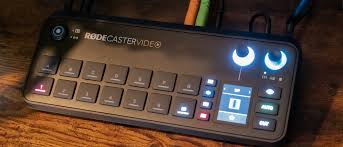
Streaming has blown up. But here’s the problem: most affordable livestream gear still felt like you were settling—cheap mics, laggy encoders, video quality that looked rough. Rode flipped that on its head. The Video Core packs dual XLR inputs, HDMI passthrough, USB connectivity, and built-in video mixing into one device.
Creators on Twitch and YouTube Live can now skip the $800+ mixing console route entirely. According to The Verge, this price point directly takes on older mixing boards that cost three times as much.
Rodecaster Video Core: The Specs That Matter
Here’s what you’re actually getting:
| Feature | Specification |
|---|---|
| Price | $299 USD |
| Audio Inputs | 2x XLR, USB audio support |
| Video I/O | HDMI in/out, 4K pass-through |
| Streaming Output | USB-C to PC/Mac, direct streaming |
The best part? It handles multi-source mixing without needing your laptop to do all the heavy lifting. Grab a camera and microphone, hit record, and you’re live. No unnecessary software. No steep learning curve.
How This Reshapes Creator Economics
Money matters. So do entry barriers. When gear costs under $300, creators stop asking “Can I afford this?” and start asking “Why haven’t I upgraded yet?” That’s what Rode pulled off here.
Smaller streamers—gaming channels, indie musicians, solo content creators—finally have a real option to improve their production quality without going broke. The Video Core also plays nicely with what you’ve already got. Own a decent microphone or camera? It integrates right in.
That’s way smarter than buying everything separately and spending way more.
FAQ: Your Livestream Gear Questions Answered
Q: Does the Video Core require special software?
Nope. It works as a plug-and-play USB device on Windows and Mac. Fire up OBS or whatever streaming app you use—it just works.
Q: Can I use it for podcasting too?
Definitely. The dual XLR inputs and audio routing make this excellent for podcast recording and remote interviews.
Q: Is 4K passthrough actually useful for streamers?
Absolutely. Most streams max out at 1080p, sure, but having 4K passthrough means your setup’s ready for whatever comes next.