Apple released iOS 18, and with it came many new user-facing features, chief among them a long-wanted one for iPhone users: built-in call recording. Until iOS 18 came out, users of iPhones either had to use third-party apps to record calls or should not record them at all. Here’s a detailed look at how this new feature works.
Setting Up Call Recording on iOS 18
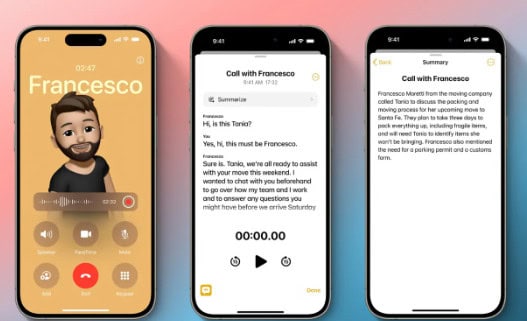
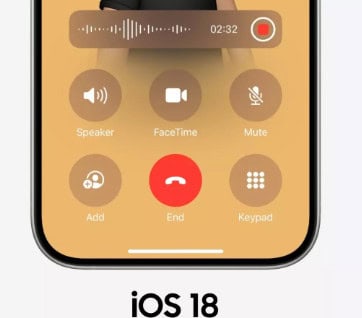
It is simplified and easy to use in that now you can record calls on your iPhone with iOS 18. All you need to do is place a call from the dialer. After the call is connected, you will then see a record button on the screen. Tap this button to begin recording. Importantly, both participants in the call will be notified with a message stating, “This call will be recorded,” ensuring transparency. Here’s a step-by-step guide on how to record calls on iPhones running iOS 18:
- Make a Call: Use your iPhone to make a phone call.
- Tap the Record Button: When you get on a call, find the “Record” button at the top left of the screen and tap on it.
- Notification: An in-app prompt that says “This call will be recorded” and cannot be dismissed from the caller or receiver side. If it’s left there then the recording will auto-stop.
- Stop Recording: Press on “Stop” and you will have your call recording saved.
- Access your recordings: Your recorded call will be saved in the Notes app. Open the Notes app, and go to Notes > Call Recordings folder.

In addition to recording calls, iOS 18 includes a transcription feature that converts recorded conversations into text. This text will be saved along with the audio recording in the “Call Recordings” folder. The transcription feature supports several languages, including English (U.S., UK, Australia, Canada, India, New Zealand, Singapore), Spanish (U.S., Mexico), Japanese, Mandarin Chinese, Cantonese, and Portuguese (Brazil).
FAQs
How do I start recording a call on iOS 18?
Simply make a call and tap the “Record” button on the call screen once the call is connected.
Where can I find my recorded calls?
Recorded calls are saved in the Notes app under the “Call Recordings” folder.