SA329 & 387 (134.4 ov)
 AUS429
 BAN272 & 79/6 (29 ov)
 WI245
WI245 HAC1
HAC1 PSG4
PSG4 NICE4
NICE4 REN2
REN2 SHA4
SHA4 AHL1
AHL1 ELV
ELV M05
M05 VIL
VIL ESP
ESP LILL
LILL RCL
RCL UAE
UAE NED
NED PAK
PAK SL
SL Chennaiyin
 Kerala
 Chelsea
 Man Utd
 Levante
 Atlético
 DIR1
DIR1 NEOM2
NEOM2 NEU1
NEU1 BFC1
BFC1 ABH1
ABH1 ITT1
ITT1 NAM168 (41/50 ov, target 299)
 IRE298/8
 SOA154 & 182/1 (48 ov, target 422)
 WA406/5d & 169
 TAS335/5 (96 ov)
 NSW
NSW NZ
NZ IND
IND AS-W
AS-W MS-W
MS-W PS-W
PS-W MR-W
MR-W ST-W
ST-W BH-W
BH-W ND
ND AUCK
AUCK OTAGO
OTAGO CD
CD AFG221/7
 ZIM202/5 (20 ov, target 222)
 ENG386/5
 SS-W157/6 (20 ov, target 155)
 HH-W174/8 (20 ov, target 193)
 COT1
COT1 BOC2
BOC2 BODO3
BODO3 VFK2
VFK2 LBK1
LBK1 RAN1
RAN1 OAK0
OAK0 NKU0
NKU0 GRA0
GRA0 HAR2
HAR2 GRE0
GRE0 DIJO1
DIJO1 METZ0
METZ0 PAU1
PAU1 NAN1
NAN1 CLE0
CLE0 AVE0
AVE0 DUN0
DUN0 Al Taawoun
 Al Ettifaq
 Bologna
 Monza
Monza Fiorentina2
 Atalanta2
 Al Nassr5
 Al Kholood3
 Al Riyadh0
 Al Qadsiah6
WhatsApp is a well-known social media platform that works across all platforms. On their devices, everyone has WhatsApp. This platform is also available for all devices, including Android and iOS, as well as for PC users via the web version. These days, WhatsApp cheats are really prevalent.
In the official WhatsApp application, you have the ability to adjust the font size within conversation threads. Additionally, WhatsApp for iPhone and Android enables you to apply bold, italics, strikethrough, and monospace formatting to your text. However, it is important to note that changing the color of the text is not currently available. Moreover, you can customize the background of a text status through the status option.
Did you know that with the help of a third-party tool, you can send messages and modify the appearance of your text to appear in blue? It’s true! The official WhatsApp application offers the functionality to customize font colors.
Looking for WA GB? How to Download WA GB Safely as of 2025
| Step | Safe Practice | How It Helps | Risks if Ignored |
|---|---|---|---|
| 1 | Use the Official Developer’s Site | Reduces the chance of downloading malware-infected APKs. | Fake APK mirrors often bundle spyware or ads. |
| 2 | Check Version & Update Logs | Ensures you get the most recent, stable build. | Old versions may stop working or crash. |
| 3 | Verify APK with Antivirus / APK Checker | Confirms the file’s integrity before installing. | Corrupted APKs can damage your phone or steal data. |
| 4 | Enable “Unknown Sources” Temporarily | Lets you install the APK outside Play Store. | Leaving this on permanently exposes you to risky installs. |
| 5 | Backup Your Chats | Protects your data if the installation fails. | Chats may be lost permanently. |
| 6 | Prefer Stable Over Beta Builds | Stable builds are tested for fewer bugs. | Beta may break key features mid-use. |
| 7 | Avoid Third-Party “Auto-Update” Apps | Keeps you in control of what you install. | Many auto-updaters push adware or fake versions. |
| 8 | Read User Feedback (Telegram/Reddit/XDA) | Community feedback alerts you about safe vs unsafe builds. | Ignoring can lead you to a harmful or outdated version. |
| 9 | Keep a Secondary Number for WA GB | Minimizes risk to your main WhatsApp account if Meta enforces bans. | Using your primary number risks losing access permanently. |
| 10 | Always Have Official WhatsApp as Backup | Ensures you stay connected if WA GB stops working. | Without backup, you may lose contact access suddenly. |
⚠️ Reminder: WA GB (GB WhatsApp) is a third-party mod. It is not officially supported by WhatsApp/Meta, which means there’s always some risk of account ban or security issues. Safe download practices reduce, but don’t eliminate, those risks.

HOW TO CHANGE THE COLOR OF THE WHATSAPP FONT?
To begin, go to the Google Play Store and download any font-changing software. In the Play Store, you’ll find a plethora of font switcher apps. So, for WhatsApp and text, download WhatsBlue Text (Fancy Text Generator Pro) or Cool Fonts.
Note: You may also use the Google Play Store to find additional text-generating apps.
This software, however, is not an official WhatsApp app. However, you may get this program through the Google Play Store. It satisfies the Play Store’s criteria. Although the software is safe, it does include advertisements. So, go to the Google Play Store and download WhatsBlue (Fancy Text + Sticker Maker).
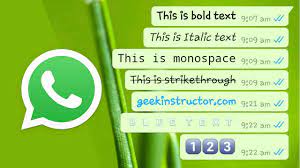
What’s Blue Text App’s features include?
Blue is the color you can use to send a message.
- It also has over 50 elegant text styles, allowing you to compose a message in a variety of ways.
- Over 30 unique fonts to choose from.
- 30+ ready-to-use sticker packs in a variety of categories.
- You may make your own personalized stickers as well.
To freestyle draw on the sticker, do a freehand pencil sketch.
To design personalized stickers, we provided 25+ clipart packs (including happy new year, birthday, and so on).
Because it combines a stylish text generator app with a sticker creator app, this software is more utilitarian than text style. It has sticker packs pre-installed. You may also create your own custom sticker by downloading images from the internet.
The sticker collection offers a wide variety of more than 30 fonts and over 20 color variations. Additionally, the text on the sticker can be customized with any color preference. The feature of pencil sketches allows users to create freestyle drawings. After generating custom stickers using clipart packs and font colors, they can be saved to the phone gallery. This makes it convenient to share artistic creations with friends.
IN WHATSAPP CHAT, CHANGE THE FONT COLOR

WHERE DO I CHANGE THE COLOR OF THE WHATSAPP STATUS FONT?
While WhatsApp only allows users to change the background color of their text status, there are a variety of elegant fonts available, including bold, italic, strikethrough, and monospace. Unfortunately, the color of the status text itself cannot be changed directly within the app. However, there are solutions like WhatsBlue text that can alter the color of your WhatsApp status type to blue. The process for doing this is outlined below.
1. Open the Google Play Store and download the WhatsBlue Text app. (On this page, there is a link.) Another programme can also be installed.)
2. Tap the Start writing button in the WhatsBlue Text app on your phone. Then, in the text field, fill in your status.
3. Now tap on the blue text to reveal three options: Copy Text, WhatsApp, and Share Text. The WhatsApp app will open after you select the WhatsApp option.
4. Next, pick My status from the drop-down menu and hit the tick mark icon in the bottom right corner of the screen.
5. The color of your current status will be displayed as blue now. Feel free to modify the background color as you wish. However, please note that changing the font color to blue does not have the same effect. Nonetheless, it does have an impact on the spacing and appearance of the status text. Lastly, click on the Send icon to publish it as your status.

Edit THE TEXT COLOR IN WHATSAPP:
You can add up to 139 characters to your WhatsApp About text. Your friends or contacts will see the “About text.” You can alter the color of the About text with the WhatsBlue text app.
1. To use the fancy text feature, open the WhatsBlue app and select it. Then write your About paragraph.
2. The Copy text option appears when you tap on the blue-colored text. To copy the text to the clipboard, tap on it.
3. Now open the WhatsApp app on your phone and touch on the three vertical dots in the upper right corner to open Settings. Then, at the top, tap on your name.
4. Now, from the right side of the About option, hit the pencil icon. From the right side of your About text, tap the pencil icon once more.
5. In the text field, delete the old About text and paste the new text from the WhatsBlue app. To paste text, simply tap and hold the text field area.
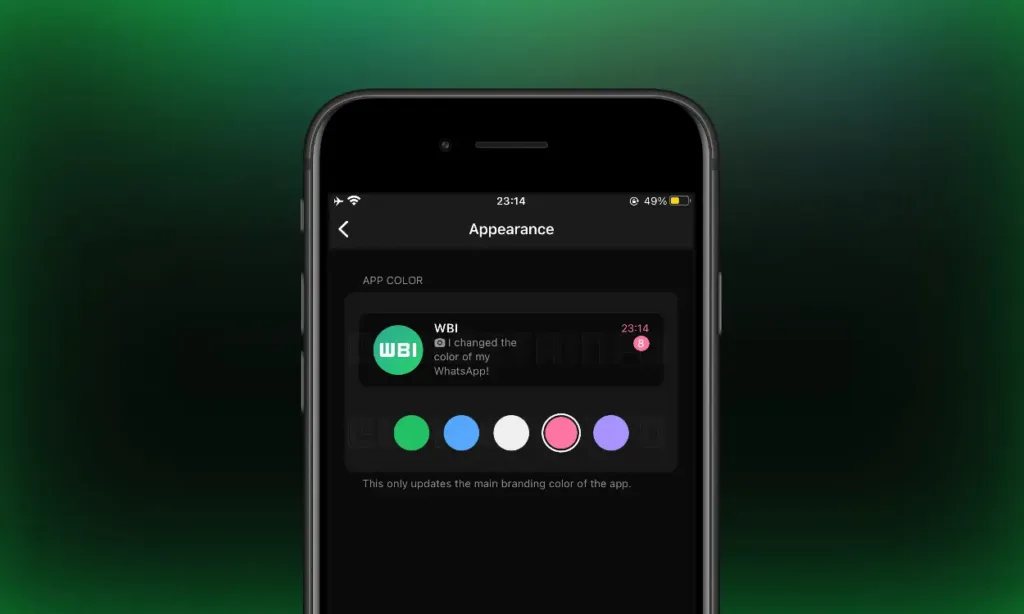
IN WHATSAPP, THE BEST APPS FOR CHANGING FONT COLOR ARE:
The WhatsBlue Text Generator app is the best in class; however, it does have some flaws. However, there are also more options available. These programs are available for download.
1. Keyboard+ Converter – Blue Text:
This is a keyboard and text translator that enables you to type in the color blue. You have the ability to employ the built-in translation tool to manually modify your text into a blue hue. Moreover, it offers a keyboard feature, allowing you to set it as the default keyboard for your Android device. This software is compact and compatible with the dark theme.
Go to Phone Settings >> Language and input » to activate the Blue Text keyboard on your Android device. Keyboard in Use >> « Choose a Keyboard Emoji Letter Keyboard should now be enabled. (Note that different Android phones have different options.)
2. Fonts that are cool:
This is a different version of Whats Blue. WhatsBlue is the same app. You must type text into the cool fonts program, which then turns it into several styles. The text can then be copied and pasted wherever you want.
The software is only 2.3 MB in size and requires Android 4.0.3 or later to run.
3. BlueWords:
Blue Words is a straightforward text-based program that can convert letters into emojis. The software is recognized for writing letters in a blue hue, as its name suggests. It also includes 30+ different styles.
Blue letters, Thin, Round, Squared, Dirty, Underlined, Celtic, Magic, Uppercase, Dark squared, Diamonds, Jail, Classical, Parenthesis, Tropical, and more are among the letter styles offered.
Words of Closure:
So, that’s ‘How To Change WhatsApp Font Color’ for you guys. This is a quick and simple way to send a blue-coloured message. In addition, this software has a large number of fonts. You may also use any other Google Play Store app to accomplish this. Because there are many apps that modify WhatsApp’s typeface in the Play Store.
This program can be used to change the fonts on a different messaging platform. Please let us know if you find any other impressive font applications in the Play Store.
Also Read-
- Why Indian Government excited to welcome Samsung, Intel, TSMC and others to manufacture chips in India?
- Razer’s latest application drop Chroma RGB in your home
- Emma Watson Breaks the silence about she left from Harry Potter after Goblet of Fire
- Top 10 Richest Sports Leagues in the world according to Their Revenue Per Match
FAQs
Can I directly change the font color in WhatsApp chats?
Are there any workarounds to add colored text in WhatsApp?
Third-party apps: Some keyboard apps offer the ability to style text before pasting it into WhatsApp. However, be cautious while downloading such apps and ensure they come from reputable sources.
Font formatting tricks: WhatsApp supports basic text formatting like bold, italics, and monospaced fonts. While not directly changing color, these can add emphasis and visual interest.