
 SA329 (82.3 ov)
 AUS
AUS ROMA4
ROMA4 CAG2
CAG2 TOR1
TOR1 COMO1
COMO1 BRD2
BRD2 PET0
PET0 FLE1
FLE1 ARS1
ARS1 BAN
BAN WI
WI IND-W
IND-W ZIM-W
ZIM-W GOA
GOA SC Delhi
 Milan
Milan Bologna
 Parma
Parma Udinese
 Venezia
 Inter Milan
 Genoa
Genoa Juventus
 Monza
Monza Napoli
 SAS2
SAS2 LAZ6
LAZ6 AFG177
 ZIM140 (19.1/20 ov, target 178)
 ABH0
ABH0 ALF1
ALF1 PAK110
 SL114/2 (18.1/50 ov, target 111)
 AUCK
AUCK CANT
CANT CD
CD ND
ND SIKM184
 NAGA187 & 46/4 (34 ov)
 JHK131/4 (47 ov)
 DELHI515/5d
 ODSA194
 SVCS13/0 (5 ov)
 BRODA616
 J & K6/0 (4 ov)
 CHD685/5d
 HP49/0 (14 ov)
 CGR216/8 (95 ov)
 AP231
AP231 HYD193/2 (54 ov)
 PNJB431
 KNTKA297/7 (95 ov)
 TPURA194
 KER101/6 (35 ov)
 BENG350
 UAE
UAE OMA
OMA ENG
ENG DEN
DEN QAT
QAT KENYA
KENYA KUW
KUW POA
POA SPR
SPR BRB
BRB VAG
VAG NAM316/7
 IRE253 (44.5/50 ov, target 317)
 NZ198/3
 IND199/4 (13.2/20 ov, target 199)
 NED371/5
 JAB113 (19.3/20 ov, target 133)
 KAY132/9
 TORD3
TORD3 MIR3
MIR3 LLA1
LLA1 PON1
PON1 BVV2
BVV2 RKC2
RKC2 DON2
DON2 EXT2
EXT2 MNR0
MNR0 AND0
AND0 DOR2
DOR2 SVW2
SVW2 BMG2
BMG2 KSC0
KSC0 ELV0
ELV0 SVD2
SVD2 Gamba Osaka
 Buriram
 Kashima
 Pohang Steelers
 Sevilla2
 Osasuna0
 PSG2
PSG2 Lyon0
Lyon0 Mohun Bagan1
 Chennaiyin0
 ALS3
ALS3 HIL1
HIL1
Gmail. Photos. YouTube. Search. Gemini now reasons across your entire Google life to answer questions no generic AI assistant ever could.
Google has officially launched Personal Intelligence in the Gemini app for India — making it one of only a handful of countries globally to receive one of the most significant Gemini upgrades to date. Announced on April 14, 2026, Personal Intelligence transforms Gemini from a powerful but generic AI assistant into a genuinely personalised partner that understands your life, your context, and your data — securely, and entirely on your terms.
India is only the second country in the world after the United States to receive the feature, with Japan also confirmed. This makes the India launch a significant strategic signal from Google about the importance of the Indian market in its global AI expansion roadmap.
What Is Personal Intelligence — And Why Is It Different?
Most AI assistants answer questions based on their training data. Personal Intelligence does something fundamentally different — it reasons across your personal Google ecosystem to give you answers that are tailored to your specific life, not to the average user.
As Google’s official India blog describes it, Personal Intelligence has two core strengths that work together: reasoning across complex sources and retrieving specific details from a connected app — like an email or a photo — to answer your question. It combines both constantly, working across text, photos, and video simultaneously to provide uniquely contextual answers.
The four apps connected at launch are:
| Connected App | What Gemini Can Access |
|---|---|
| Gmail | Booking confirmations, receipts, tickets, correspondence threads |
| Google Photos | Screenshots, saved images, visual references, travel photos |
| YouTube History | Recently watched videos for recommendations and context |
| Google Search History | Past searches to understand your interests and intent |
This is not a surface-level integration. As Google’s official blog states, Personal Intelligence is designed to let Gemini “reason across your digital life” — not just retrieve individual data points, but connect them into coherent, actionable responses.
A Real-World Example — The Jaipur Trip Scenario
The clearest way to understand what Personal Intelligence actually does is through a concrete use case. Here is the scenario Google uses in its official blog, and it is genuinely illuminating.
Imagine you are planning a trip to Jaipur. Your booking confirmations are in Gmail. A local map screenshot is saved in Photos. A restaurant recommendation came from a YouTube video you watched last week. Normally, you would open four different apps to piece this together manually.
With Personal Intelligence enabled, you simply ask Gemini: “What are my travel plans for Jaipur?”
Gemini then:
| Step | What Happens |
|---|---|
| Gmail | Pulls your hotel and flight booking details into a clean timeline |
| Google Photos | Retrieves your saved map screenshot and any gift idea photos you saved |
| YouTube History | Identifies the food trend video you watched and surfaces the restaurant recommendation from it |
| Result | A single, coherent, personalised answer — no app-switching, no manual searching |
This is what makes Personal Intelligence categorically different from asking Gemini a standard question. It is not just smarter — it is smarter about you specifically.
Other practical use cases include:
- “Find the receipt for my last Amazon order” — Gemini searches Gmail
- “What was that photo I saved for kitchen renovation ideas?” — Gemini searches Photos
- “Remind me what I was researching about electric vehicles last month” — Gemini searches your Search history
- “What cooking technique was in that YouTube video I watched this week?” — Gemini references YouTube history
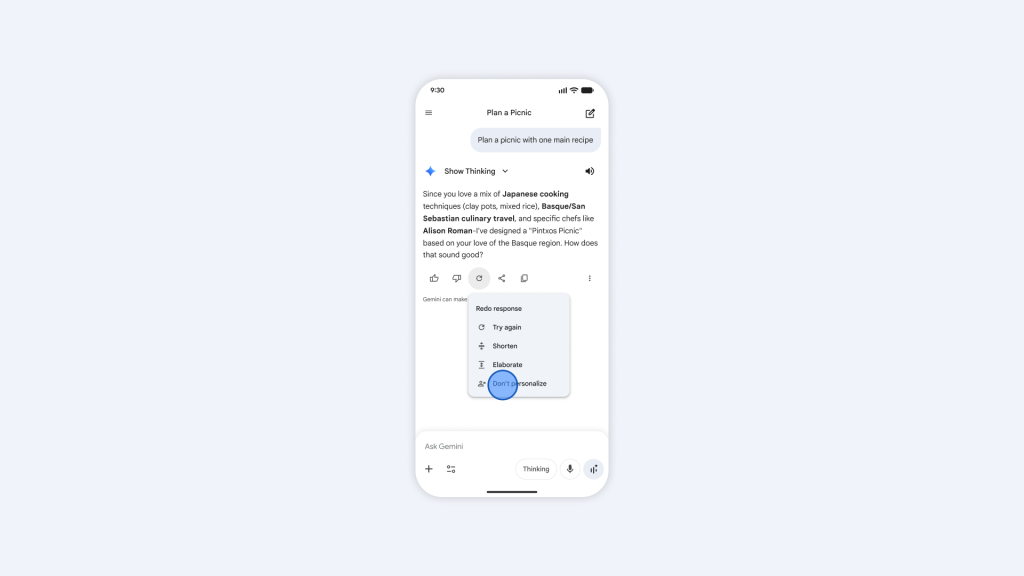
Privacy and Control — Built In, Not Bolted On
This is the part of the Personal Intelligence launch that deserves the most careful attention — because the feature only works if users trust how their data is handled. Google has built the privacy architecture with an explicit opt-in design.
As the Google India blog states, “Because this data already lives at Google securely, you don’t have to send sensitive data elsewhere to start personalizing your experience. This is a key differentiator.”
| Privacy Feature | How It Works |
|---|---|
| Off by Default | Personal Intelligence does not activate automatically — users must proactively enable it |
| Granular App Control | Users choose which apps to connect — Gmail only, Photos only, all four, or any combination |
| No Training on Personal Data | Gemini does not train on your Gmail or Photos data — it references it only to answer your specific requests |
| Source Transparency | Gemini shows where each piece of information came from so you can verify it independently |
| Real-Time Correction | If a response feels wrong, you can correct it on the spot — “Remember, I prefer window seats” |
| Temporary Chats | Users can have conversations without any personalisation active via temporary chat mode |
| Regeneration Without Personalisation | Individual responses can be regenerated without personal context if needed |
| Disconnect Anytime | Apps can be unlinked and the feature turned off entirely at any moment from Settings |
Importantly, Google has clarified precisely how training works with Personal Intelligence. As the official Google blog states: “We don’t train our systems to learn your booking details; we train them to understand that when you ask for that, we can locate them.” The model trains on prompt-and-response structure with personal data filtered out — not on the content of your Gmail or Photos library.
Google has also confirmed that Personal Intelligence includes built-in sensitivity guardrails. For example, Gemini avoids making proactive assumptions about health-related topics — it will address them if explicitly asked, but will not volunteer health-based inferences unprompted.
Honest Limitations — What Google Says It Cannot Always Get Right
In a refreshingly transparent move, Google has explicitly acknowledged the current limitations of Personal Intelligence in beta.
As Google’s official blog notes, the feature may sometimes produce “over-personalisation” — making connections between completely unrelated topics based on the data it sees. The example given is instructive: if you have hundreds of photos taken at a golf course, Gemini might assume you love golf — missing the nuance that you were there because your son plays, not because you do. If Gemini gets this wrong, you can simply tell it “I don’t like golf” and it will adjust.
The system also acknowledges potential struggles with timing and relationship context — understanding that a relationship has changed, for instance, or that an interest you had six months ago is no longer relevant. These are edge cases, and the correction mechanism is straightforward, but they are worth understanding before enabling the feature.
Who Gets Access — And When
At launch, Personal Intelligence in India is rolling out in waves:
| User Tier | Access Status |
|---|---|
| Google AI Pro | Available now — rolling out gradually |
| Google AI Ultra | Available now — rolling out gradually |
| Google AI Plus | Available now — rolling out gradually |
| Free Users | Coming in the next few weeks |
| Platforms | Web, Android, and iOS — all Gemini models supported |
This also includes users who received free Google AI Pro access through Jio’s partnership with Google, making the feature accessible to a significantly broader Indian user base than standard paid subscriber numbers might suggest.
If the Personal Intelligence invitation does not appear automatically on the Gemini home screen, users can enable it manually by going to Settings — Personal Intelligence — Connected Apps and selecting which apps to link.
The Broader Context — Google’s AI Push in India
This launch does not exist in isolation. India is one of Google’s most strategically important markets, and the company has been seeding advanced AI features at an accelerated pace across the country.
In March 2026, Google launched Gemini in Chrome for Indian users. Last week, Google enabled an agentic restaurant-booking flow in AI Mode in India through integrations with Zomato, Swiggy, and EazyDiner. The Personal Intelligence launch follows directly in that trajectory — each feature building toward a version of Gemini that operates less like a chatbot and more like a proactive, context-aware assistant integrated into the fabric of daily life.
As NotebookCheck notes in its coverage, features like Personal Intelligence “point to a future where Gemini operates more proactively in the background” — a shift from reactive question-answering to anticipatory assistance.
For broader context on India’s AI landscape and what these capabilities mean for everyday users, read our feature on How AI Assistants Are Changing the Way Indians Use Smartphones in 2026 and our guide to Best AI Tools and Apps for Indian Users in 2026 on Technosports.
How to Enable Personal Intelligence in Gemini Right Now
Getting started takes less than a minute:
| Step | Action |
|---|---|
| Step 1 | Open the Gemini app on Android, iOS, or web |
| Step 2 | Tap Settings |
| Step 3 | Select Personal Intelligence |
| Step 4 | Tap Connected Apps |
| Step 5 | Choose which apps to link — Gmail, Photos, YouTube, Search |
| Step 6 | Start asking Gemini questions about your life |
If you do not see the option yet, it is still rolling out — check back over the coming days as Google expands the wave-based access.
The Bottom Line
Personal Intelligence in Gemini is one of those features that sounds incremental in a headline but feels transformative in practice. The ability to ask one AI assistant a question and receive an answer drawn simultaneously from your Gmail, Photos, YouTube history, and Search history — without switching apps, without manual searching, without losing context — is a genuinely new mode of interacting with your digital life.
It is private by design, opt-in by default, correctable in real time, and available across web, Android, and iOS. And for Indian users with significant digital lives spread across Google’s ecosystem — which describes the majority of smartphone users in the country — it is one of the most useful AI features to arrive in 2026.
Enable it. Try the Jaipur question. Then think about what else you have been searching for across four different apps when one question to Gemini could have done it all.
Stay ahead of every AI launch and technology update with TechnoSports — India’s most trusted destination for tech news.


