
 SA329 (82.3 ov)
 AUS
AUS BAN7/0 (4.5 ov)
 WI
WI IND-W
IND-W ZIM-W
ZIM-W GOA
GOA SC Delhi
 Milan
Milan Bologna
 Parma
Parma Udinese
 Venezia
 Inter Milan
 Genoa
Genoa Juventus
 Monza
Monza Napoli
 UAE
UAE OMA
OMA ROMA4
ROMA4 CAG2
CAG2 TOR1
TOR1 COMO3
COMO3 SAS2
SAS2 LAZ6
LAZ6 AFG177
 ZIM140 (19.1/20 ov, target 178)
 AUCK
AUCK CANT
CANT CD
CD ND
ND SIKM184
 NAGA187 & 79/5 (50 ov)
 JHK131/4 (47 ov)
 DELHI515/5d
 ODSA194
 SVCS13/0 (5 ov)
 BRODA616
 J & K6/0 (4 ov)
 CHD685/5d
 HP49/0 (14 ov)
 CGR216/8 (95 ov)
 AP231
AP231 HYD193/2 (54 ov)
 PNJB431
 KNTKA297/7 (95 ov)
 TPURA194
 ENG
ENG SL
SL DEN
DEN QAT
QAT KENYA
KENYA KUW
KUW POA
POA SPR
SPR BRB
BRB VAG
VAG PAK110
 NAM316/7
 IRE253 (44.5/50 ov, target 317)
 NZ198/3
 IND199/4 (13.2/20 ov, target 199)
 NED371/5
 JAB113 (19.3/20 ov, target 133)
 KAY132/9
 Al Khaleej
 Al Hazem
 Gamba Osaka
 Buriram
 ABH0
ABH0 ALF1
ALF1 Sevilla2
 Osasuna0
 PSG2
PSG2 Lyon0
Lyon0
Switching AI assistants has always meant starting over — rebuilding context, re-explaining preferences, re-entering everything you’d already taught your previous assistant. Google is now fixing that problem directly, rolling out a pair of tools for Gemini that let users import personal memory and full chat history from other AI apps, making the jump to Gemini far less painful than it used to be.
What the Two New Tools Actually Do
| Feature | What It Does |
|---|---|
| Memory Import | Transfers personal preferences, habits, relationships & context from other AI apps into Gemini |
| Chat History Import | Upload a ZIP of past conversations from other AI providers; search and continue them inside Gemini |
| Personal Intelligence | Combines imported data with Gmail, Photos, Search history for richer, context-aware responses |
| “Past Chats” Rename | Being gradually rebranded as “Memory” across the Gemini interface |
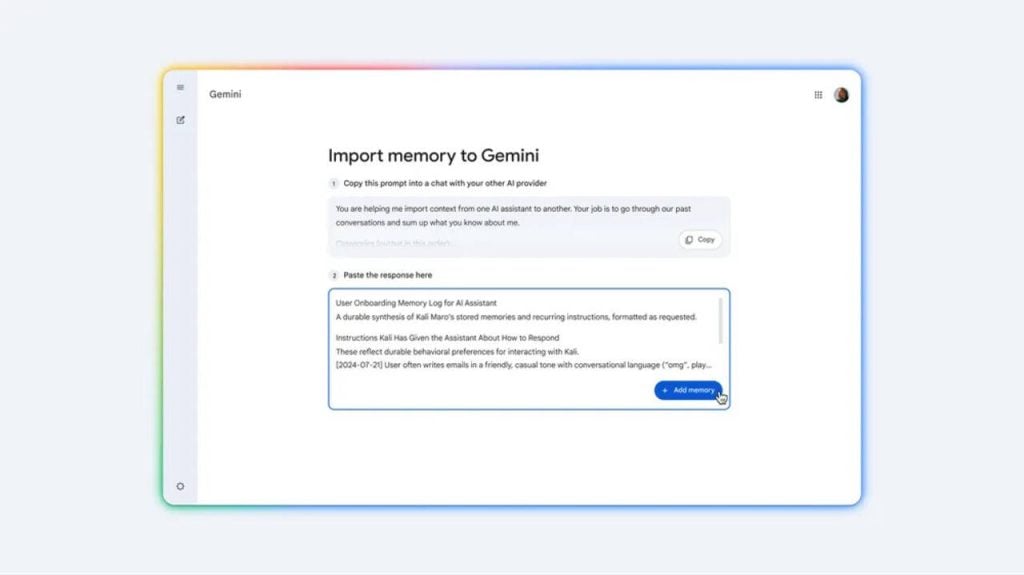
The memory import process works through a guided flow in Gemini’s Settings menu — it generates a suggested prompt you run in your current AI app (say, ChatGPT or Claude), copy the resulting summary, and paste it into Gemini. From that point, Gemini securely stores that context and uses it to personalise responses from the very first conversation, without you having to re-explain who you are, what you do, or how you like your answers structured.
Chat history import goes even further — you can upload a full ZIP archive of past conversations from any other AI provider, then search and revisit those threads inside Gemini, or even continue them mid-discussion without losing context.
The Bigger Play Here
This isn’t just a convenience feature — it’s a competitive move. Google is directly lowering the barrier to switching, and the timing is deliberate. Gemini’s Personal Intelligence layer makes this especially powerful for users already deep in the Google ecosystem: once imported memory is combined with data from Gmail, Photos, and Search history (with permission), the assistant builds a surprisingly holistic picture of the user across sessions. That’s a depth of personalisation that’s hard to replicate on platforms without Google’s data breadth.
The features are live now via Gemini’s Settings page for personal Google accounts, though they’re not available for Business or Enterprise users, anyone under 18, or users in the EEA, UK, and Switzerland. For the latest AI tool updates, keep an eye on TechnoSports.


