NAM321/6 (50 ov)
 IRE
IRE FCA
FCA FCU
FCU KOE
KOE S04
S04 M05
M05 SVW
SVW RBL
RBL ELV
ELV SCP
SCP HSV
HSV MEX-W
MEX-W ARG-W
ARG-W ARS
ARS EVE
EVE COV
COV FUL
FUL MOZ19
MOZ19 UGA23/0 (0.5/20 ov, target 20)
 NZ180/5
 IND181/6 (19.5/20 ov, target 181)
 Ipswich1
 Nottm Forest1
 Alavés1
 Málaga1
 WA105/3 (18.5/50 ov, target 372)
 NSW371/8
 DEN
DEN KUW
KUW KENYA
KENYA QAT
QAT SWD-W
SWD-W EPR-W
EPR-W TTN-W
TTN-W WPR-W
WPR-W BOR
BOR WAR15/1 (2.5/20 ov)
 LIONS
LIONS Limpo21/1 (2.5/20 ov)
 NZ-A135/3 (41 ov)
 IND-A113
 DHA293/3 (84.1 ov)
 RAJ
RAJ MYMS
MYMS CHATT
CHATT RAN320/5 (80 ov)
 BAR
BAR UAE
UAE NED
NED PAK
PAK ENG
ENG IND-W
IND-W ZIM-W
ZIM-W GMB
GMB LES
LES ZMB
ZMB NGA
NGA AFG170/3 (34.3/50 ov, target 170)
 ZIM169
 OFC
OFC NEU
NEU Torino3
 Monza2
 Brest1
 Nice2
Nice2 Stuttgart2
 Gladbach3
 Al Ahli4
 Al Khaleej1
Email security has never been more crucial! With cyber threats on the rise, protecting your sensitive information through email encryption is essential. Whether you’re sharing confidential business documents or personal information, encrypting your Outlook emails ensures only intended recipients can read your messages. This comprehensive guide walks you through multiple encryption methods available in Outlook 2025.
Understanding Email Encryption in Outlook
Encrypting an email message in Outlook means it’s converted from readable plain text into scrambled cipher text. Only the recipient who has the private key that matches the public key used to encrypt the message can decipher the message for reading. This security measure protects your communications from unauthorized access.
Available Encryption Methods in Outlook
Primary Encryption Options Comparison
| Method | Complexity | Cost | Best For | Compatibility |
|---|---|---|---|---|
| Microsoft Purview | Easy | Included with M365 | Business users | All Outlook versions |
| S/MIME | Moderate | Certificate required | Enterprise security | Classic Outlook |
| TLS Encryption | Automatic | Free | Basic protection | All email providers |
| Third-party Add-ins | Easy | Varies | Enhanced features | Most Outlook versions |
Method 1: Built-in Microsoft Encryption (Recommended)
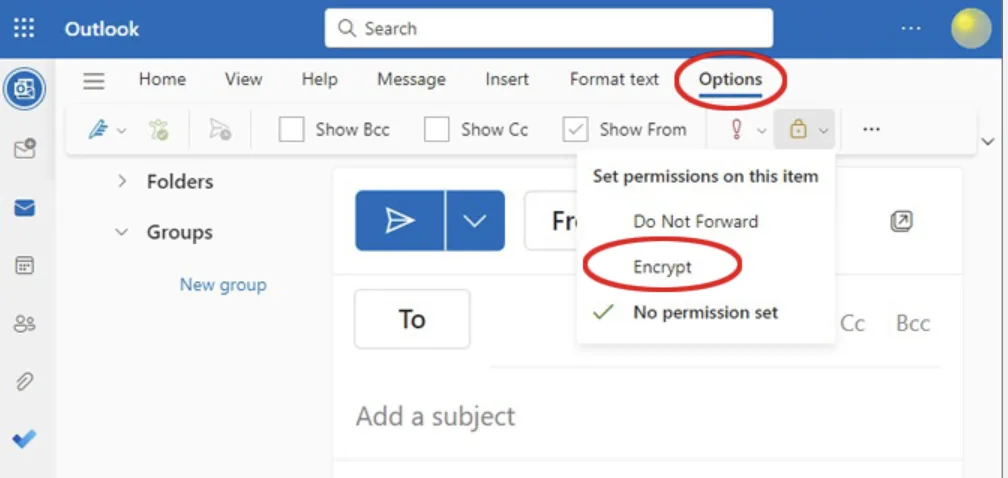
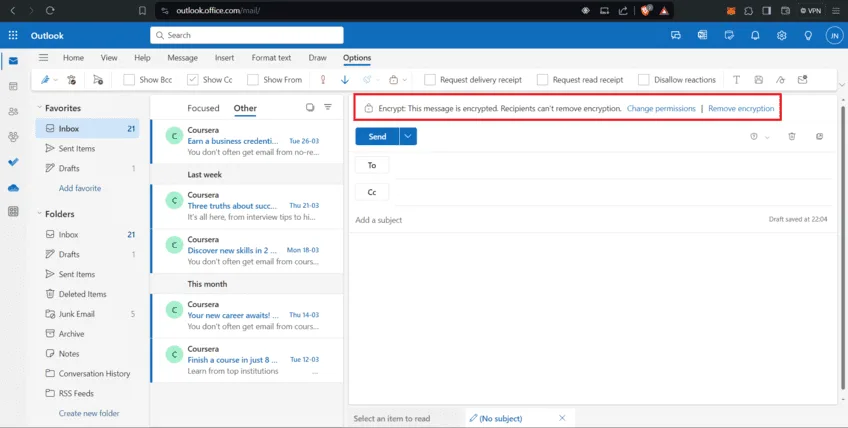
For Microsoft 365 Users: To send a message with encryption, compose a new message, select the Options ribbon, and then select Encrypt. You can choose Encrypt or Do Not Forward.
Step-by-Step Process:
- Open Outlook and click “New Email”
- Compose your message with recipient and subject
- Navigate to Options tab in the ribbon
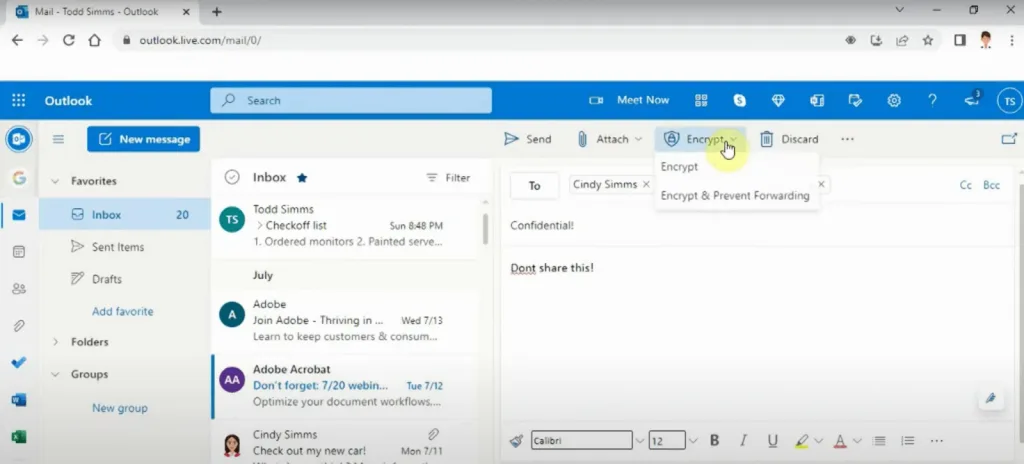
- Click “Encrypt” button
- Choose encryption level: “Encrypt” or “Do Not Forward”
- Send your message – recipient receives secure email
Encryption Options:
- Encrypt: Protects content from unauthorized access
- Do Not Forward: Prevents forwarding, copying, or printing
Method 2: S/MIME Encryption for Advanced Security
You can use encryption and digital signatures in new Outlook, classic Outlook, and Outlook on the web for work or school accounts to increase the security of messages.
Requirements:
- Digital certificate from trusted Certificate Authority
- Recipient must have corresponding public key
- Available in classic Outlook primarily
Setup Process:
- Obtain digital certificate from your IT department or CA
- Install certificate in Outlook settings
- Configure S/MIME settings under File > Options > Trust Center
- Compose email and select “Encrypt” from Security options
Method 3: Third-Party Encryption Solutions
Popular options include Trustifi, ProtonMail, CipherMail, Mailvelope, Virtru, and Lockmagic. These solutions offer additional features beyond basic encryption.
Top Third-Party Options:
- Trustifi: Outlook add-in with certified delivery tracking
- Virtru: End-to-end encryption with access controls
- Mailvelope: Browser-based PGP encryption
- ProtonMail: Secure email service with Outlook integration
Automatic Encryption Features
Any time your message includes a digital signature or an IRM protection, such as Do not forward or Do not print, it’s automatically encrypted. This provides seamless security without additional steps.
Automatic Triggers:
- Digital signatures applied
- Information Rights Management (IRM) protection
- Sensitivity labels configured
- Data Loss Prevention (DLP) policies activated
Best Practices for Email Encryption
Security Recommendations:
- Use strong passwords for encrypted messages
- Verify recipient identity before sending sensitive content
- Keep certificates updated for S/MIME encryption
- Train team members on encryption procedures
- Monitor encryption compliance in your organization
Troubleshooting Common Issues
Missing Encrypt Button:
- Verify Microsoft 365 subscription includes encryption
- Check if using new Outlook (some features may be limited)
- Ensure proper licensing for encryption features
Recipient Can’t Open Encrypted Email:
- Confirm recipient has compatible email client
- Check if recipient needs to authenticate with Microsoft
- Verify certificate compatibility for S/MIME
For more cybersecurity tips and email best practices, check out our data protection guides and digital security resources.
Choosing the Right Encryption Method
For Personal Use:
- Start with built-in Microsoft encryption
- Consider third-party solutions for enhanced features
For Business Use:
- Implement S/MIME for maximum security
- Use Microsoft Purview for compliance requirements
- Deploy organization-wide encryption policies
Advanced Features & Compliance
Microsoft 365 Advanced Features:
- Message expiration: Set automatic deletion dates
- Revoke access: Remove access to sent encrypted emails
- Audit trails: Track email access and actions
- Compliance integration: Meet regulatory requirements
Mobile Encryption Support
Email encryption works across devices:
- Outlook mobile apps: Support Microsoft encryption
- Third-party apps: Compatible with most encryption methods
- Web access: Encrypted emails accessible via browser
Discover more about mobile security and cross-platform email management on our platform.
Official Microsoft Resources
Ready to secure your email communications? Start with Microsoft’s built-in encryption today and protect your sensitive information from unauthorized access! For more cybersecurity guides and tech tutorials, visit TechnoSports – your ultimate technology resource.