UAE144/3 (32.2/50 ov)
 NED
NED PAK
PAK ENG
ENG IND-W
IND-W ZIM-W
ZIM-W GMB
GMB LES
LES MOZ
MOZ ZMB
ZMB Inter Milan
 Fiorentina
 Churchill
 Punjab FC
 NGA
NGA UGA
UGA Athletic
 Getafe
 MEX-W23 (9.3/20 ov, target 189)
 ARG-W188/5
 ATM1
ATM1 DEP0
DEP0 LAZ2
LAZ2 PAR1
PAR1 RCL2
RCL2 PAR1
PAR1 MOUNT0/0 (0.2/50 ov)
 TUSK
TUSK ROCKS
ROCKS EAGLE31/0 (3.4/50 ov)
 NZ-A317
 IND-A113 & 106/2 (36 ov)
 SYL
SYL KHU
KHU MYMS299/4 (87 ov)
 CHATT
CHATT DHA293/3 (84.1 ov)
 RAJ
RAJ RAN320/5 (80 ov)
 BAR
BAR SWD-W
SWD-W EPR-W
EPR-W TTN-W
TTN-W WPR-W
WPR-W NAM321/6
 IRE290 (47.3/50 ov, target 322)
 C Palace
 Newcastle
 Hull
Hull Brentford
 Liverpool
 Brighton
 Man United
 Bournemouth
 Atalanta
 Frosinone
 RIY2
RIY2 TAA1
TAA1 CHE0
CHE0 TOT2
TOT2 VAL1
VAL1 VIL2
VIL2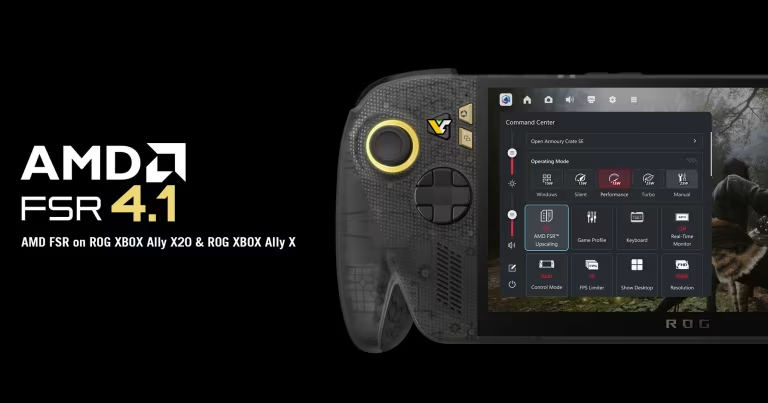
ASUS has released a preview graphics driver bringing AMD’s latest FSR 4.1 upscaling technology to the ROG Xbox Ally X and the limited-edition ROG Xbox Ally X20. The update introduces machine learning-powered image upscaling to the handheld gaming devices, potentially improving visual quality while helping games run more efficiently.
According to VideoCardz, the driver is available through Armoury Crate SE’s Preview Updates section. ASUS has confirmed that the feature uses a smaller AI model optimised for handheld hardware, although independent performance figures have not yet been published.
AMD FSR 4.1 Comes to ROG Xbox Ally X and X20
AMD FidelityFX Super Resolution, commonly known as FSR, is an upscaling technology that reconstructs a higher-resolution image from a lower-resolution render. This allows compatible games to reduce the GPU workload while maintaining a sharper image than traditional low-resolution rendering.
FSR 4.1 uses machine learning to improve image reconstruction compared with earlier versions of the technology. On the ROG Xbox Ally X and X20, the implementation has been specifically optimised for the AMD Ryzen AI Z2 Extreme processor.
ASUS says the handheld version uses an AI model less than half the size of the original INT8 model. This smaller implementation is designed to accommodate the power and performance limitations of portable gaming devices.
The update could be particularly useful when running demanding PC games on a handheld display, where balancing image quality, battery life and frame rates is essential.
FSR 4.1 Supports More Than 400 Games
One of the biggest advantages of the update is its potential reach. ASUS says the system-level FSR Upscaling feature can work with more than 400 games supporting FSR 3.1 or newer.
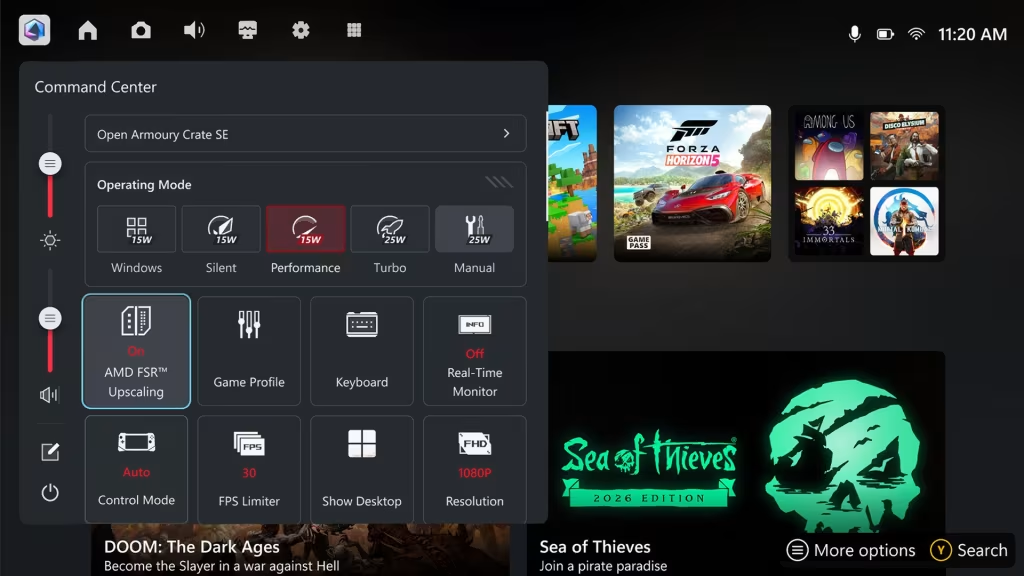
To use the feature, players must first enable FSR in the graphics settings of a compatible game. They can then activate the FSR Upscaling toggle through the handheld’s Command Center.
However, compatibility does not guarantee identical results across every title. Image quality and performance improvements will depend on the game, its rendering settings and the implementation of the upscaling technology.
Neither ASUS nor AMD has released specific frame-rate improvement figures for the ROG Xbox Ally X and X20 with this preview driver.
How to Install the AMD FSR 4.1 Preview Driver
ROG Xbox Ally X and X20 owners can try the update by following these steps:
- Open Armoury Crate SE on the handheld.
- Navigate to Update Center.
- Select Preview Updates.
- Download and install the available GPU driver update.
- Open Command Center and customise the layout to add the FSR Upscaling tile.
- Enable the feature and activate FSR in a supported game’s graphics settings.
The update remains a preview release, so users may encounter bugs or stability issues. Those who prioritise a stable gaming experience can wait until ASUS moves the driver into its regular update channel.
ASUS also advises users not to combine FSR Upscaling with Radeon Super Resolution (RSR), which is a separate system-level upscaling technology intended for games without native FSR support.
For official instructions and updates, visit the ASUS ROG announcement.

Will the Regular ROG Xbox Ally Get FSR 4.1?
The standard ROG Xbox Ally is also expected to receive FSR 4.1 support through a separate GPU driver update. ASUS has not provided a precise release date for that rollout.
The original ROG Ally and ROG Ally X have not been included in this particular announcement, so owners should wait for official compatibility information rather than assuming the feature will work on every existing ROG handheld.
What This Means for Handheld Gaming
Bringing FSR 4.1 to the ROG Xbox Ally X and X20 gives owners access to a newer upscaling solution without requiring a hardware upgrade. If image quality improves without a substantial performance penalty, the technology could make demanding games more comfortable to play on portable devices.
Still, the actual benefits remain to be established through independent testing, especially when considering frame rates, battery consumption and visual artefacts.
Bottom line: ASUS’s FSR 4.1 preview driver is a promising software upgrade for the ROG Xbox Ally X and X20. Its smaller AI model and broad potential game compatibility are encouraging, but users should wait for real-world benchmarks before expecting a specific performance boost.
Source: VideoCardz and ASUS ROG.
FAQs
How do I install the AMD FSR 4.1 preview driver on ROG Xbox Ally X?
Open Armoury Crate SE, go to Update Center, select Preview Updates, then download and install the available GPU driver. Add the FSR Upscaling tile in Command Center, enable it, and activate FSR in a supported game’s graphics settings.
Which ROG Xbox Ally models support FSR 4.1?
The preview driver brings FSR 4.1 to the ROG Xbox Ally X and limited-edition ROG Xbox Ally X20. The standard ROG Xbox Ally is expected to get support through a separate GPU driver update, but ASUS has not provided a release date.
How many games can use FSR Upscaling on ROG Xbox Ally X?
ASUS says the system-level FSR Upscaling feature can work with more than 400 games that support FSR 3.1 or newer.
Should I use FSR Upscaling with Radeon Super Resolution?
ASUS advises users not to combine FSR Upscaling with Radeon Super Resolution (RSR), a separate system-level upscaling technology intended for games without native FSR support.