NZ180/5
 IND56/2 (8.3/20 ov, target 181)
 NAM156/2 (32/50 ov)
 IRE
IRE AVL
AVL MNC
MNC RAY
RAY ELC
ELC GMB
GMB ZMB
ZMB NGA
NGA LES
LES CAG
CAG BOL
BOL COMO
COMO SAS
SAS FCA
FCA FCU
FCU KOE
KOE S04
S04 MOZ19
MOZ19 UGA23/0 (0.5/20 ov, target 20)
 Ipswich1
 Nottm Forest1
 Alavés1
 Málaga1
 Torino3
 Monza2
 WA
WA NSW371/8 (50 ov)
 DEN
DEN KUW
KUW KENYA
KENYA QAT
QAT SWD-W
SWD-W EPR-W
EPR-W TTN-W
TTN-W WPR-W
WPR-W NZ-A135/3 (41 ov)
 IND-A113
 DHA
DHA RAJ
RAJ MYMS
MYMS CHATT
CHATT RAN
RAN BAR
BAR SYL
SYL KHU
KHU MEX-W
MEX-W ARG-W
ARG-W UAE
UAE NED
NED PAK
PAK ENG
ENG IND-W
IND-W ZIM-W
ZIM-W AFG170/3 (34.3/50 ov, target 170)
 ZIM169
 CHE0
CHE0 DYI0
DYI0 CHO1
CHO1 QIN0
QIN0 HEN1
HEN1 BEI0
BEI0 LIA1
LIA1 ZHE0
ZHE0 QWC1
QWC1 YUN0
YUN0 SHX0
SHX0 Shanghai Shenh0
 TIG0
TIG0 SHP0
SHP0 WTT1
WTT1 SHT3
SHT3 M05
M05 SVW
SVW RBL
RBL ELV
ELV Brest1
 Nice2
Nice2 Stuttgart2
 Gladbach3
 Al Ahli4
 Al Khaleej1
TL;DR: NVIDIA has released DLSS 4.5 via a new NVIDIA App beta update — bringing Dynamic Multi Frame Generation, a new 6X mode for RTX 50 Series GPUs, an enhanced Frame Generation model, and a second-generation transformer for Super Resolution. This is the biggest DLSS leap since DLSS 4 launched in January 2025.
If you own a GeForce RTX GPU and you haven’t updated the NVIDIA App yet, stop reading and do that first. DLSS 4.5 just dropped, and it’s a genuinely meaningful upgrade — not just a version bump. Here’s what’s new, what’s changed, and what it means for your games.
👉 Official DLSS 4.5 Announcement — NVIDIA
What’s New in DLSS 4.5 — Quick Summary
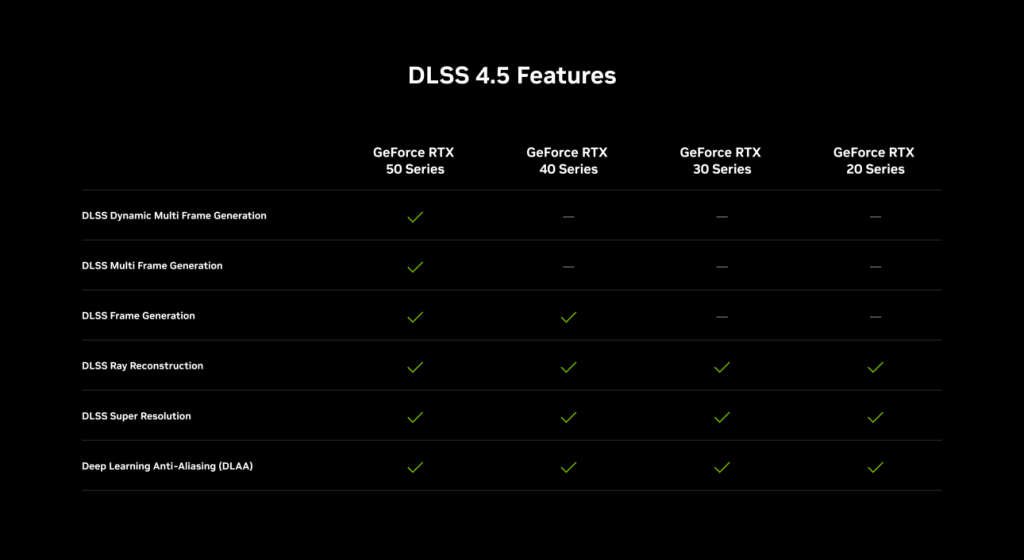
| Feature | What It Does | GPU Required |
|---|---|---|
| Dynamic Multi Frame Generation | Auto-adjusts frame multiplier to match your display’s refresh rate | RTX 50 Series |
| Multi Frame Generation 6X Mode | Generates 5 extra frames per real frame — up to 6X | RTX 50 Series |
| Enhanced Frame Generation Model | Improves UI clarity (mini maps, HUD elements) | RTX 40 & 50 Series |
| DLSS 4.5 Super Resolution | 2nd-gen transformer model — sharper, less ghosting, better lighting | All GeForce RTX |
1. Dynamic Multi Frame Generation: The Automatic Transmission for Your GPU
This is the headline feature. Think of Dynamic Multi Frame Generation like cruise control for your frame rate — instead of locking you to a fixed 2X, 4X, or 6X multiplier, it automatically shifts between multipliers in real time to keep your frame rate matched to your display’s refresh rate, whether that’s 120Hz, 144Hz, 240Hz, or higher.
In graphically intense scenes, it upshifts and generates more frames to cover performance drops. When the workload lightens, it downshifts to only compute what’s needed. The result: your high-refresh display stays smooth without wasting GPU resources when you don’t need them.
To enable it, open the NVIDIA App, go to Settings > Graphics, then under “DLSS Override – Frame Generation Mode” select Dynamic. You can then set a target of Max Refresh Rate (syncs to your monitor) or a Custom FPS target.
2. Multi Frame Generation 6X: Five AI Frames for Every One Real Frame
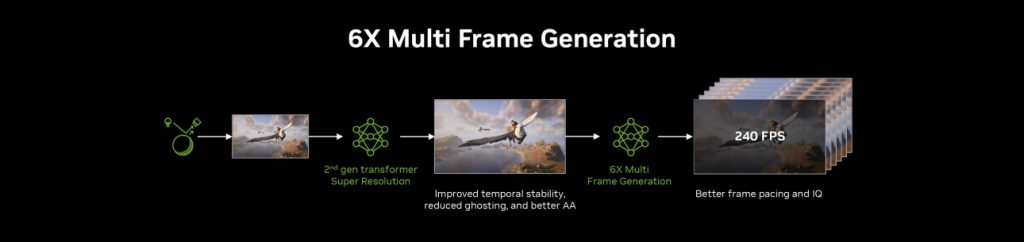
DLSS 4 introduced 4X Multi Frame Generation — generating three AI frames per real rendered frame. DLSS 4.5 raises that ceiling to 6X on RTX 50 Series GPUs, generating five additional frames per natively rendered frame.
The result? On RTX 50 Series GPUs, the jump from 4X to 6X increases 4K frame rates in path-traced titles by up to 35%. Combined with NVIDIA Reflex’s low-latency technology, those additional AI frames come with minimal impact to responsiveness — making this combination specifically suited to 4K 240Hz OLED gaming displays and super-high refresh rate 1080p/1440p setups.
Users now choose between two modes in the NVIDIA App:
- Dynamic — auto-adjusts multiplier to hit your target frame rate
- Fixed — locks to a specific multiplier (2X, 4X, or 6X) just like before
3. Enhanced Frame Generation Model: Finally, Clean HUDs
One of the most practical improvements in DLSS 4.5 is the new Frame Generation model for RTX 40 and 50 Series users. By incorporating additional game engine UI buffer data, the model now more intelligently handles static interface elements — mini maps, health bars, on-screen prompts — when Frame Generation is active.
Games supported as of March 31, 2026 include Battlefield 6, Monster Hunter Wilds, God of War Ragnarök, Indiana Jones and the Great Circle, Marvel’s Spider-Man 2, The Elder Scrolls IV: Oblivion Remastered, The Outer Worlds 2, Hogwarts Legacy, Starfield, Forza Horizon 5, and more.
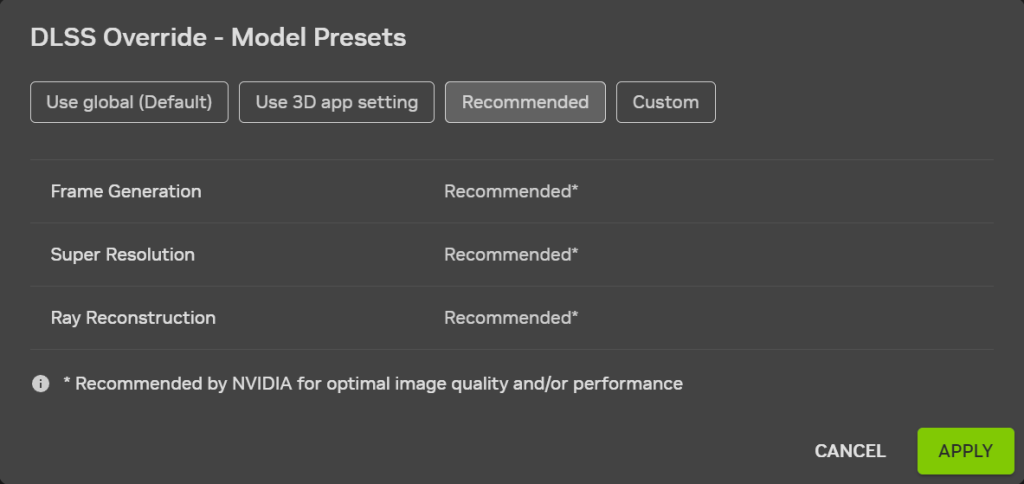
To activate it, go to “DLSS Override – Model Presets” in the NVIDIA App and select Preset B for Frame Generation.
4. DLSS 4.5 Super Resolution: Built on 8 Years of Research
DLSS 4.5 Super Resolution is the second generation transformer AI model — trained on a significantly expanded, high-fidelity dataset using five times the compute power of the original transformer model. The key improvements:
| Problem in DLSS 4 | Fix in DLSS 4.5 |
|---|---|
| Ghosting on fast-moving objects | Drastically reduced trailing artifacts |
| Jaggy edges in Performance mode | Sharper, more precise edge rendering |
| Shimmering on fine details | Better temporal stability in motion |
| Muted lighting, crushed shadows | Infers in linear space — physical accuracy restored |
The biggest practical headline: Performance Mode is now comparable to, and can beat, native image quality. Ultra Performance mode has become a genuinely viable option for 4K gaming — something that felt like a stretch in previous generations.
RTX 40 and 50 Series users get the best performance from the new FP8 Tensor Cores. RTX 20 and 30 Series users can still use DLSS 4.5 Super Resolution but may want to stick with Model K (DLSS 4.0) for the best performance-to-quality balance.
How to Activate All DLSS 4.5 Features Right Now
All DLSS 4.5 features are available today via a new NVIDIA App beta update. Here’s how to get it:
- Open the NVIDIA App
- Go to Settings > About
- Tick “Beta and experimental features”
- Update the app
- Requires GeForce Game Ready Driver 595.79 WHQL or newer
For Super Resolution: go to DLSS Override – Model Presets and select “Recommended” (the app will automatically assign Preset M for Performance mode and Preset L for Ultra Performance mode).
Games Already Supported
Two major titles just added DLSS 4.5 support today:
ARC Raiders (Flashpoint Update) — the fifth free content update adds new gameplay, enemies, weapons, and full DLSS 4.5 Super Resolution support. Pair it with DLSS 4 Multi Frame Generation, NVIDIA Reflex, and RTXGI for the full RTX experience.
Marvel Rivals (Season 7: The Hunt Is On) — White Fox joins the roster, a new Lower Manhattan map arrives April 2, and DLSS 4.5 Super Resolution is now available via NVIDIA App override. Multi Frame Generation can multiply frame rates by up to 5X, while NVIDIA Reflex cuts PC latency by up to 55%.
20 more games with native DLSS 4.5 Dynamic Multi Frame Generation support were announced at GDC 2026. For the full and growing list of supported titles, check NVIDIA’s RTX games tracker.
Bottom Line
DLSS 4.5 is not a minor patch. Dynamic Multi Frame Generation is a genuinely smart system that removes the manual guesswork from frame generation settings. The 6X mode pushes what RTX 50 Series GPUs can do with path tracing to a new level. And the Super Resolution improvements mean that even RTX owners who’ve been happy with DLSS 4 have a real reason to update — especially if you play in Performance mode at 4K.
For more on NVIDIA’s latest GPU tech and gaming updates, follow TechnoSports’ tech coverage.
👉 Read the Full Official Announcement — NVIDIA GeForce | Download the NVIDIA App
Source: NVIDIA GeForce Official | Published March 31, 2026