SA329 (82.3 ov)
 AUS
AUS BAN
BAN WI
WI IND-W
IND-W ZIM-W
ZIM-W GOA
GOA SC Delhi
 Milan
Milan Bologna
 Parma
Parma Udinese
 Venezia
 Inter Milan
 Genoa
Genoa Juventus
 Monza
Monza Napoli
 ROMA4
ROMA4 CAG2
CAG2 TOR1
TOR1 COMO3
COMO3 SAS2
SAS2 LAZ6
LAZ6 AFG177
 ZIM140 (19.1/20 ov, target 178)
 AUCK
AUCK CANT
CANT CD
CD ND
ND SIKM184
 NAGA187 & 46/4 (34 ov)
 JHK131/4 (47 ov)
 DELHI515/5d
 ODSA194
 SVCS13/0 (5 ov)
 BRODA616
 J & K6/0 (4 ov)
 CHD685/5d
 HP49/0 (14 ov)
 CGR216/8 (95 ov)
 AP231
AP231 HYD193/2 (54 ov)
 PNJB431
 KNTKA297/7 (95 ov)
 TPURA194
 KER101/6 (35 ov)
 BENG350
 UAE
UAE OMA
OMA ENG
ENG SL
SL DEN
DEN QAT
QAT KENYA
KENYA KUW
KUW POA
POA SPR
SPR BRB
BRB VAG
VAG PAK110
 NAM316/7
 IRE253 (44.5/50 ov, target 317)
 NZ198/3
 IND199/4 (13.2/20 ov, target 199)
 NED371/5
 JAB113 (19.3/20 ov, target 133)
 KAY132/9
 Gamba Osaka
 Buriram
 Kashima
 Pohang Steelers
 ABH0
ABH0 ALF1
ALF1 Sevilla2
 Osasuna0
 PSG2
PSG2 Lyon0
Lyon0
Smoke assists are one of the trickiest challenges in Battlefield 6, but they’re essential for unlocking Support class progression. If you’ve been tossing smoke grenades aimlessly and wondering why your counter isn’t budging, you’re not alone. Let me break down exactly how this mechanic works and share the fastest farming strategies.
What Are Smoke Assists in Battlefield 6?
| Element | Details |
|---|---|
| Definition | Credit when teammates kill enemies through your active smoke |
| Class Requirement | Support only |
| Tools Needed | Smoke Grenades, M320A1 SMK Launcher |
| Best Modes | Breakthrough, Rush |
| Challenge Goal | 50 assists for Support 3 unlock |
How Smoke Assists Actually Work
A smoke assist registers when your teammate downs or kills an enemy while your deployed smoke is actively providing cover. The key word here is active—your smoke must still be obscuring vision when the kill happens, not after it fades.
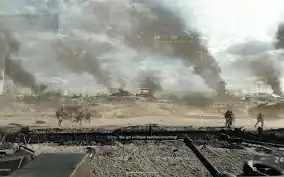
Here’s what many players miss: covering downed teammates for revives typically awards a “Concealed Revive” accolade instead of a smoke assist. While both boost your score, only kill-based assists count toward the Support 3 challenge.
Step-by-Step Farming Strategy
1. Load the Right Gear
Equip smoke grenades as your throwable and the M320A1 SMK launcher as your gadget. Pair them with the Ammo Bag so you can continuously resupply yourself during extended pushes.
2. Pick the Perfect Mode
Breakthrough works best because combat concentrates around two objectives rather than spreading across five or more in Conquest. Smaller maps like New Sobek City, Manhattan Bridge, or Empire State maximize your assist potential.
3. Master Placement Technique
Don’t throw smoke at your feet—that blinds your team. Pre-smoke enemy sightlines by throwing grenades toward where defenders are holding angles, especially on flags, doorways, and chokepoints. Your goal is blocking enemy vision, not friendly vision.
4. Chain Your Smokes
The assist window ties to the smoke’s active duration, so re-smoke the same angle roughly 10 seconds later to keep pushes covered. This creates multiple assist opportunities from a single engagement.
5. Lead the Push
Ping your route and move with your squad. Assists won’t register if teammates wait out the smoke instead of fighting through it. Your smoke creates the opportunity—your squad executes it.

Advanced Tactics
Tank Support: Stick with friendly armor and smoke enemy anti-tank sightlines ahead of their advance. Vehicle crews fighting through your screen rack up assists quickly.
Thermal Scope Synergy: Coordinate with teammates using thermal optics. They can see through your smoke while enemies can’t, turning your grenades into easy assist generators.
Deployable Cover Pairing: Place a shield panel at your smoke’s edge to give teammates a clear peek spot while maintaining concealment.
Common Mistakes to Avoid
❌ Smoking your own position – Blinds your team
❌ Poor timing – Throwing smoke after kills or letting it fade mid-fight
❌ No follow-through – Teammates ignoring your smoke coverage
❌ Wrong expectations – Revive assists don’t count toward this challenge
How to Unlock Drifter in Risk of Rain 2: Your Complete Guide to the Lost in Transit Challenge