
Game night just got a Netflix upgrade. Without much warning, Netflix has added Codenames Party to its cloud gaming library, bringing the hit tabletop word game to your TV and web browser. No console, no downloads, and your phone becomes the controller. Here’s everything you need to know, based on reporting from What’s on Netflix.
Table of Contents
Codenames Party : Overview
| Detail | Info |
|---|---|
| Game | Codenames Party |
| Developer | Czech Games Edition |
| Category | Tabletop and party games |
| Players | 1 to 10 (local multiplayer) |
| Platforms | TV and web browser |
| Controller | Phone (Netflix game controller app) |
| Age rating | 7+ |
| New mode | One-against-all Party Mode |
What Is Codenames?
If you’ve never played, Codenames is a party game from Czech Games Edition, first released in 2015. Two rival spymasters know the secret identities of 25 agents. Their teammates must figure out which agents are theirs using only one-word clues. It’s simple to learn and easy to get wrong, and that’s where the laughs come from. A clue that seems obvious to you can send your teammates in a completely different direction.
Netflix’s official description sums it up as a party game of wits and wordplay, where players take turns coming up with clever code words and guessing which cards they point to.
The New Party Mode
The developers announced the launch on X and highlighted a mode built specifically for this version: a one-against-all Party Mode. It uses the same 16 words for everyone, and every player is both the Spymaster and the guesser at once. That’s a big change from the classic format, where only one person per team gives clues. It keeps everyone involved at all times, which suits a crowded living room.
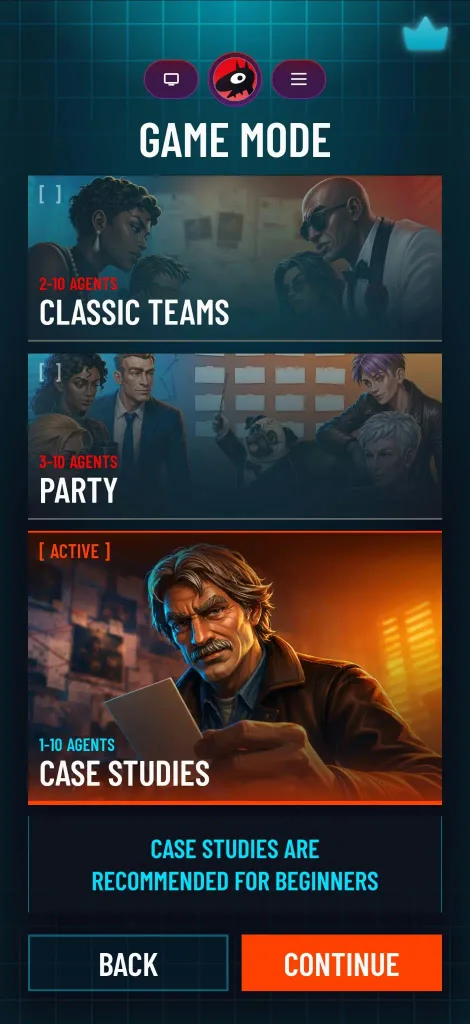
The game also includes the classic team mode and a Case Studies mode, where players guess for pre-made word and clue sets instead of having their own spymasters. That last one is handy when you’re short on players or just want a quick round.
How to Play on Netflix?
This is part of Netflix’s cloud gaming beta, so there’s nothing to install:
- Open the game in the Netflix app on a supported Smart TV, or in your web browser.
- Scan the QR code shown on screen.
- Your smartphone becomes your controller.
Codenames Party supports up to 10 players, which ties the record set by Pictionary on the platform. That makes it a strong pick for family gatherings, friends’ nights, and even festival get-togethers.
Where Is It Available?
Not every region has access to Netflix’s cloud gaming beta yet. According to the latest Help Page update, it’s available in Australia, Austria, Belgium, Brazil, Canada, Finland, France, Germany, Ireland, Italy, Mexico, the Netherlands, New Zealand, Poland, South Africa, Spain, Sweden, Switzerland, the United Kingdom, and the United States. India isn’t on that list yet, so readers here may have to wait for a wider rollout.
What’s Next for Netflix Cloud Gaming?
Since late 2025, Netflix has been steadily building a library of social and party experiences for the living room. Codenames is one of two cloud games scheduled over the next few weeks. Horror fans have something to look forward to too: an adaptation of The Conjuring is set to launch at the end of October, just in time for Halloween.
For more on the streaming world, browse our Netflix news and gaming and OTT updates on Technosports.
FAQs
Q1. How many people can play Codenames Party on Netflix?
Up to 10 players can join using their phones as controllers, matching the platform record set by Pictionary.
Q2. Do I need a console to play Codenames Party?
No. Play on a supported Smart TV or in your browser, then scan a QR code to use your phone as the controller.