BAN
 WI235/4 (70 ov)
 AFG
 ZIM326/5 (87 ov)
 MIL0
 FER2
 AND2
 SLZ0
 CRY1
 TSG1
 LEV1
 JAG0
 LSK0
 PLZ1
 NEC3
 OMON1
 AZ
 JUV
 B04
 OLM
 SLB
 LECH
 CEL
 USG
 CEL
 BES
 HBE
 OFI
 STG
 NKC
 SUN
 DZG
 MBSG3
 OFC2
 CHU0
 NEU2
 Dortmund2
 Betis1
 FC Porto4
 Napoli1
 WAR138/7 (20 ov)
 BOL138/5
 DMJIR290 & 134/5 (46 ov) (f/o)
 HYD-R519/8d
 KRBLS280 & 2/1 (2 ov)
 SRB241 & 388/5d
 FSLB259 & 54/1 (26 ov) (f/o)
 PRB503/4d
 LAHW234 & 40/4 (17 ov, target 412)
 FATA362 & 283
 ISB215 & 163/6 (51 ov)
 MUL327
 PCBXI151/8d
 SL223/7d & 121/6 (38 ov)
 ZIM-A
 IRE-A420/9 (90 ov)
 NZ
 IND
 MS-W
 SS-W
 MR-W
 AS-W
 KAY
 SPR
 TUSK
 RHINO
 MOUNT
 ROCKS
 CHR
 POA
 EASTN
 DOLPH
 WI-A123 (16.3/20 ov, target 220)
 LIONS219/7
 ST-W166 (19/20 ov, target 184)
 PS-W183/3
 BH-W184/4
 HH-W154/7
 BIK83
 KAG86/1 (9.4/20 ov, target 84)
 JAB133/8 (20 ov, target 150)
 LUL149/8
 RSO1
 LYON1
 SPP1
 BOU3
 AGF0
 SCB0
 ATA1
 KAI1
 MID1
 AJA5
 THUN3
 HOM0
 Lens1
 Como9
 PSV1
 Club Brugge2
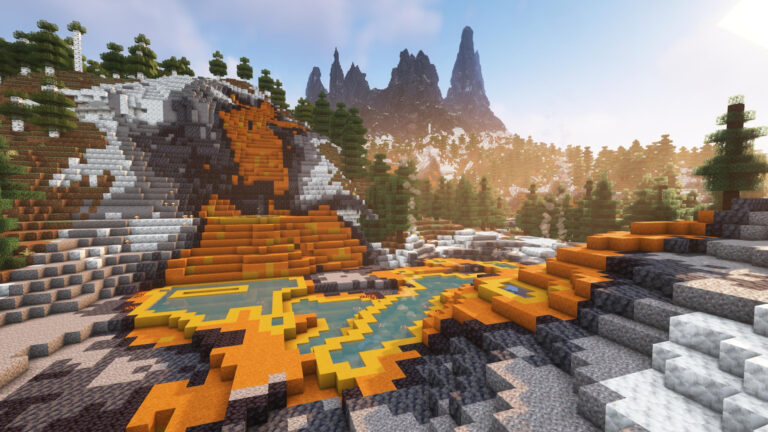
Creating compelling Minecraft content requires more than just building skills and creativity. Today’s successful content creators leverage powerful mods that transform their gameplay experience, enhance recording capabilities, and provide unprecedented control over cinematography. Whether you’re streaming on Twitch, creating YouTube videos, or capturing the perfect screenshot, these essential mods will elevate your content to professional levels.
With millions of content creators competing for attention, having the right tools makes the difference between amateur recordings and viral masterpieces. These carefully selected mods represent the top tier of content creation enhancement for 2025.
Minecraft Essential Content Creator Mods Overview

The modern content creation landscape demands versatility and professional-grade tools. Here are the game-changing mods every serious Minecraft creator should have installed:
| Mod Name | Primary Function | Best For | Compatibility |
|---|---|---|---|
| Replay Mod | Automatic recording & playback | Video editing, highlights | Forge/Fabric |
| Freecam | Free camera movement | Cinematic shots, exploration | Forge/Fabric |
| Do a Barrel Roll | Enhanced flight controls | Aerial cinematography | Fabric |
| WATERFrAMES | Multimedia display | Interactive content | Forge/Fabric |
| Twitch Chat Integration | Live chat overlay | Stream interaction | Forge |
1. Replay Mod – The Content Creator’s Time Machine
The Replay mod by luks_gamer99 stands as the cornerstone of professional Minecraft content creation. The unique capture mechanism allows players to record their entire gameplay automatically, ensuring that they do not miss any crucial moments.
Key Features:
Automatic Recording: Never miss spontaneous moments or unexpected gameplay highlights Timeline Markers: Press ‘M’ to mark specific footage sections for easy location during editing Multi-Perspective Playback: Review gameplay from any angle or viewpoint Export Functionality: Generate high-quality video files for direct upload
The mod’s intuitive notification system keeps creators informed about recording status through chat messages and visual indicators, making it foolproof even during intense gaming sessions.
For comprehensive Minecraft modding guides and installation tutorials, explore our Minecraft modding section featuring expert tips and troubleshooting advice.
2. Freecam Mod – Professional Camera Control
The Freecam mod by hashalite is a unique mod that adds a freecam in your world that allows gamers to control their camera separately from their character. This revolutionary approach to camera control eliminates the need for spectator mode switching.
Advanced Capabilities:
Collision Toggle: Phase through blocks for impossible shots Distance Limitations: Customizable render distance boundaries Smooth Movement: Professional-grade camera panning and movement Real-Time Control: Adjust camera while your character remains stationary
This mod particularly excels for architectural showcases, landscape reveals, and complex redstone contraption demonstrations.
3. Do a Barrel Roll – Cinematic Flight Mastery
Elytra flight gets a professional upgrade with the Do a Barrel Roll mod by enjarai. It introduces X and Y axis maneuverability that players can control with their mouse or use the A/D keys to strafe.
Flight Enhancement Features:
6-Axis Control: Full directional movement in three dimensions Unlocked POV: Complete camera freedom during flight Precision Maneuvering: Fine-tuned control for perfect shots Cinematic Mode: Smooth flight paths for professional footage
Perfect for creating drone-style footage, aerial tours, and dynamic action sequences that rival professionally produced content.
Looking for more streaming and content creation tips? Check our content creator guides for comprehensive coverage of streaming setups and audience engagement strategies.

4. WATERFrAMES – Interactive Multimedia Integration
The WATERFrAMES: Multimedia Displays by SrRapero720 is a powerful Minecraft mod that adds multimedia support in the game, allowing players to display static and dynamic media.
Multimedia Capabilities:
Platform Support: YouTube, Twitch, Kick, Google Drive, OneDrive integration Display Options: Frames, projectors, TVs, and custom screens Local Media: Import personal images and videos Interactive Elements: Create immersive multimedia experiences
This mod opens unprecedented possibilities for educational content, reaction videos, and interactive streaming experiences.
5. Twitch Chat Integration – Real-Time Audience Connection
The Twitch Chat Integration mod by BlayTheNinth allows players to integrate their Twitch chat within Minecraft. This seamless integration revolutionizes live streaming interaction.
Streaming Features:
Live Chat Display: Real-time chat appears in Minecraft’s chat system Emote Support: Full Twitch emote compatibility Subscriber Filtering: Optional subscriber-only chat mode Badge Recognition: Displays user badges and status indicators
Perfect for streamers who want to maintain immersion while staying connected with their audience.
Installation and Setup Guide
Prerequisites:
Mod Loader: Install Forge or Fabric (version compatibility varies) Java: Ensure Java 17+ for optimal performance Backup: Create world backups before installing mods
Performance Optimization:
OptiFine Compatibility: Check mod compatibility with OptiFine Memory Allocation: Increase RAM allocation for smooth recording Render Distance: Balance quality and performance based on content needs
Ready to optimize your gaming setup further? Visit our PC gaming optimization guides for hardware recommendations and performance tuning tips.
Content Creation Workflow Tips
Pre-Recording Setup:
Mod Configuration: Test all mods before important recording sessions Resource Pack Selection: Choose packs that enhance visual appeal World Preparation: Scout locations and plan shots in advance
During Recording:
Multiple Angles: Use Replay mod to capture various perspectives Marker Usage: Mark important moments for easy editing location Chat Interaction: Engage with audience through integrated chat
Post-Production:
Export Settings: Use optimal quality settings for your platform Editing Integration: Import Replay mod footage into editing software Backup Management: Organize recorded content for easy access
Advanced Techniques for Professional Content
Cinematic Storytelling:
Camera Movements: Combine Freecam and Do a Barrel Roll for complex shots Lighting Control: Use time commands with cinematic mods for perfect lighting Scene Composition: Apply photography principles to Minecraft scenes
Interactive Content:
Audience Participation: Use WATERFrAMES for viewer-submitted content Live Reactions: Integrate multimedia for real-time content responses Educational Applications: Create interactive tutorials and demonstrations
For more advanced gaming techniques and professional tips, explore our gaming tutorials hub featuring expert strategies across multiple genres.
Elevating Your Content Creation Game
These five essential mods transform ordinary Minecraft gameplay into professional-quality content. From automatic recording capabilities to advanced camera control and real-time audience interaction, they provide the tools necessary to compete in today’s content creation landscape.
Success in content creation comes from combining technical capabilities with creative vision. These mods handle the technical aspects, freeing you to focus on storytelling, entertainment, and audience engagement.
Ready to take your content to the next level? Start with the Replay mod for reliable recording, then gradually incorporate additional mods based on your specific content style and audience preferences.
Stay updated with the latest gaming and content creation trends through our gaming news section, featuring breaking updates from across the gaming industry.
For official mod downloads and community support, visit CurseForge and Modrinth for verified, safe mod installations.