

Getting a professional AI Headshot Generator used to mean booking a photographer, coordinating schedules, and waiting days—or weeks—for edits. Today, the rise of the AI headshot generator has changed that workflow completely. But with so many tools entering the space, a new problem appears: figuring out which one is actually the best fit.
Some tools prioritize speed. Others focus on studio-like quality. A few try to balance flexibility, access, and output variety. The challenge isn’t whether these tools work—it’s understanding how they differ in real-world use.
This guide breaks that down clearly, so you can decide which is the best AI headshot generator for your needs.
- HeadshotMaster: best for flexible user journey with anonymous access and fast iteration
- Notegpt: best for structured pay-per-image workflows with consistent outputs
- Dreamwave: best for high-quality previews before committing to purchase
- Pixelbin: best for batch-style generation with credit-based pricing
Comparison Table
| HeadshotMaster | Notegpt | Dreamwave | Pixelbin | |
|---|---|---|---|---|
| Generation speed | 6–15 sec/image generation | ~6 sec/image generation | 24 sec–1.6 min/image generation | ~6 sec/image generation |
| Pricing / free tier | unlimited basic usage without login; advanced model 4× daily registered access | pay-per-image; 3 free monthly images + trial access | pay-per-image; watermark preview via email | pay-per-image; 3 free monthly images + trial access |
| Input requirements | 1–4 photos supported input | minimum 4 photos required input | minimum 4 photos, 500×500 required input | minimum 4 photos required input |
| Output quality | variable likeness in basic; stylized smoothing effects | consistent professional filtering output | consistent professional style with watermark preview | filtered professional output consistency |
| Key limitation | occasional over-smoothing in results | limited free access without payment | login and payment required for final output | limited style control in free mode |
How AI Headshot Technology Has Improved
Early versions of headshot generators struggled with realism. Faces looked slightly off, lighting felt artificial, and outputs often lacked consistency across images.
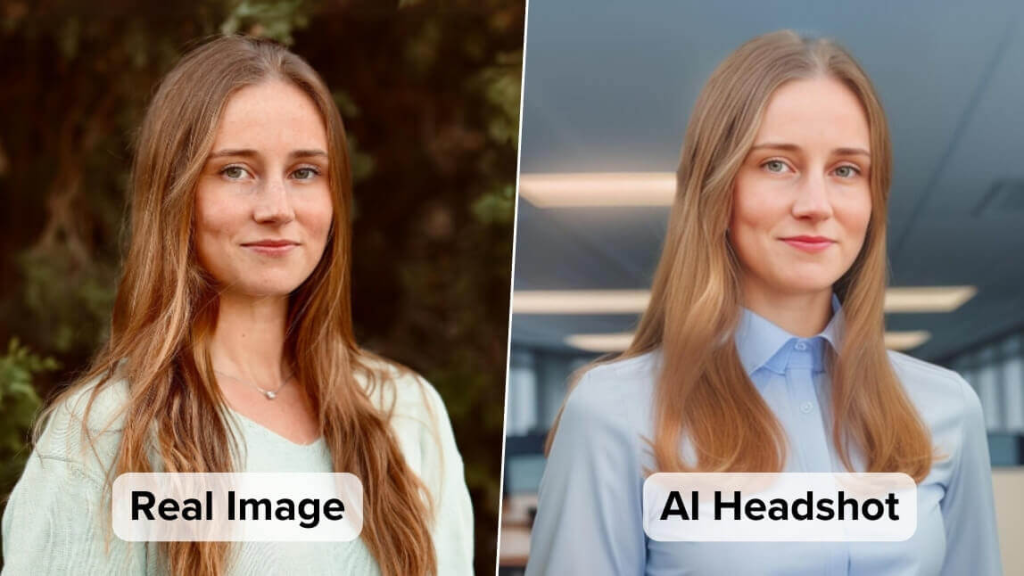
That’s changed quickly. Modern tools can now produce studio-like lighting, natural facial textures, and cohesive styles across multiple images. Processing time has also dropped significantly—many tools now generate results in seconds rather than minutes.
Perhaps the biggest shift is accessibility. What once required expensive software or photography sessions is now available through a browser, sometimes without even creating an account.
What Makes the Best Tool in This Space?
Choosing the best AI headshot generator depends on how you plan to use it. There are five key factors that matter most:
1. Generation Speed
Fast tools allow rapid iteration. This matters if you want to test multiple looks or expressions without waiting.
2. Pricing and Access
Some platforms require upfront payment or login before generating anything. Others allow limited or unlimited free use. This can significantly affect experimentation.
3. Input Flexibility
Tools that accept fewer photos reduce friction. Requiring four or more images can slow down the process, especially for casual users.
4. Output Quality
Consistency, realism, and lighting all play a role. Some tools prioritize polished results, while others offer broader variation.
5. Limitations
Every tool has trade-offs—whether it’s restricted free usage, watermark previews, or variability in output.
Competitor Breakdown
Notegpt
Notegpt supports headshot generation at around 6 seconds per image generation, enabling quick turnaround for individual outputs. It uses a pay-per-image pricing structure, with 3 free monthly images and additional bonus credits for first-time users. Input requires at least 4 photos, which allows the system to apply filtering and maintain consistent professional-style output. Anonymous usage includes a limited trial window, while extended access requires login and payment. This setup fits users who prefer predictable per-image pricing and structured usage.
Dreamwave
Dreamwave generates images within a range of 24 seconds to 1.6 minutes per image generation, focusing on consistent styling across outputs. It requires a minimum of 4 photos with specific resolution thresholds, ensuring higher-quality inputs. Access is tied to account registration, and preview images are delivered with watermark overlays via email. Final outputs require payment. This workflow suits users who want to review results before purchasing final images.
Pixelbin
Pixelbin operates at approximately 6 seconds per image generation, supporting batch-style workflows. It follows a credit-based pricing model, including 3 free images per month and additional credits for new users. Like others, it requires at least 4 input photos and applies filtering to maintain professional output consistency. Anonymous use includes a limited trial, with expanded usage tied to login and credits. It works well for users managing multiple headshots at scale.
HeadshotMaster: A Different User Journey Approach
One of the more distinctive aspects of HeadshotMaster is how it structures the user journey—from anonymous access to optional registration.
Many tools require commitment upfront. This AI Headshot Generator takes a different approach: you can start generating immediately, without logging in, and explore results before deciding whether to go further.
Using the AI Headshot Generator, you can begin with just a single photo. That lowers the barrier significantly compared to tools that require four or more images.
From there, the process expands:
- The basic model supports unlimited generation without requiring an account
- The advanced model allows up to four generations per day once registered
- You can upload up to four photos to improve likeness accuracy
- More than 20 scene options give flexibility across professional styles
Generation speed stays within the 6–15 second range per image, which supports quick iteration. You can try different lighting setups, outfits, or expressions without slowing down your workflow.
There are trade-offs to consider. The basic model can produce variable likeness accuracy depending on the input quality. In some cases, skin smoothing may appear more processed than expected.
Still, the ability to move from anonymous experimentation to more controlled usage creates a flexible experience. That’s not something every AI Professional Headshot Generator currently offers.
Who Benefits Most from This Type of Tool?
One common frustration is not knowing whether a tool will work until after you’ve already paid or committed time to setup. That uncertainty often stops people from trying multiple options.
Tools like this are best suited for users who want to explore before committing. If you only have one or two photos available, or you want to test different looks quickly, the flexibility becomes useful.
Freelancers, job seekers, and remote professionals may find this especially practical. Instead of organizing a full shoot, they can generate multiple usable headshots in a short session.
Teams or businesses with strict style requirements may still prefer tools with more controlled outputs and structured pricing. But for individual use, flexibility tends to matter more.
A small observation: most people don’t expect the process to feel this fast until they try it themselves.
Conclusion: Which Is the Best AI Headshot Generator?
Each tool fits a slightly different workflow.
- Notegpt works well for users who prefer pay-per-image control with consistent filtering
- Dreamwave suits those who want preview-based decision-making before purchase
- Pixelbin aligns with batch workflows and credit-based usage
- HeadshotMaster fits users who value flexibility and minimal barriers to entry
If you’re evaluating which is the best fit, it often comes down to how much friction you’re willing to accept before generating your first image.
For those exploring options, an AI Professional Headshot Generator like AI Professional Headshot Generator can offer a low-commitment starting point before moving into more structured tools.
One defining difference worth noting: HeadshotMaster allows unlimited basic usage without requiring login, which changes how easily users can begin experimenting.
Read more: Best World Cup Kits: Top 10 Team Uniforms for 2026


