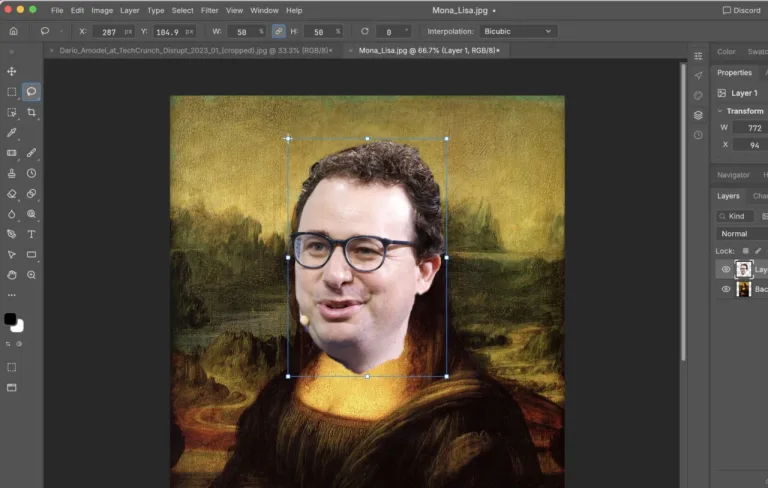
Someone reportedly vibe coded a free Adobe Creative Suite knockoff and released it publicly on Wednesday, October 7, 2026. The browser-based creative suite uses generative AI tools instead of traditional manual programming. Unconfirmed reports list 8 GB of RAM and 2 GB of SSD space among its requirements.
What is the free Adobe Creative Suite knockoff Someone Vibe Coded?
The project is reportedly an open-source web app that offers Adobe-style creative tools without an upfront subscription. Its developer reportedly announced it in a viral post on X, formerly known as Twitter, on October 7, 2026, then released the software on GitHub under the MIT License. The main difference is that the developer reportedly built the project entirely through “vibe coding”, using generative AI tools rather than conventional manual programming.
That method moves much of the implementation into natural-language prompts, automatically generated code, and repeated corrections. Available information doesn’t show whether the application matches Adobe Creative Cloud feature-for-feature, so users should view it as an early open-source alternative, not a direct replacement. The timing also matters, since software subscriptions remain a major concern for independent designers, students, and small teams. Free access could make creative tools easier to try, though browser-based work still depends heavily on a user’s computer, graphics workload, and local storage.

How does the browser-based software work?
The application reportedly runs in a web browser, while client-side rendering handles demanding creative tasks. Heavy vector graphics require at least 8 GB of RAM for stable operation, and local project-file caching requires 2 GB of available SSD space.
An 8 GB RAM requirement is light by creative-workstation standards, but it’s not necessarily light for everyday browser use. Several open tabs, video tools, or large design documents could push memory usage beyond the minimum. The browser-based model may make access easier across ope
Is it really open source, and who announced it?
The project is reportedly hosted on GitHub under the MIT License, a permissive open-source licence that generally lets users inspect, modify, and redistribute software under its conditions. The developer’s public X post reportedly sparked a viral discussion on October 7, 2026. The MIT License gives developers a clearer way to study and adapt the code than a closed commercial application would.
It still doesn’t promise professional support, feature parity, security audits, or long-term maintenance. Those issues matter to designers who rely on dependable project files and predictable updates. As Gizmodo first reported, the project’s appeal combines zero stated subscription cost, browser access, and AI-assisted development. That mix also puts more responsibility on users to inspect the code, understand licensing limits, and keep sensitive client work elsewhere until the project’s security record becomes clearer.
What could this mean for Adobe alternatives?
A free knockoff can’t be judged simply because it exists. Adobe’s products come with mature workflows, established file formats, plug-ins, collaboration systems, and professional support, while this project’s feature coverage and compatibility remain unclear.
The biggest takeaway may be that generative AI can help one developer assemble a usable creative application quickly, even without conventional programming. That lowers the technical barrier for future experiments, but it doesn’t eliminate the harder work of testing performance, fixing defects, maintaining dependencies, and protecting user data. The project could draw contributors who add tools, improve rendering, or expand ope
What should users do next?
Anyone interested in the application should start with non-sensitive test projects. Before importing client files, they should review the GitHub licence, installation instructions, and supported browser information. They should also confirm that their system has at least 8 GB of RAM and 2 GB of free SSD capacity.
The sensible next move is evaluation, not an immediate switch from a professional creative workflow. Designers should compare export quality, file compatibility, performance with heavy vector graphics, and the project’s update history before moving important work. Contributor activity and real-world compatibility reports will show whether the free software has staying power. If those signals look good, this vibe-coded project could become a useful Adobe alternative for lightweight browser-based design.
What is the free Adobe Creative Suite alternative?
It’s a reportedly open-source browser application created through generative AI-assisted “vibe coding” and released under the MIT License on GitHub.
How much RAM does the application require?
The reported minimum is 8 GB of RAM for stable operation with heavy vector graphics.
Does it work on Apple computers?
Reported processor support includes Apple Silicon from M1 onwards, as well as Intel Core i5 processors.
How much storage is needed?
Local caching of project files reportedly requires at least 2 GB of available SSD space. Someone reportedly vibe coded a free Adobe alternative, but its staying power will depend on contributors, compatibility, and whether browser performance can meet professional expectations.
Was this article helpful?
Your feedback directly improves future articles on this site.