
 NZ
NZ IND
IND NAM
NAM IRE
IRE MOZ
MOZ UGA
UGA Aston Villa
 Man City
 Rayo
Rayo Elche
Elche GMB
GMB ZMB
ZMB NGA
NGA LES
LES Cagliari
 Bologna
 IPS1
IPS1 NFO1
NFO1 ALA1
ALA1 MCF1
MCF1 TOR3
TOR3 MON2
MON2 BRE1
BRE1 NICE2
NICE2 TAS53/4 (13/50 ov, target 305)
 VIC304/7
 NZ-A96/0 (31 ov)
 IND-A113
 DHA
DHA RAJ
RAJ MYMS
MYMS CHATT
CHATT RAN
RAN BAR
BAR SYL
SYL KHU
KHU UAE
UAE NED
NED PAK
PAK ENG
ENG IND-W
IND-W ZIM-W
ZIM-W AFG170/3 (34.3/50 ov, target 170)
 ZIM169
 DOLPH56/0 (3.5/8 ov, target 56)
 SWD51/4 (8/8 ov)
 WSW1
WSW1 BRI1
BRI1 Como
Como Sassuolo
 Augsburg
 Union Berlin
 Cologne
 Schalke
 Mainz
Mainz Bremen
 RB Leipzig
 Elversberg
 VFB2
VFB2 BMG3
BMG3 AHL4
AHL4 KHA1
KHA1Ultraportable PCs are getting harder to justify at “Windows premium” Worth noting: this review is based on leaks and supplier-style reporting, not yet fully official. Dell officially announced this generation of the XPS 13 in early 2026.
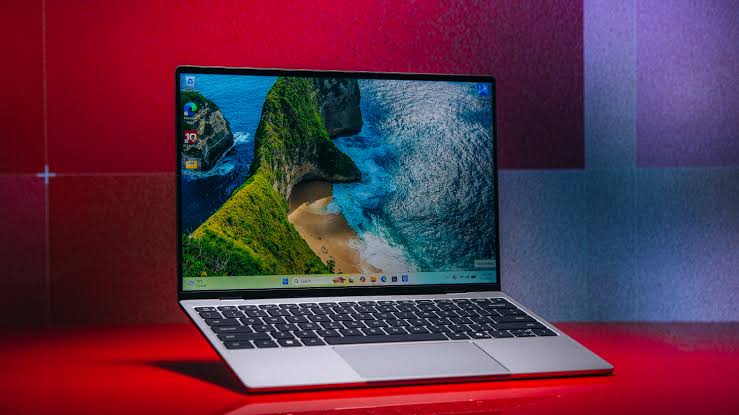
Overview: what Dell XPS 13 is targeting in 2026
The core problem the 2026 XPS 13 is trying to solve is value under constraints: you want laptop-grade performance, but you also want it to feel like a premium product every day. Here’s the thing: Windows buyers often end up paying MacBook-style money and still receive “thin-and-try” components—especially around memory tiers and ports.
Dell’s approach is to treat the XPS 13 like a pro tool, not a bargain thin laptop. The starting for the reviewed configuration, and the announcement timing (early 2026) signals Dell is competing on the newest platform, not refreshing an old recipe.
For context, WIRED’s review highlights a familiar pattern—great hardware, careful engineering, and then one or two choices that don’t match what power users expect. That tension is exactly where the “Move Over, Neo” angle comes from: this XPS 13 doesn’t just look like it belongs in the same category as Apple-style ultraportables, it also tries to match what buyers actually feel in day-to-day use.
Key Details: hardware choices that change the real experience
The 2026 XPS 13 is built around Intel’s Lunar Lake processor architecture. In practical terms, that’s part of why the laptop is positioned as both fast and efficient for professionals and students who need battery life without throttling during work apps.
The base model configuration that shapes buyer outcomes is memory. The reviewed base model comes with 16GB of LPDDR5X RAM, which is the difference between “smooth” and “mysteriously constrained” in a laptop that also expects modern background tasks. Storage is similarly expandable up to 2TB of PCIe Gen 4 NVMe SSD, so you can plan for large local files and faster project loading without immediately buying an external SSD.
Display and battery are where XPS buyers usually judge the brand. The panel measures 13.4 inches diagonally, and the battery is rated at 55 watt-hours—numbers that point to a compact platform built for portability rather than desk-only performance. Finally, the laptop ships with Windows 11 pre-installed, so buyers don’t need to budget time for setup and driver work.
Worth noting the trade-offs reviewers called out: WIRED liked the gorgeous display, excellent touchpad, and backlit keyboard, but criticized the starting RAM configuration (implying a less ideal tier for some buyers) and the lack of a headphone jack.
Context: the root cause behind the “Neo vs XPS” dilemma
The root cause of the current ultraportable standoff is simple: customers want MacBook-level polish in a Windows ecosystem that must also run broader software stacks, plus it has to do so with battery and heat limits that thinner designs enforce. In that environment, ports and memory tiers matter more than marketing slide specs.
There’s also a cultural expectation gap. MacBook Neo-style positioning sells “premium feel for less,” while many Windows rivals still feel uneven across the lineup—great screens on paper, but compromises in input latency, trackpad tuning, or value memory. That’s where Dell’s strategy stands out: according to WIRED, the XPS 13’s day-to-day feel is compelling enough to compete directly with the “premium-at-a-known-
That said, there’s an opposing view we have to respect: some buyers don’t want compromises like removing the headphone jack, and others want the base RAM tier to be a no-brainer for multitasking. Our take: Dell can’t win every port argument, but the company can win the “you notice this every day” parts—trackpad, keyboard, display, and overall efficiency balance.
What’s next: pick your option (and accept the downside)
Here are the real buyer paths when choosing between the XPS 13 approach and the wider “Neo-style” premium Windows race. We’ll keep it practical, because every solution has a downside.
| Buyer priority | Best-fit approach | Downside |
|---|---|---|
| You want premium feel + efficiency | Choose the Dell XPS 13 with 16GB LPDDR5X | Some buyers dislike the headphone jack omission |
| You want cheaper entry | Consider lower RAM/ | WIRED called out that starting RAM can be a weak point |
| You want long-term storage flexibility | Configure up to 2TB PCIe Gen 4 NVMe | Higher storage configurations usually raise total cost |
Here’s the thing: if you’re the kind of buyer who keeps a laptop for years, prioritize memory and storage choices first, then judge ports. If you’re coming from Windows devices with average touchpads, prioritize the XPS 13 because the review praise for input quality isn’t a minor detail—it’s part of why people stop thinking about the laptop and start using it.
For those cross-shopping platforms, we’d also look at how competitors are positioning their own ultraportable lines; for example, TechCrunch and The Verge have been tracking the broader notebook refresh cycle as OEMs chase efficiency and “creator-grade” displays (see TechCrunch coverage on the notebook roadmap and The Verge’s laptop reporting for context). If you want a neutral spec-heavy counterpoint, GSMArena also maintains easy comparisons for display and platform choices (via their laptop coverage context). Stay tuned for more on dell xps 13.
Related Articles
FAQs
Is the Dell XPS 13 a good buy for students and office work in 2026?
Yes, because the platform choices emphasize portability and everyday usability, with the reviewed model pairing Windows 11 and a 55Wh battery 16GB memory configuration is the comfort zone rather than the “hope it’s enough” zone.
What are the main complaints mentioned in the Dell XPS 13 review?
WIRED highlighted strong experience areas—display, keyboard, and touchpad—but criticized a less ideal starting RAM configuration for some buyers and the absence of a headphone jack. For buyers who rely on wired audio, this matters more than average.
Which configuration should we choose if we want longevity?
If longevity is the goal, we’d start with 16GB LPDDR5X and then plan storage—up to 2TB PCIe Gen 4 NVMe SSD is the most future-proof path for local libraries and large project files. The trade-off is simple: higher configurations cost more, so match it to how you actually store files.
Closing takeaway
If you want a Windows ultraportable that feels premium every day, the Dell XPS 13’s core hardware decisions are pointing you in the right direction—just don’t ignore the ports and base-memory trade-offs before buying.
Was this article helpful?
Your feedback directly improves future articles on this site.




